Table of Contents
Excel's ROUNDDOWN function reduces a number's precision by rounding it toward zero. It is useful when you need to discard extra decimal places without allowing the result's absolute value to increase.

ROUNDDOWN syntax
=ROUNDDOWN(number, num_digits)
- number: the value or cell reference to round.
- num_digits: the number of digits to keep. Use 0 for an integer, a positive number for decimal places, or a negative number to round digits to the left of the decimal point.
ROUNDDOWN always moves toward zero. For a positive number, the result is smaller; for a negative number, it is less negative. This distinction matters because “round down” can otherwise be mistaken for rounding toward negative infinity.
Basic examples
| Formula | Result | What it does |
|---|---|---|
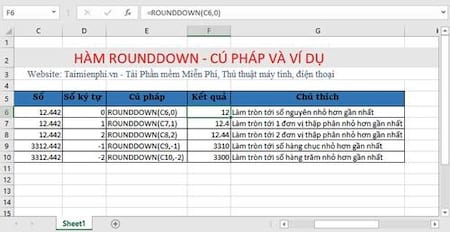
=ROUNDDOWN(12.442,0) | 12 | Removes all decimal places |
=ROUNDDOWN(12.442,2) | 12.44 | Keeps two decimal places |
=ROUNDDOWN(1278,-2) | 1200 | Rounds toward zero to the nearest hundred |
=ROUNDDOWN(-12.442,0) | -12 | Rounds a negative value toward zero |
If the source number is in cell C6, enter =ROUNDDOWN(C6,0) to return its integer portion. Depending on regional settings, Excel may use semicolons between arguments and a comma as the decimal separator.
When to use ROUNDDOWN
Use ROUNDDOWN when the rule explicitly requires digits to be discarded toward zero—for example, limiting a calculated quantity to whole units. Do not assume it is appropriate for financial or tax calculations: those processes may require a prescribed rounding method.
ROUNDDOWN changes the value used in later calculations. If you only want fewer decimals to appear on screen, change the cell's number format instead. For standard nearest-value rounding, use ROUND; to force rounding away from zero, use ROUNDUP.
ROUNDDOWN compared with TRUNC
With num_digits supplied, ROUNDDOWN and TRUNC commonly return the same result because both move toward zero. TRUNC defaults to zero decimal places when its second argument is omitted. See the Excel TRUNC function guide for examples. If rounding is part of a matching workflow, review these tips for matching values in Excel as well.
Common mistakes
- Using text that Excel cannot interpret as a number produces
#VALUE!. - Positive
num_digitsvalues keep decimal places; negative values round tens, hundreds, and larger positions. - ROUNDDOWN returns a numeric value, so its result can be used directly in other formulas.
Related Articles
 How to Use the Rounding Function in Excel Simply and Effectively7 minutes read
 Do Not Round Numbers in Excel, Turn Off Rounding in Excel3 minutes read
 Compare ROUND, ROUNDUP and ROUNDDOWN Rounding Functions in Excel8 minutes read
 ROUND, ROUNDDOWN, ROUNDUP Functions - Functions for Rounding Decimal4 minutes read
 Ways to Round Numbers in Excel: Round Function Excel Number6 minutes read
 How to Use the ROUNDUP Function in Excel3 minutes read
Reader Comments 0
Sign in with email or Google to join the discussion.