Table of Contents
RIOT (Radical Image Optimization Tool) reduces image file size while showing a preview of the optimized result. Open an image, choose JPEG, PNG or GIF output, adjust the relevant quality or color settings and save a new copy. The side-by-side preview helps you stop before compression artifacts become distracting.
Before you start
- Download RIOT from the official RIOT website, then verify the publisher and scan the installer.
- Keep the original image. Optimization can remove metadata or use lossy compression.
- Decide where the image will be used and the maximum file size or dimensions it actually needs.
JPEG is normally suitable for photographs, while PNG is useful for transparency and graphics with sharp edges. If the terminology is confusing, see the difference between JPG and JPEG.
Compress an image with RIOT
1. Open the source image
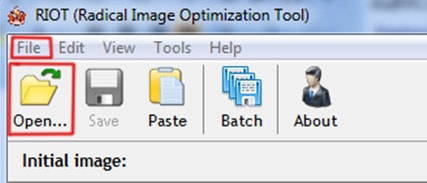
Launch RIOT and choose File > Open, then select the image. The screenshots show an older version, so the arrangement may differ slightly in a current release.
2. Choose the output format and quality
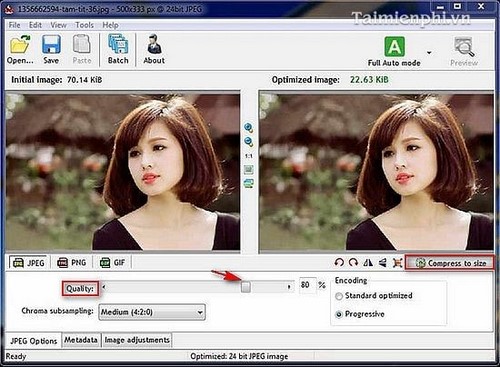
Select the required output format. For JPEG, move the Quality control while watching both the preview and estimated file size. Lower quality usually creates a smaller file but may introduce blocks, halos or blurred detail.
If the installed version offers Compress to Size, enter the target file size and let RIOT calculate suitable settings. Treat that value as a constraint, then inspect the result rather than assuming that a requested size will remain visually acceptable.
3. Compare the preview
Use the original and optimized panes to inspect fine detail at the same zoom level. Check text, faces, gradients and high-contrast edges. The toolbar also provides view and orientation controls; changing the view does not by itself reduce the saved file size.

4. Decide whether to keep metadata
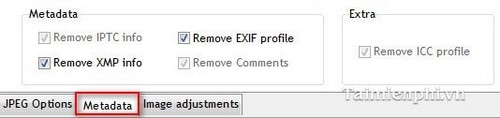
Open the Metadata options and choose which information to retain. Removing camera details, capture time, GPS coordinates or other metadata can reduce size and protect privacy, but it also discards information that may be useful for an archive or photography workflow.
5. Make image adjustments only when needed
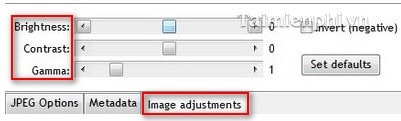
RIOT can provide adjustments such as contrast, brightness and gamma. Compression does not normally require changing these values. If you edit them, compare the result carefully and avoid using compression as a substitute for a full photo editor.
6. Save an optimized copy
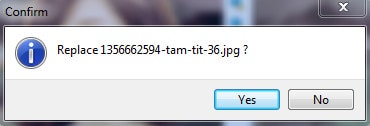
Choose Save As or decline any overwrite prompt, then give the optimized image a different name or save it in a separate folder. Open the saved file afterward to confirm that it is readable and that the actual size meets the requirement.
Quality settings that work in practice
- Start with a moderately high quality setting and reduce it gradually while comparing the preview.
- Resize very large dimensions before applying aggressive compression if the image will only appear at a small web size.
- For screenshots or interface graphics, compare PNG with JPEG; JPEG artifacts often make small text harder to read.
- Do not judge only by the percentage saved. The smallest file is not useful if important detail is damaged.
If RIOT is not the right tool
RIOT is useful when you want visual control over compression. For processing a folder automatically or using a browser-based tool, compare TipsMake's image-compression and size-reduction options. Avoid uploading confidential photographs or documents to an online compressor unless its privacy terms are suitable for the material.
Related Articles
 Reduce Image Size, How to Compress Images Online for Free8 minutes read
 Compress Photos, Reduce Image Size with Bzzt! Image Editor3 minutes read
 How to Reduce the Capacity of Free Online Images14 minutes read
 Instructions for Reducing Image Size with Fileminimizer Pictures6 minutes read
 Instructions to Reduce the Volume of Photos in Photoshop3 minutes read
 Learn About Riot ID, How to Change Riot ID4 minutes read
Reader Comments 0
Sign in with email or Google to join the discussion.