Table of Contents
NotebookLM can support several stages of a creative project: finding and organizing sources, asking questions about them, mapping themes and preparing presentation material. Its value comes from reusing a selected source collection across those tasks, while keeping the original evidence available for review.
It is best treated as a research and drafting workspace, not a guarantee that every generated chart, slide or narration is accurate. Features and limits vary by account. Google's current help pages use the name Gemini Notebook for the product.
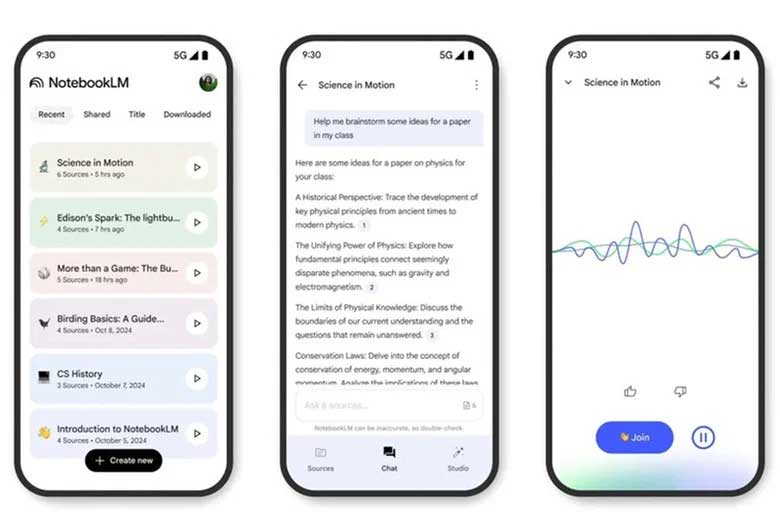
Build a focused source collection
Start with the decision or story you are developing. For a product concept, that might mean user-research notes, requirements and competing approaches; for a workshop, it might mean a reading list and teaching objectives.
Google's source-discovery guide describes Fast Research and Deep Research options. Review suggested sources before relying on them: check authorship, publication date, relevance and whether they support the claim you need.
Keep your own observations distinct from external research and AI-generated interpretations. Adding a source to a notebook does not make it reliable, and a generated research report can still miss a conflicting perspective.
Use a mind map to inspect the structure
A generated mind map can organize themes and subtopics into a navigable view. Use it to ask whether important concepts are missing, whether two branches repeat the same point, and where the source material supports a relationship.
A connection in the map is not automatically a causal relationship or a finding from the research. Check it before using the map to justify a design decision.
If you need to move the result into another tool, this guide to NotebookLM workflow extensions discusses export options and the permissions third-party extensions may require.
Compare options with explicit criteria
Use a Data Table or a structured response when the task involves comparing alternatives. Define the columns first—for example, requirement, supporting source, limitation and unanswered question.
Compare the three proposed approaches using only the selected sources. For each, list supported capabilities, constraints and missing information. Include source references and mark unsupported values as unknown. Do not rank the options unless the criteria justify it.
Check numbers, units and dates against the original material. A neatly formatted table can hide gaps if the model fills an empty cell with an assumption.
Turn the research into a presentation draft
The Studio area supports outputs such as slide decks and infographics. Specify the audience and purpose: a technical handoff needs different detail from a short management briefing.
Google's research-workflow update describes creating downloadable assets, including PowerPoint and structured-data formats. Check the export choices available for the output you created, then inspect the downloaded file in the application where it will be used.
Review every figure, caption and factual statement. Keep illustrative images separate from evidence, and correct any visual that implies a result the sources do not establish. Sharing an export is also different from granting access to the notebook and its sources.
Use audio and video to test an explanation
Audio Overviews offer a spoken way to review material. Video Overviews add a visual presentation, while Cinematic Video Overviews use generated motion and imagery for a more produced treatment.
Listen or watch for unclear transitions, missing qualifications and emphasis that changes the meaning. Generated speech is not a quotation from a source author, and a cinematic scene is not documentary footage of the research.
Check availability and usage allowances before planning a deliverable around a particular format. Do not assume that every account can create the same videos or the same number of outputs.
Keep the project manageable
Organize sources by topic or decision and remove irrelevant duplicates. Do not equate a model's advertised context window with the product's upload limits or assume an entire project history is always considered in every response.
A useful sequence is: select evidence, ask a focused question, inspect a map or table, draft the communication, and verify the final artifact. For a comparison with a general-purpose assistant, see NotebookLM versus ChatGPT. Choose the workflow that makes both creation and checking practical.
Related Articles
 How to Share NotebookLM Publicly6 minutes read
 Guide to Creating Lesson Plans Using NotebookLM4 minutes read
 Why Auto-Label Is an Indispensable Feature in NotebookLM Research8 minutes read
 6 Smart Prompts Make NotebookLM Even More Useful3 minutes read
 6 Notable Differences Between Mac Studio and Mac Pro10 minutes read
 3 Best Chrome Extensions for Gemini Notebook (NotebookLM)12 minutes read
Reader Comments 0
Sign in with email or Google to join the discussion.