Table of Contents
i-Speed is VNNIC’s neutral platform for measuring Internet access speed in Vietnam. It is available through the i-Speed app and the official web test. A result includes download speed, upload speed, latency, and jitter, but a single test should be treated as a snapshot rather than a complete judgment of your Internet plan.
You can use the official i-Speed website or the mobile app linked by VNNIC. The current VNNIC service page identifies the platform as a collaboration between the Viet Nam Internet Network Information Center and the Telecommunications Authority.
Measure Internet speed with i-Speed
1. Start a measurement
Open i-Speed and follow the app’s permission prompts. Location access may be requested to associate the measurement with an area; review the permission and your device settings before allowing it. Select Perform measurement to test the current connection.


2. Choose a measurement point when needed
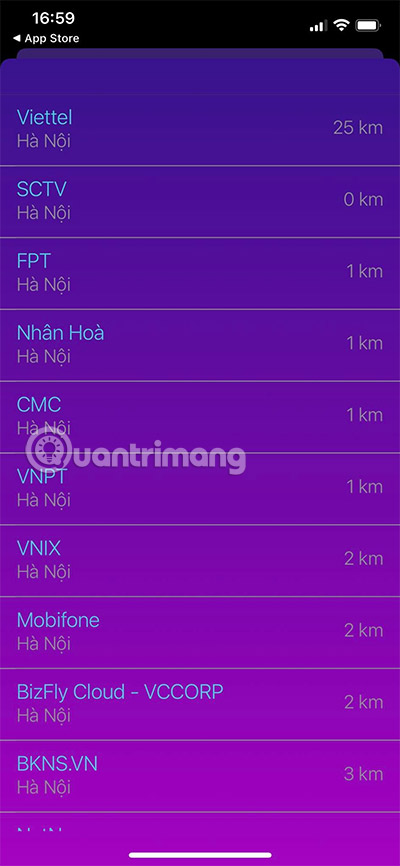
The selected server affects the route and latency recorded by a speed test. To compare another available point, choose Change measurement point from the current network or server area, then select a nearby option. Use the same point when comparing tests taken at different times.
Understand the i-Speed results
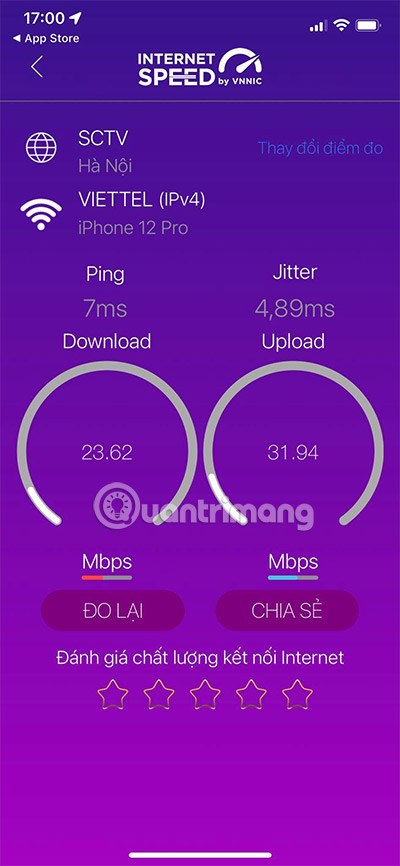
- Download speed: how quickly the device receives data during the test, usually shown in megabits per second (Mbps). It affects activities such as streaming and downloading large files.
- Upload speed: how quickly the device sends data, also usually shown in Mbps. It matters for cloud backups, sending large files, live streaming, and video calls.
- Ping or latency: the round-trip delay between the device and the selected measurement point, generally shown in milliseconds (ms). Lower latency usually supports more responsive calls, games, and remote sessions.
- Jitter: variation between latency measurements. Large fluctuations can make real-time audio or video feel uneven even when average speed looks adequate.
Throughput and latency measure different aspects of a connection. A high download result does not guarantee low delay, and Wi-Fi conditions can affect the device’s result even when the Internet line itself is working normally.
Run a fair comparison
- Pause large downloads, cloud backups, and streaming on other devices.
- For a Wi-Fi test, stay in the same place and use the same Wi-Fi band each time.
- For a line-speed check, use a wired Ethernet connection when practical.
- Run several tests at different times and record the server, connection type, and device.
- Compare results with the speed and conditions stated in your service plan, not only with another household’s result.
If only one device is slow, investigate that device or its Wi-Fi connection first. If repeated wired tests are consistently poor, save the results and contact the Internet provider with the test times and setup details.
Other ways to investigate a slow connection
The TipsMake network utility hub includes browser-based speed, ping, jitter, and related diagnostic tools. To isolate delay or reachability problems from raw throughput, see how to check a network connection with ping.
Related Articles
 Measure Your Internet Speed Online, No Software Required19 minutes read
 How to Measure Network Speed: Step-by-Step Guide3 minutes read
 Check Network Speed: How to Check Internet Speed with Cmd Command3 minutes read
 Measuring the Speed of Viettel, Vnpt and Fpt Using Speed of Me4 minutes read
 Checking Internet Speed, Wi-Fi Fpt, Vnpt Network, Viettel Does8 minutes read
 How to Measure Network Speed on Laptop, If the Speed Is Slow, What to Do?5 minutes read
Reader Comments 0
Sign in with email or Google to join the discussion.