Table of Contents
TikTok's built-in Save video command is the safest way to keep a clip for offline viewing. If the creator has disabled downloads, or if you need a watermark-free copy of your own or licensed video, SnapTik can process a public TikTok link in a phone or desktop browser.

Copyright warning: Removing a watermark does not remove the creator's copyright, grant permission to repost the video, or prevent a platform claim. Download and reuse only your own content, public-domain material, or videos for which you have the necessary permission. Keep creator attribution when a license or agreement requires it.
Try TikTok's built-in download first
- Open the video in the TikTok app.
- Tap Share.
- Tap Save video.
If Save video is unavailable, the creator may have disabled downloads or the content may not be eligible. TikTok documents this control in its official download help. Respect that choice rather than trying to obtain private or access-restricted content.
Use SnapTik on Android or iPhone
You can normally use the SnapTik website in a browser, which avoids installing an extra app. Third-party sites change frequently and may show advertising, so verify the domain, do not install unexpected extensions or profiles, and never enter your TikTok password.
- In TikTok, open the public video, tap Share, and select Copy link.
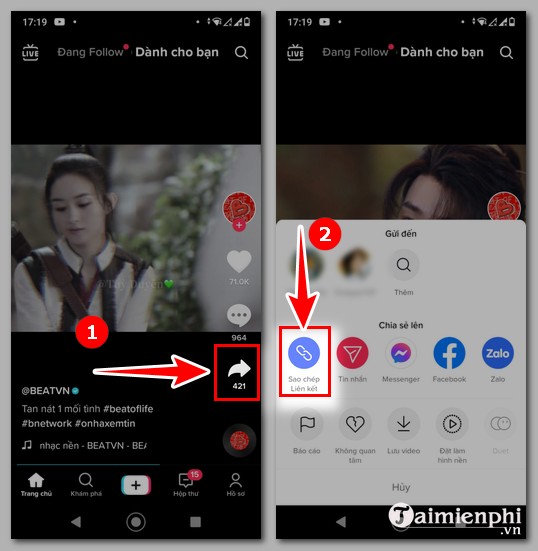
- Open your browser and go to the SnapTik website. Paste the copied URL into its link field and start the download. If you use a SnapTik app, install it only from your platform's official app store and review its developer and permissions first.
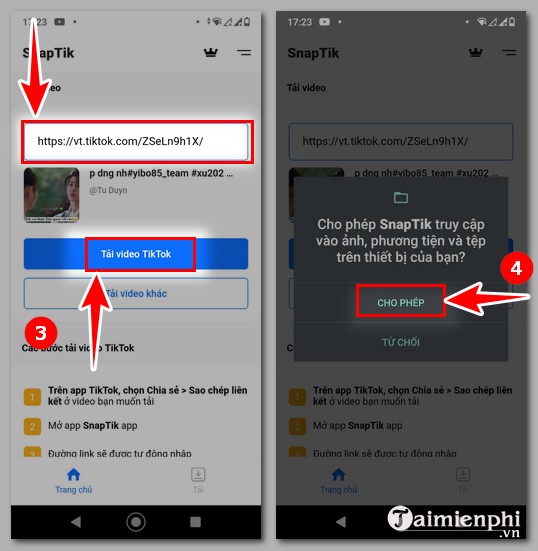
- Select the offered video download. On iPhone, Safari may place the file in the Downloads folder in the Files app; on Android, look in the browser's Downloads list or the device's Downloads folder.
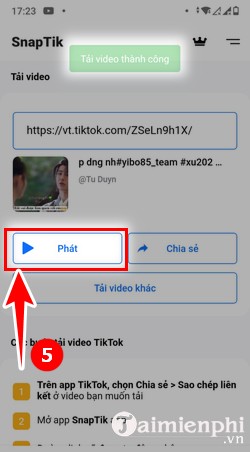
Allow access to Photos only if you deliberately want the app to save there. A website should not need your TikTok login, contact list, SMS messages, or device-administration access.
Use SnapTik on a computer
- Open TikTok in a browser, display the video, and copy its link from the Share menu or address bar.
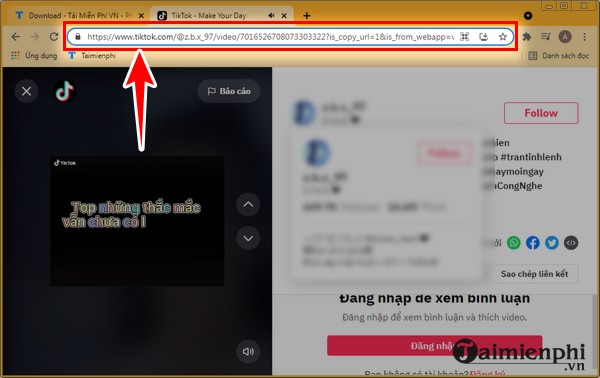
- Open SnapTik in a new tab and paste the URL into the field labeled for a TikTok link.
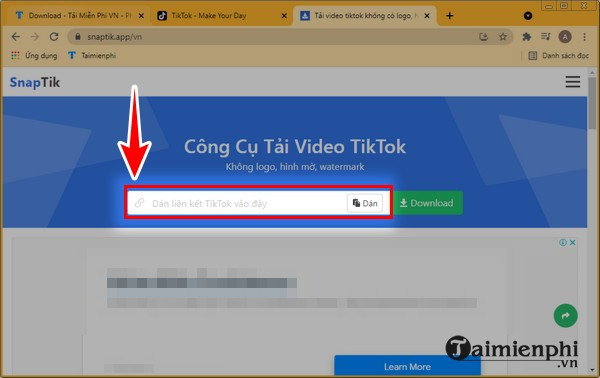
- Select Download and wait while the public link is processed.
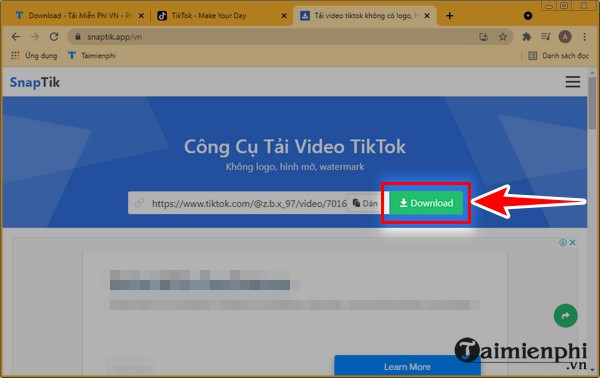
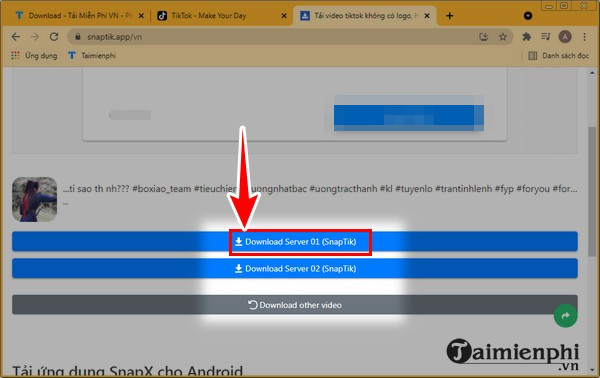
- If several download servers are offered, use a standard video option. Do not click unrelated software-download, notification, or browser-extension prompts.
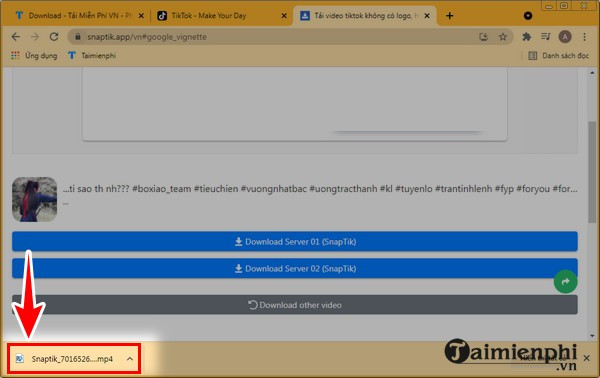
- Open the browser's Downloads panel or the computer's Downloads folder to find the file.
If the download fails
- Copy the link again and remove any text accidentally added before or after the URL.
- Confirm that the video is still public and viewable in a normal browser.
- Temporarily disable a content blocker only if you trust the site; do not bypass a browser's malware warning.
- Try TikTok's built-in Save video option instead.
- For your own upload, use the original file from the camera, editing app, or cloud backup. It will usually be better quality than a downloaded social-media copy.
For a related workflow, see options for saving Douyin videos. You can also learn how Cốc Cốc handles downloadable media, but every service's terms and the creator's rights still apply.
SnapTik's interface and output choices can change without notice. Do not assume a “no watermark” label guarantees original quality, safe files, or legal permission to republish.
Related Articles
 How to Download TikTok Videos Without Logo on Your Phone9 minutes read
 How to Install and Use Snaptik on a Computer6 minutes read
 Download TikTok Videos without Watermark on Computer Using x2convert: Step-by-Step Guide7 minutes read
 Smalltik: Download Tiktok Videos Without Watermark6 minutes read
 12 Ways to Download TikTok Videos Without Logo or Watermark: Top Picks and13 minutes read
 How to Watch Tiktok Videos on Computers Without an Account5 minutes read
Reader Comments 0
Sign in with email or Google to join the discussion.