Table of Contents
A range area and line combination chart is useful when each observation has a low value, a high value, and a central value such as an average. The shaded range shows variation, while the line makes the trend easier to follow.
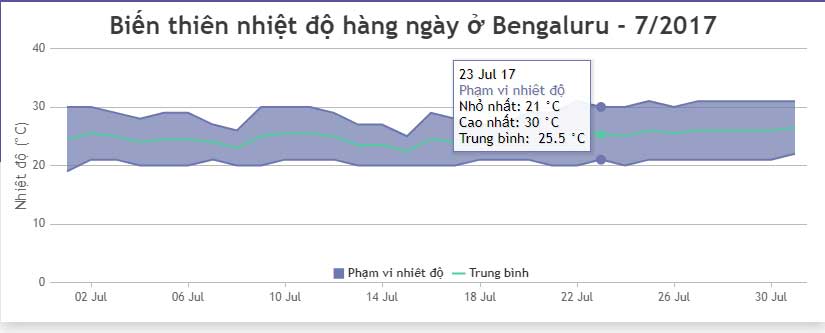
Complete CanvasJS combination-chart example
The following example uses demonstration temperature values. Each range point stores its low and high values in a two-item y array. The average line is calculated from those two values so it always stays consistent with the range.
<!doctype html>
<html lang="en">
<head>
  <meta charset="utf-8">
  <meta name="viewport"
        content="width=device-width, initial-scale=1">
  <title>Range area and line chart</title>
  <script src="https://cdn.canvasjs.com/canvasjs.min.js"></script>
</head>
<body>
  <div id="chartContainer"
       style="height: 380px; width: 100%;"></div>

  <script>
    window.addEventListener("DOMContentLoaded", function () {
      const rangePoints = [
        { x: new Date(2026, 0, 1), y: [4, 12] },
        { x: new Date(2026, 0, 2), y: [5, 14] },
        { x: new Date(2026, 0, 3), y: [3, 11] },
        { x: new Date(2026, 0, 4), y: [6, 15] },
        { x: new Date(2026, 0, 5), y: [7, 16] },
        { x: new Date(2026, 0, 6), y: [5, 13] },
        { x: new Date(2026, 0, 7), y: [8, 17] }
      ];

      const averagePoints = rangePoints.map(function (point) {
        return {
          x: point.x,
          y: (point.y[0] + point.y[1]) / 2
        };
      });

      const chart = new CanvasJS.Chart("chartContainer", {
        animationEnabled: true,
        exportEnabled: true,
        title: {
          text: "Daily temperature range"
        },
        axisX: {
          title: "Date",
          valueFormatString: "MMM D"
        },
        axisY: {
          title: "Temperature (°C)",
          suffix: "°C"
        },
        toolTip: {
          shared: true
        },
        data: [
          {
            type: "rangeArea",
            name: "Low to high",
            showInLegend: true,
            color: "#93c5fd",
            fillOpacity: 0.55,
            yValueFormatString: "0°C",
            dataPoints: rangePoints
          },
          {
            type: "line",
            name: "Average",
            showInLegend: true,
            color: "#1d4ed8",
            lineThickness: 3,
            markerSize: 7,
            yValueFormatString: "0.0°C",
            dataPoints: averagePoints
          }
        ]
      });

      chart.render();
    });
  </script>
</body>
</html>
How the range area series works
A range area point has one x value and two y values:
{ x: new Date(2026, 0, 1), y: [4, 12] }The first number is the lower boundary and the second is the upper boundary. CanvasJS shades the area between the boundaries across the series. Keep the order consistent and validate that the low value does not exceed the high value.
Add the line series
A combination chart is created by adding another series object to the same data array and assigning a different type. The example overlays a line series containing averages.
CanvasJS renders series in their array order. Put the range area first and the line second so the line remains visible above the shaded band.
Useful customization options
fillOpacitycontrols how transparent the shaded range appears.colorsets a series color.lineThicknessmakes the average line more or less prominent.markerSizecontrols the points on the line.toolTip.sharedshows values from both series for the same horizontal position.exportEnabledadds an export option; review the library's behavior and your data-handling requirements before enabling it for sensitive charts.indexLabeladds labels to data points, while related font and background options style those labels.
Do not label every point when the chart is dense. Too many index labels can obscure the band and trend line; tooltips or selected annotations are usually clearer.
Use the chart with real data
Replace the sample values with validated records from your data source. Parse date strings explicitly rather than depending on browser-specific date parsing, convert numeric strings to numbers, and handle missing low, high, or average values before rendering.
If the average comes from a separate measurement rather than the midpoint of low and high, store the actual average values instead of calculating them as shown here. State the method in the chart caption so readers do not misinterpret the line.
Troubleshooting
- If the range does not appear, confirm that every range point uses a two-number
yarray. - If dates appear out of order, sort the points by time before rendering.
- If the line is hidden, place its series after the range area and use a contrasting color.
- If the chart is blank, verify the library, container ID, container height, and browser console errors.
CanvasJS is a third-party library, so review its current licensing before production use. See the official range area and line chart example for current library options.
For non-code alternatives, compare these data-visualization tools. These code-sample websites are also useful for testing and sharing JavaScript snippets.
Related Articles
 JavaScript Code to Create a Chart/graph Combining Lines, Areas, and Columns3 minutes read
 Javascript Code to Create OHLC and Line Chart Combo Chart Template2 minutes read
 Javascript Code to Generate Dynamic Line Graphs/Charts2 minutes read
 Javascript Code to Create Bubble Chart with Custom Marker2 minutes read
 Javascript Code to Generate Error Line Graph/Graph2 minutes read
 Javascript: Complete Guide2 minutes read
Reader Comments 0
Sign in with email or Google to join the discussion.