Table of Contents
Learn how to delete the Windows installer folder on Windows with clear steps, practical tips, and troubleshooting guidance for a reliable result.
Manually delete the Windows Installer folder
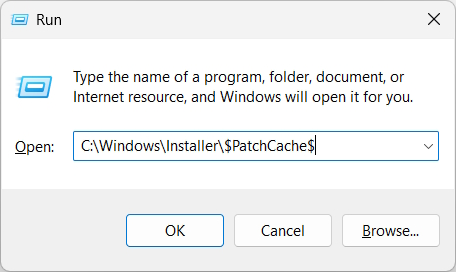
Open the Run dialog box and enter the following path.
C: WindowsInstaller$PatchCache$
We'll proceed to delete each folder one by one over several days. You shouldn't delete them completely; instead, move them to the Recycle Bin, or create a backup on another drive if possible.
If you encounter a problem with a program, simply return the file to the Recycle Bin folder.
Use Disk Cleanup to delete the Windows Installer folder
The built-in Disk Cleanup tool can delete some leftover files when the Disk Cleanup folder becomes too large.
Step 1
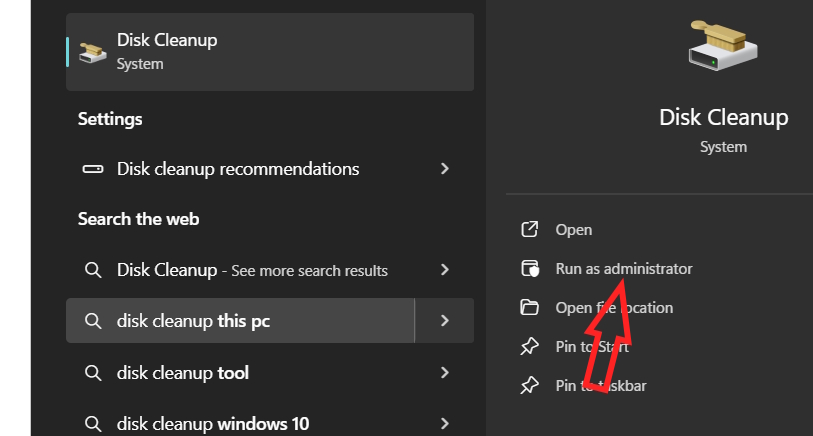
Type "Disk Cleanup" into the search bar , then click "Run as administrator" to run it with administrator privileges.
Step 2
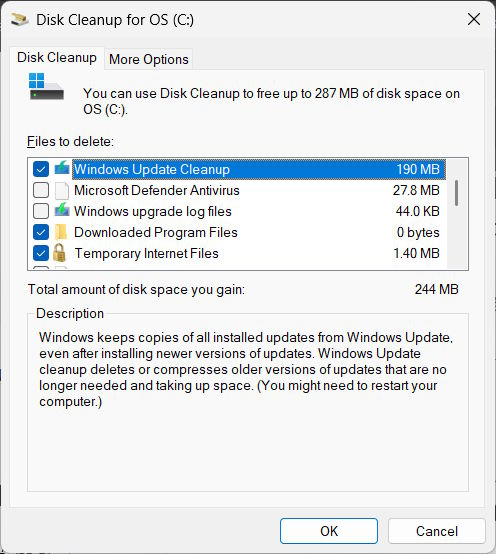
We will check the Windows Update Cleanup box , then click OK and wait for the process to complete.
Using third-party tools
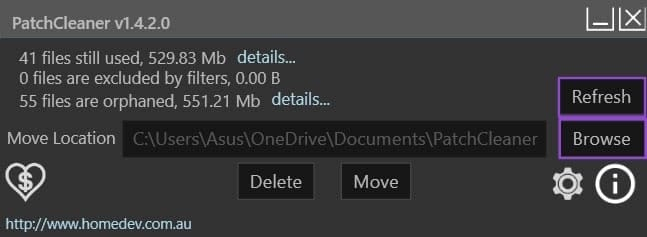
There are several tools available to delete old files that are taking up computer space. For example, the PatchCleaner tool, which can be downloaded from the link below.
https://sourceforge.net/projects/patchcleaner/files/PatchCleaner/v1.4.2.0/PatchCleaner_1.4.2.0.exe/download
You can choose whether to delete the files or move them to another location if there is free space on another drive to use. If you want to move the files to an empty Windows Installer folder, click Browse to find the destination folder.
Finally, press Refresh to refresh the system.
Final Thoughts
Use this guide as a practical checklist for how to delete the windows installer folder on windows. Work through the steps in order, verify each result, and adjust the options to match your needs.
FAQ
What do you need before following this How to Delete the Windows Installer Folder on Windows guide?
Review the required tools, accounts, settings, or materials mentioned in the article. Learn how to delete the Windows installer folder on Windows with clear steps, practical tips, and troubleshooting guidance for a reliable result.
What are the main steps for how to delete the windows installer folder on windows?
Follow the sections in order, especially Manually delete the Windows Installer folder, Use Disk Cleanup to delete the Windows Installer folder, Step 1. Complete each step before continuing and verify the result as you go.
What should you do if the process does not work as expected?
Recheck the prerequisites, update the relevant app or service, review the settings, and repeat the step that caused the issue. Use any troubleshooting notes included in the guide.
Related Articles
 Is It Safe to Delete Files from the Windowsinstaller Folder in4 minutes read
 What Is the Windows.old Folder and How Do You Delete It?5 minutes read
 4 Ways to Delete Windows.old Folder on Windows 10 Computer4 minutes read
 Instructions to Delete Windows.old Folder on Windows 7/8 // 8.1?4 minutes read
 How to Delete the Windows.old Folder in Windows 116 minutes read
 How to Delete Windows. Old Folder on Windows 10 to Free up Hard Drive Space2 minutes read
Reader Comments 0
Sign in with email or Google to join the discussion.