Table of Contents
You are familiar with the trend of creating AI toy houses with ChatGP T and in this article, you will have some more commands to create 3D desktop models. We just need to upload the character image to Gemini or ChatGPT and use the command to get a unique 3D desktop model. Below is a detailed guide to creating a 3D desktop model with AI.
How to create desktop 3D models with AI
Step 1:
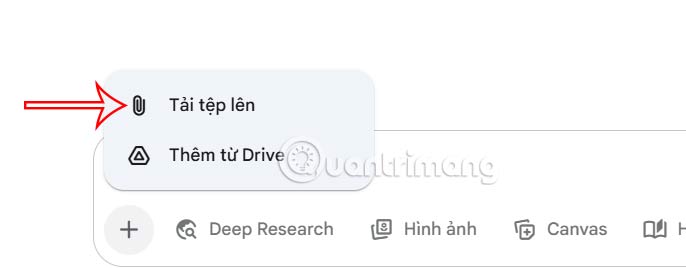
Open Gemini or ChatGPT, depending on your needs, then click the plus icon to upload your character photo.
Step 2:
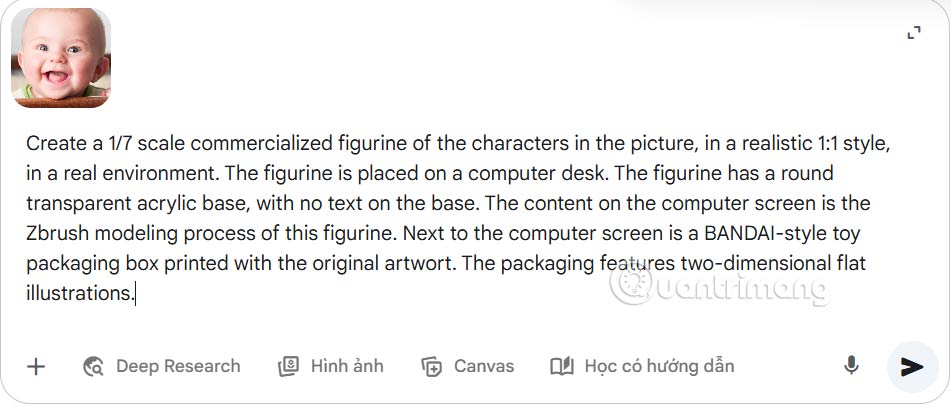
Then you type prompt into the box in Gemini to create a desktop 3D model, then press send.
Step 3:
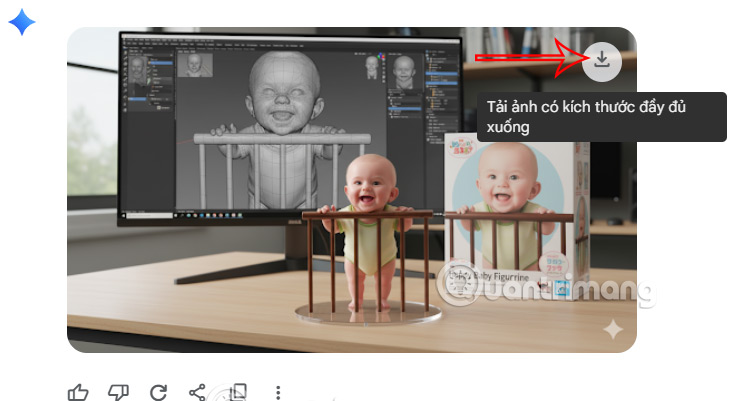
We get the desktop 3D model as below. select the image and then select the arrow icon to download the image in original size if you like.
Some desktop 3D modeling prompts you can refer to:
Prompt #1
Create a 1/7 scale commercialized figure of the character in the illustration, in a realistic style and environment. Place the figure on a computer desk, using a circular transparent acrylic base without any text. On the computer screen, display the ZBrush modeling process of the figure. Next to the computer screen, place a BANDAI-style toy packaging box printed with the original artwork.
Prompt #2
Create a 1/7 scale commercialized figurine of the characters in the picture, in a realistic 1:1 style, in a real environment. The figurine is placed on a computer desk. The figurine has a round transparent acrylic base, with no text on the base. The content on the computer screen is the Zbrush modeling process of this figurine. Next to the computer screen is a BANDAI-style toy packaging box printed with the original artwort. The packaging features two-dimensional flat illustrations.
Prompt #3
Create a 1/7 scale commercialized figurine of the characters in the picture, in a realistic style, in a real environment. The figurine is placed on a computer desk. The figurine has a round transparent acrylic base, with no text on the base. The content on the computer screen is the Zbrush modeling process of this figurine.
Next to the computer screen is a BANDAI-style toy packaging box printed with the original artwork. The packaging features two-dimensional flat illustrations.
Prompt #4
Create a 1/7 scale commercialized figurine of the characters in the picture, in a realistic style, in a real environment. The figurine is placed on a computer desk. The figurine has a round transparent acrylic base, with no text on the base. The content on the computer screen is a 3D modeling process of this figurine. Next to the computer screen is a toy packaging box, designed in a style reminiscent of high-quality collectible figures, printed with original artwork. The packaging features two-dimensional flat illustrations.
Final Thoughts
Overall, Tutorial on Creating Desktop 3D Models Using AI is best understood by considering the main facts, practical context, and limitations together. Use the details above as a clear starting point and confirm time-sensitive information when necessary.
FAQ
What does this article explain about Tutorial on Creating Desktop 3D Models Using AI?
You are familiar with the trend of creating AI toy houses with ChatGP T and in this article, you will have some more commands to create 3D desktop models.
What should you know about How to create desktop 3D models with AI?
Open Gemini or ChatGPT, depending on your needs, then click the plus icon to upload your character photo.
Should time-sensitive details be verified?
Yes. Software features, game codes, product specifications, prices, and research findings can change. Confirm important details with an official or primary source when accuracy affects your decision.
Related Articles
 Dell Released Desktop 1TB, Notebook4 minutes read
 Find Desktop Computers for Windows 734 minutes read
 A Guide to Creating an Awesome AI Video Titled 'the Evolution of Car Models'12 minutes read
 Instructions to Buy a Desktop Computer: Choose the Right Computer11 minutes read
 Click: How to Quickly Show the Desktop on a Mac3 minutes read
 Photoshop CS6: How to Create Abstract Geometric Shapes12 minutes read
Reader Comments 0
Sign in with email or Google to join the discussion.