Table of Contents
This guide organizes the entries in "If You Haven't Used ChatGPT's Special Tools, You're Definitely" and explains what each option, idea, or example offers. It also highlights practical details that matter when comparing the choices.
Create image
ChatGPT's image generation capabilities have come a long way since its initial launch. Human images now look like real people and the text within them is easy to read, especially when compared to the results of the past.
1. When you want to create graphs and diagrams
ChatGPT's visualization tools are pretty good for creating graphs and diagrams. People use this feature when they need to map something out and sketching in a chat isn't enough. Plus, it's a great feature for planning timelines.

People use ChatGPT to create a variety of diagrams and graphs. In my experience, it is equally capable of Venn diagrams, bar charts, and pie charts. Keeping the instructions simple so as not to overwhelm the tool is one of the best AI prompt creation tips and tricks.
2. To visualize goals and ideas
Everyone has a lot of abstract ideas and goals that they want to achieve. Sometimes it can be hard to figure out what they might look like. With ChatGPT's visualization feature, you can sometimes ask it to visualize what your goals and ideas might look like.
Creating the images usually takes a few minutes, but you can easily access them in your library whenever you need them. Because GPT-4o is much more realistic than the early days of DALL-E, you get a better sense of what your life would be like if you made it a reality.
Visualizing goals and ideas in ChatGPT is one of the best ways you can use technology to make your goals a reality.
3. When you want to create a prototype
Many people are passionate about photography and web design; while much of the creativity comes from the mind, they sometimes want to see what the finished product will look like. In addition to scanning Pinterest and saving ideas to your boards, it's also helpful to not rely on other people's existing ideas — and to use AI.

When it comes to creating images and prototypes, use ChatGPT's Image Generation. No need for text and such to be the best; you just need a sketch to make at least some sense. Once you're done, you can decide whether to move forward with the final piece.
Search the web
ChatGPT's special tools are great for searching the web and finding useful information. In some cases, ChatGPT Search is actually better than Google. While I don't believe that ChatGPT Search will completely replace traditional search, it does excel at doing a few select things exceptionally well.
1. Statistics
Many people used to hate searching for stats through Google. Most of the time, they would find articles with slight SEO tweaks for the current year (but still including stats from 2017 in 2022). Since using AI tools, like ChatGPT Search, finding accurate stats has become much simpler.
In addition to simplifying the way you get your stats, people use ChatGPT Search because it makes it easier to understand. You don't have to worry about reading multiple articles and putting everything together; this tool does it for you.
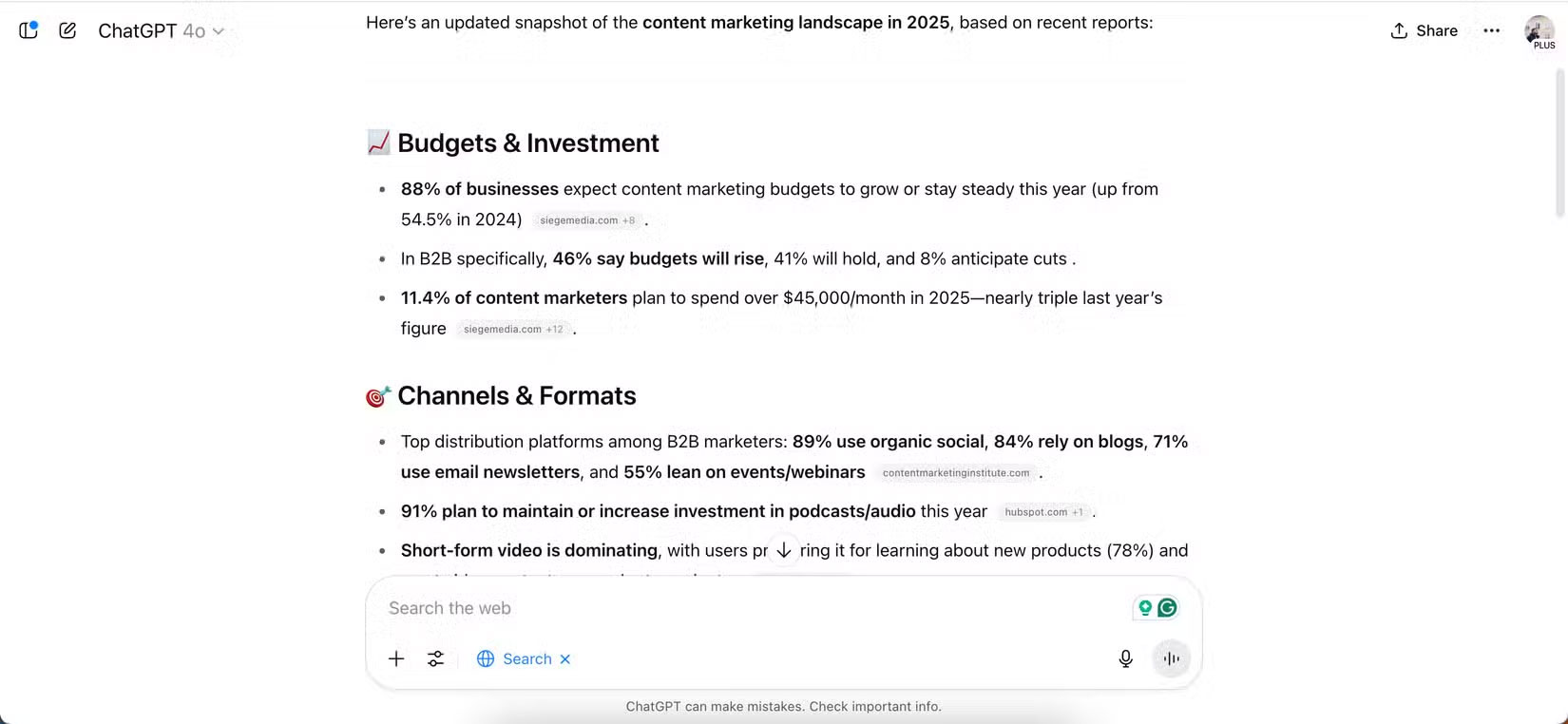
If you really want to see more detailed statistics or add context, you can combine ChatGPT with Google or Perplexity to get a clearer picture. ChatGPT itself shows the resources it has cited, making further research simple.
2. To find resources
Finding resources, such as books, is often time-consuming when done manually. Fortunately, this has become much easier since starting to use ChatGPT's special tools.
If you want a list of books, academic papers, articles, or videos, ask ChatGPT Search to find a list. Once you've done that, you can review everything and dig deeper into what you think might be useful.

ChatGPT provides the websites it used to find these resources. For books, you sometimes need to manually search for the title yourself if you want to buy it. However, this is not a big deal. For academic articles, you usually need to click directly from ChatGPT.
Write or create code
ChatGPT has many uses in programming, including the ability to generate code through its special programming tools. You can also use ChatGPT for writing inspiration, as well as to better structure essays and articles.
1. Write code to update the website
Despite having their own website to share information, many people are not very good at coding - and they don't like doing it. Because they can't afford to hire a web developer, people sometimes ask ChatGPT to create code in a controlled environment.
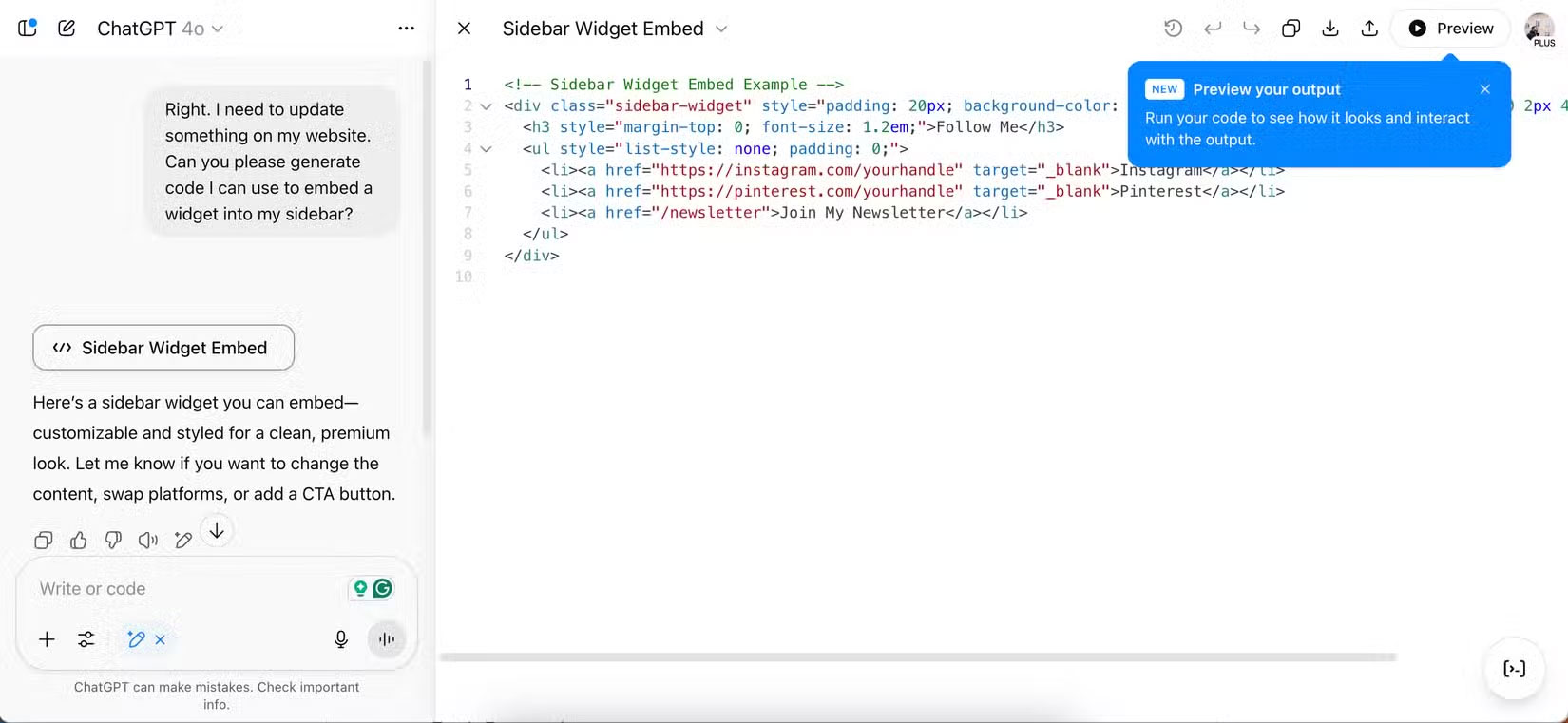
When you ask ChatGPT to generate code, it will show you a preview of the code as it goes live. Based on this information, you can then decide if you want to make any changes. If not, test it on your site to make sure everything looks good (and safe)!
2. To sketch ideas and get inspired
Many people don't use ChatGPT to write articles right away, because they often find it easier to write them themselves. ChatGPT is too buggy to be reliable, and often requires a lot of editing, which takes longer than starting from scratch. However, ChatGPT is great for sketching out ideas and getting inspired.

If you feel the need, use ChatGPT's Canvas feature to create a comprehensive outline. You can also ask the post builder for inspiration; this is especially helpful when you're stuck for ideas. If you really want to, you can edit within the canvas. Meanwhile, the chat is useful if you want to clarify or add additional sections.
Run in-depth research
ChatGPT has an amazing Deep Research tool that beats every other AI chatbot equivalent. People use it for several tasks and since they are no longer bound by strict monthly limits, they continue to experiment.
1. Review research projects
Reviewing research projects is one of the best uses for Deep Research. It provides comprehensive analysis of obscure topics and presents them in an easy-to-understand format. While manual research is still required, you will get a strong overview and a pretty good idea of where your research should go.

When presenting information, ChatGPT provides sources where necessary. Furthermore, the tool asks follow-up questions to give you more precise feedback.
2. Learn the language
ChatGPT Plus can help you learn a language in several ways, and while Deep Research is available in the free version, upgrading makes learning a new language much more effective. You can use Deep Research to analyze phrases and find useful websites, which is especially good if you're learning something completely new.
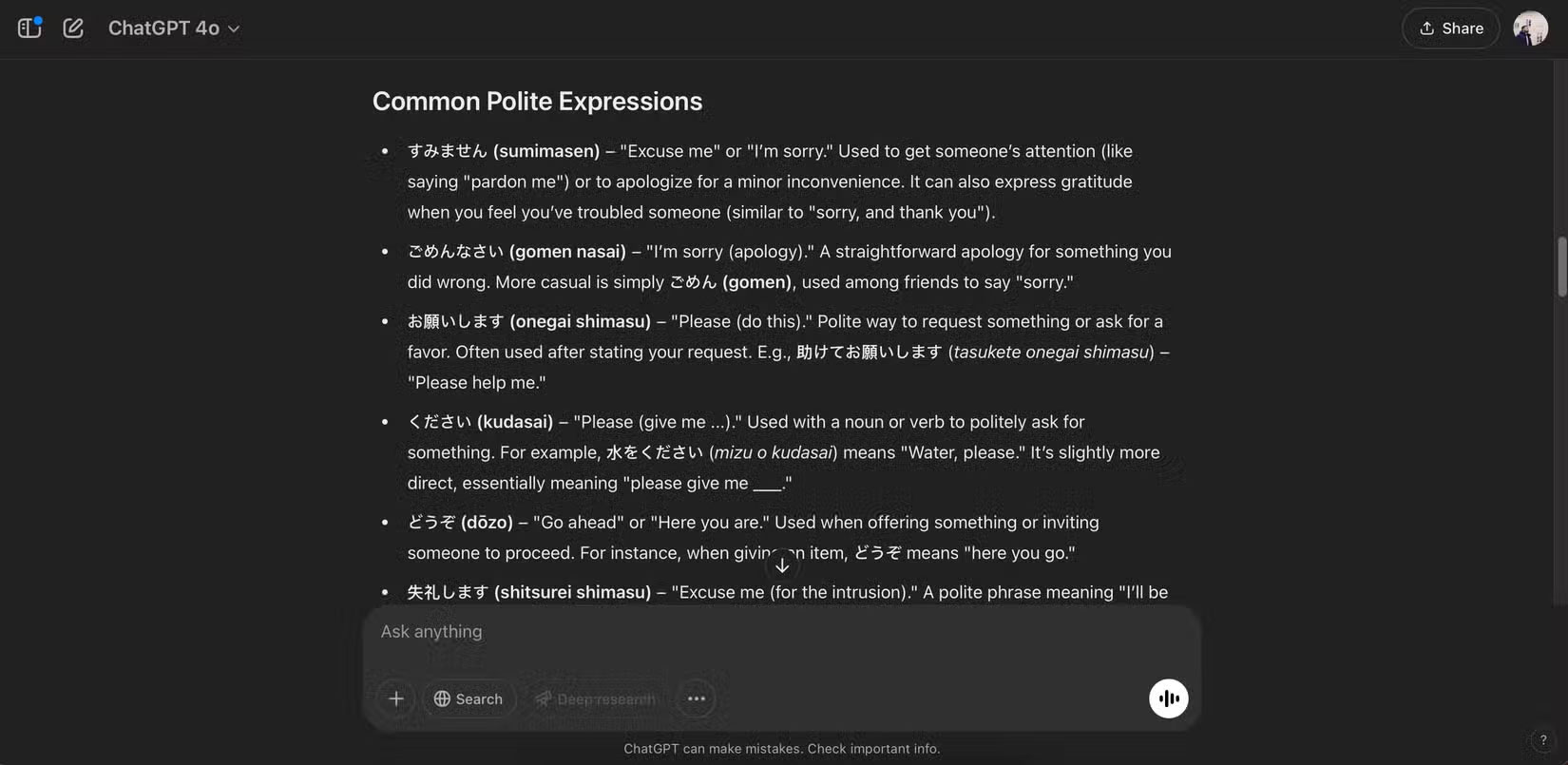
Deep Research also has the ability to find useful stories in the language you're trying to learn, along with offering exam preparation tips and more.
3. Book Summary
While many people enjoy reading, they don't want to buy a book before they know they might like it. Searching for book summaries on the web can be time-consuming, and many people don't like watching video summaries. Meanwhile, ChatGPT's Deep Research tool is a great way to get a summary of a book before deciding whether to buy it.

Asking ChatGPT for a comprehensive summary of the entire book helps you determine whether you should read more. From there, you can ask for chapter-by-chapter summaries as needed. To make reading more efficient, incorporate more tech habits into your reading routine beyond ChatGPT.
ChatGPT's unique tools add context, make simple tasks easy, and provide a useful starting point for research. They're also great for visualizing goals and creating prototypes. Find ways to use them to your advantage, and try them out to see how they work for you!
FAQ
What should you know about create image?
ChatGPT's image generation capabilities have come a long way since its initial launch. Human images now look like real people and the text within them is easy to read, especially when compared to the results of the past.
What should you know about 1. When you want to create graphs and diagrams?
ChatGPT's visualization tools are pretty good for creating graphs and diagrams. People use this feature when they need to map something out and sketching in a chat isn't enough. Plus, it's a great feature for planning timelines.
What should you know about 2. To visualize goals and ideas?
Everyone has a lot of abstract ideas and goals that they want to achieve. Sometimes it can be hard to figure out what they might look like. With ChatGPT's visualization feature, you can sometimes ask it to visualize what your goals and ideas might look like.
What should you know about 3. When you want to create a prototype?
Many people are passionate about photography and web design; while much of the creativity comes from the mind, they sometimes want to see what the finished product will look like. In addition to scanning Pinterest and saving ideas to your boards, it's also helpful to not rely on other people's existing ideas — and to use AI.
Related Articles
 What Is the Error Msvcr110.dll Missing? How to Prepare?7 minutes read
 How to Fix Missing Comdlg32.ocx on Windows5 minutes read
 How to Fix MSVCP140.dll Error Is Missing: Step-by-Step Guide4 minutes read
 How to Fix Missing or Missing Msvcp110. Dll File on the Computer3 minutes read
 How to Fix 'the Program Can't Start Because4 minutes read
 How to Fix MSVCP140. Dll Is Missing Error on Windows 10/118 minutes read
Reader Comments 0
Sign in with email or Google to join the discussion.