Table of Contents
You can use LDCloud on an iPhone or iPad through Safari. Your Apple device displays and controls a remote Android phone, so Android apps run on the cloud phone. The browser route works without installing an app or trusting a configuration profile.
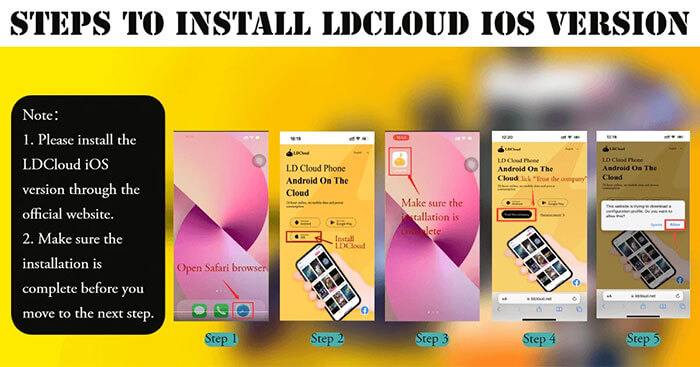
Connect to LDCloud in Safari
- Open Safari and go to LDCloud Web. Check the address before signing in.
- Sign in to your LDCloud account. If you already have a cloud phone, select it from the device list.
- Open the remote device and test tapping, typing, and switching orientation. If you do not have a device yet, review the available plans and Android versions before choosing one.
- Launch an app on the remote Android screen. If your app needs Play Store access or a specific Android version, confirm that the cloud phone supports it.
If the page is difficult to use on an iPad, try the mobile or desktop website option in Safari’s page menu. The vendor also publishes a guide to opening LDCloud without a download.
Check these details before paying
- Compatibility: Check the app’s Android requirements and its rules for using cloud phones, especially for online games.
- Performance: Test input delay on the network you use most. The remote phone runs the app, while your connection still carries screen updates and touch input.
- Session and storage: Find out whether the plan keeps the remote phone active when Safari closes, when it renews, and what happens to data after expiration.
- Data: Treat the cloud phone as a separate device. Back up important files, and remove any accounts you signed into when you stop using it.
Related Articles
 How to copy files and files from your computer to iPhone / iPad easily
 Can Pokemon Go be played on a computer? The answer is yes!
 Summary - How to play Pokemon GO, virtual reality game catch Pokemon on smartphone
 Poké Ball Types Explained: Generations III–V (Part 2)
 How to Earn and Use Stardust in Pokémon GO
 How to Hatch Eggs in Pokémon GO
Reader Comments 0
Sign in with email or Google to join the discussion.