Table of Contents
Learn how to play Pokémon GO on a smartphone. Follow clear, step-by-step instructions, review the required setup, and use practical troubleshooting tips for common problems.
Numerous groups and fan pages quickly appeared to share gameplay and catching tips. Explore this game offline.
When the installation is complete, go to Settings> General> Device Management> Select Yestech and click Trust , the game should then run normally.
Download Pokémon GO for Android
Some Problems with Pokémon GO Game
How to Move in Pokémon GO Game
Pokémon GO uses augmented reality and GPS to place game elements in your surroundings. Your in-game position changes as you walk or move in the real world.
How to Turn on Your Phone's GPS?
- On Android: open Notification Center> turn on Location.
- On iPhone, iPad: go to Settings> turn on Location.
I Can't Download Pokémon GO on iPhone?
You need an Apple ID registered in a supported region to download the game, if not already available, follow the instructions:
- Create a new email address.
- Sign out of your current Apple ID in the App Store.
- Select any game or application for FREE , click Download.
- Select " Create New Apple ID "
- Visit the Fake Name Generator site, get an Australian address and phone number.
- Use your address and phone number to create an account, during the account creation process, do not choose to pay by Visa.
- Create completed verification email by going to the email created in step 1, confirming the email.
- Exit new Apple ID, Turn off App Store completely, reopen and log in again with the new account.
- Choose Pokémon GO , download and play.
Is There a Mistake When Traveling?
Have. The permissible deviation range is 50m or less compared to the GPS position on the map.
For Some Reason I Can't Get Out on the Street, Is There Any Way to Catch Pokémon?
Have. By using the Item in the game, it is called Incense, which acts to lure Pokémon closer to your location, the effective time is 30 minutes, the price is 80 coins.
Boost Points Combat Power - CP for Pokémon?
Transfer the same type of Pokémon, the same system to get candy points, use that candy to upload the main Pokémon you want (each type of Pokémon has 1 different type of candy, only used for the same type), slightly confusing but if started If you play games, you will know.
I Can't Access Pokémon GO Game to Play?
The phenomenon of users not being able to access the game, or entering the game without moving may be caused by the server - Server is maintaining and updating the feature so it will cause that error phenomenon.
What Effect Does the Item Purchased in the Game Have?
Currently the shop is available: Poké Ball, Incense, Lucky Egg, Lure Module, Egg Incubator, Bag upgrade and Pokémon Storage Upgrade.
- Incense is used to attract Pokémon closer to your location, so use it when you don't have time to go out. Call Pokémon to come and catch. Time 30p
- Lucky Egg used to x2 exp for the character. Time used in 30p.
- Lure Module is also a form of Pokémon attraction, used at PokéStops, but it will attract Pokémon to PokéStops for you, especially the other players also enjoy it when you use this item.
- Egg Incubator: This one is not clear because there is no egg to try yet, it is probably used to hatch eggs.
- Bag upgrade and Pokémon storage upgrade is to expand the item box and Pokémon to 50 cells.
Some of the First Images of Pokémon GO
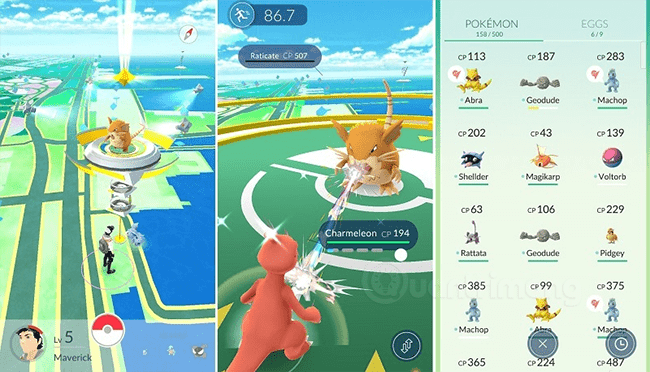
When New to the Game
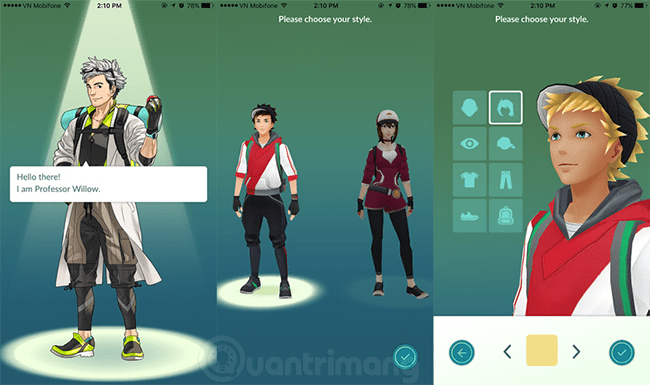
Upon Seeing Any Pokémon
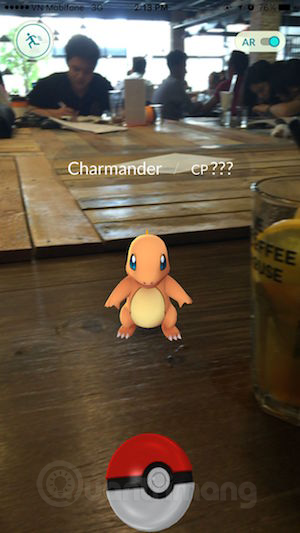
To catch Pokémon, you throw the globe icon on the Pokémon you need to catch, don't throw your phone:
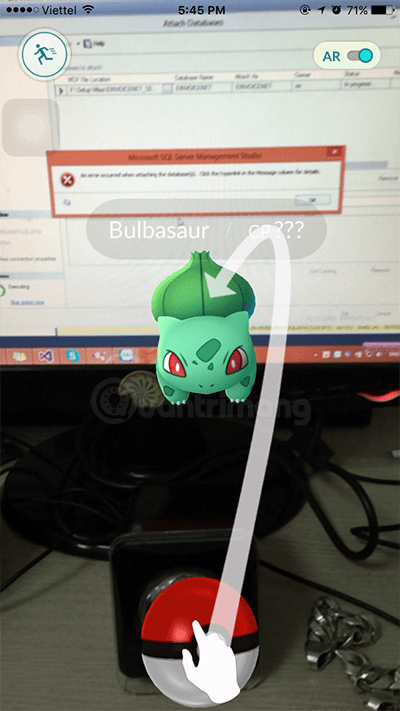
Good luck!
Update note: Game mechanics, item values, menus, and availability can change. Check the current game version or official support information if your experience differs.
FAQ
What does this guide explain about play Pokémon GO on a Smartphone?
Learn how to play Pokémon GO on a smartphone. Follow clear, step-by-step instructions, review the required setup, and use practical troubleshooting tips for common problems.
What is the best way to apply these tips?
Work through the sections in order, especially some problems with Pokémon GO game and how to move in Pokémon GO game. Practice one change at a time so you can see what improves your results.
Can game features or requirements change?
Yes. Updates can change menus, mechanics, item values, compatibility, and availability. Check the current in-game information or the developer's official support pages when details differ.
Related Articles
 Can Astronauts Go to Catch Pokemon: Play Pokemon3 minutes read
 How to Catch Pokémon Rare in Pokémon GO4 minutes read
 How to Catch Dragonite, Snorlax, Gyarados and Other Rare Pokémon in Pokémon GO?5 minutes read
 You Should Not Ignore the Top 5 Easy to Catch Pokémon but Not Trivial7 minutes read
 The Terms You Need to Know When Playing Pokémon GO6 minutes read
 You Are Wondering Whether to Choose the Red5 minutes read
Reader Comments 0
Sign in with email or Google to join the discussion.