Table of Contents
BIGO LIVE lets adults watch public broadcasts, join chats, and stream from a phone. To broadcast, install the official app, sign in, tap the central camera button, set a clear title and audience options, check the camera and microphone preview, and then tap Go Live. The interface changes over time, so use the labels shown in your current app rather than expecting every older screenshot to match.
BIGO LIVE is for users aged 18 or older. Its current User Agreement defines the minimum age as 18, subject to any higher age required by local law. Minors should not register, use an account, or appear in a broadcast.
Install BIGO LIVE and secure the account
- Download BIGO LIVE from Google Play or the Apple App Store, following links from the official BIGO website. Check that the publisher is BIGO TECHNOLOGY.
- Create an account with a phone number or another login method offered in your region.
- Use a unique password and enable any available account-security option.
- Open the privacy settings before broadcasting. Review who can message you, see your activity, or find you through contacts or location.
Do not buy an existing account or share a verification code. An account sold as an “IDOL account” can be recovered by its original owner and may already have policy violations.
How to watch a livestream
- Open the app's Home, Discover, Nearby, or category feed. The exact tab names vary.
- Tap a broadcast thumbnail to enter the room.
- Use Follow if you want to find that broadcaster again. Chat, guest, fan-club, and gift controls may require sign-in.
- To leave, use the back or close control. Blocking and reporting tools are available from the room or a user's profile when behavior violates the rules.
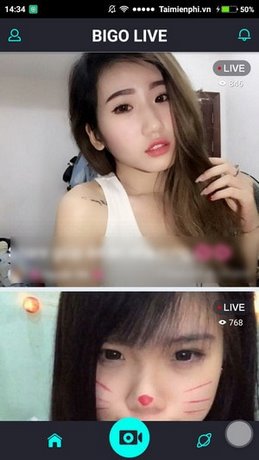
Messages in a public room can be seen by the broadcaster, moderators, and other viewers. Avoid posting a phone number, home address, financial details, or login codes. Treat private messages that offer cheap Diamonds, guaranteed earnings, or off-platform jobs as potential scams.
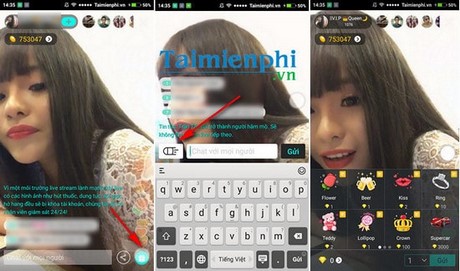
How to start a mobile livestream
- Tap the central Live, camera, or create button.
- Choose a live format if prompted. Options may include a standard video room, audio room, multi-guest room, or game stream.
- Add a specific title and choose the most accurate topic or category. Avoid clickbait and do not use another creator's identity.
- Grant camera and microphone access when you are ready to broadcast. Location, contacts, and broad photo-library access are not required for a basic camera stream.
- Check the preview for names, screens, documents, windows, or reflections that reveal private information. Use headphones when guest audio could feed back into the microphone.
- Tap Go Live. The app may show a short countdown before the broadcast begins.
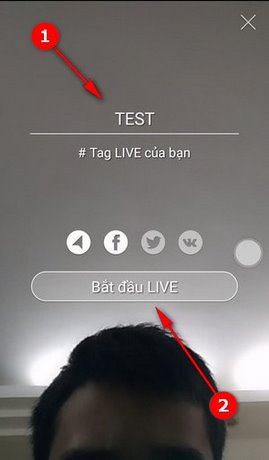
Do a brief first stream rather than committing to a long session. Confirm that speech is clear, the connection is stable, and the frame does not reveal a precise location. If you want a desktop production workflow, first learn the basics of setting up OBS Studio.
Controls available while you are live
The bottom toolbar commonly provides controls for chat, guests, camera switching, microphone mute, flash, effects, filters, and room management. Features differ by device and account.
- Chat: read comments and respond without revealing personal details.
- Camera: switch between front and rear cameras. Look at the preview before switching so you do not expose something unintended.
- Microphone: mute before a private conversation or interruption.
- Beauty filters and effects: use them sparingly; some effects can increase device load and heat.
- Guests: invite only people you trust. Remove a guest who shares prohibited or private content.
- Moderation: appoint trusted moderators when available, apply chat controls, and block or report abuse.
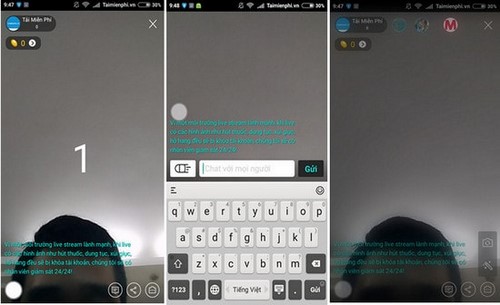
Follow BIGO's Community Guidelines. They prohibit minors from using or actively appearing on the platform and set rules for sexual content, harassment, hate, violence, illegal activity, and other harmful material. You also need permission to broadcast music, films, sports, games, or other copyrighted work; owning a subscription does not normally include rebroadcast rights.
End the livestream and review the result
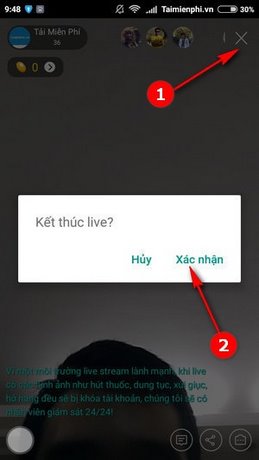
- Tap the X, End, or close button.
- Confirm that you want to stop. Do not simply lock the phone and assume the broadcast has ended.
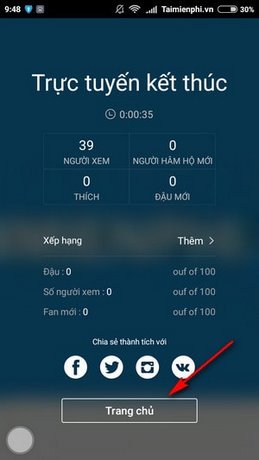
- Wait for the end screen, which may show viewers, new followers, likes, gifts, or other session statistics.
- Review any replay or clip privacy setting before leaving the screen. Delete or restrict a replay if it exposes information you did not intend to publish.
How BIGO gifts and creator earnings work
Viewers can purchase virtual currency called Diamonds and use it to send virtual gifts. Broadcasters may receive Beans from eligible gifts. Beans are not the same as the viewer's purchase price, and earning or withdrawing money is not automatic.
Eligibility, identity checks, conversion rules, withdrawal methods, minimums, limits, taxes, and agency arrangements can vary by account and region. Read the terms shown in your wallet before spending money or agreeing to a host contract. BIGO's official earnings guide explains the current gift and withdrawal model, but it does not guarantee income.
- Never pay an agency or individual to “unlock” a withdrawal without verifying the arrangement through BIGO.
- Do not accept gifts in exchange for activity that violates the Community Guidelines.
- Keep records of payouts and expenses for any tax or business reporting required where you live.
- Use in-app support for a missing balance; do not give a stranger remote access to your phone.
Watch or stream from a computer
You can watch public broadcasts at BIGO's official website. Desktop login and broadcast options depend on the region and account. Eligible creators may be able to use an official desktop tool or send a stream from OBS with a server URL and stream key supplied inside BIGO.
Never paste a stream key into a chat, screenshot, or remote-support session; anyone with it may be able to broadcast to your channel. If BIGO does not show an OBS or desktop option in your account, do not buy a key from a third party. For a general computer broadcasting workflow, see how XSplit organizes scenes, sources, and livestream settings; platform-specific login steps will differ.
Fix common problems
| Problem | What to check |
|---|---|
| Camera or microphone is unavailable | Phone Settings > Apps > BIGO LIVE > Permissions; close another app using the device |
| Stream drops or freezes | Stable Wi-Fi or mobile data, other uploads, battery-saver restrictions, and device temperature |
| Viewers hear echo | Use headphones, lower speaker volume, and remove duplicate guest audio |
| Someone is abusive | Mute, block, or report from the room/profile; save evidence without reposting harmful content |
| Gift or wallet issue | Use Settings > Help & Feedback or the official BIGO contact page |
Related Articles
 How to Chat with Friends on Bigo Live5 minutes read
 Live Stream Bigo Live on Computer: Play Live Stream Bigo Live PC5 minutes read
 How to Live Stream with BIGO LIVE6 minutes read
 Instructions on How to Register to Become a BIGO LIVE Idol6 minutes read
 How to Watch Live Football on Android with Ace Stream8 minutes read
 How to Fix Common Errors When Live Streaming Facebook with OBS5 minutes read
Reader Comments 0
Sign in with email or Google to join the discussion.