Table of Contents
Gemini 2.5 Computer Use was Google’s specialized model for agents that interact with interfaces through actions such as clicking and typing. Google introduced it in October 2025, with a focus on browser tasks.
Availability update: Google’s Gemini API deprecation table lists gemini-2.5-computer-use-preview-10-2025 as shut down on July 28, 2026. It currently names gemini-3.8-flash as the recommended replacement. Check the current documentation before following launch-era API examples.
How the action loop worked
- The application supplied a task, screenshot, and recent action history.
- The model proposed an interface action, such as a click or text entry.
- The client checked the response and handled any required confirmation.
- Client code executed the action in the environment.
- The application returned a new screenshot and URL for the next step.
The model proposed actions; the surrounding application performed them. The loop could stop on success, an error, a user decision, or a safety response. It did not guarantee completion of every task.
Scope and benchmark claims
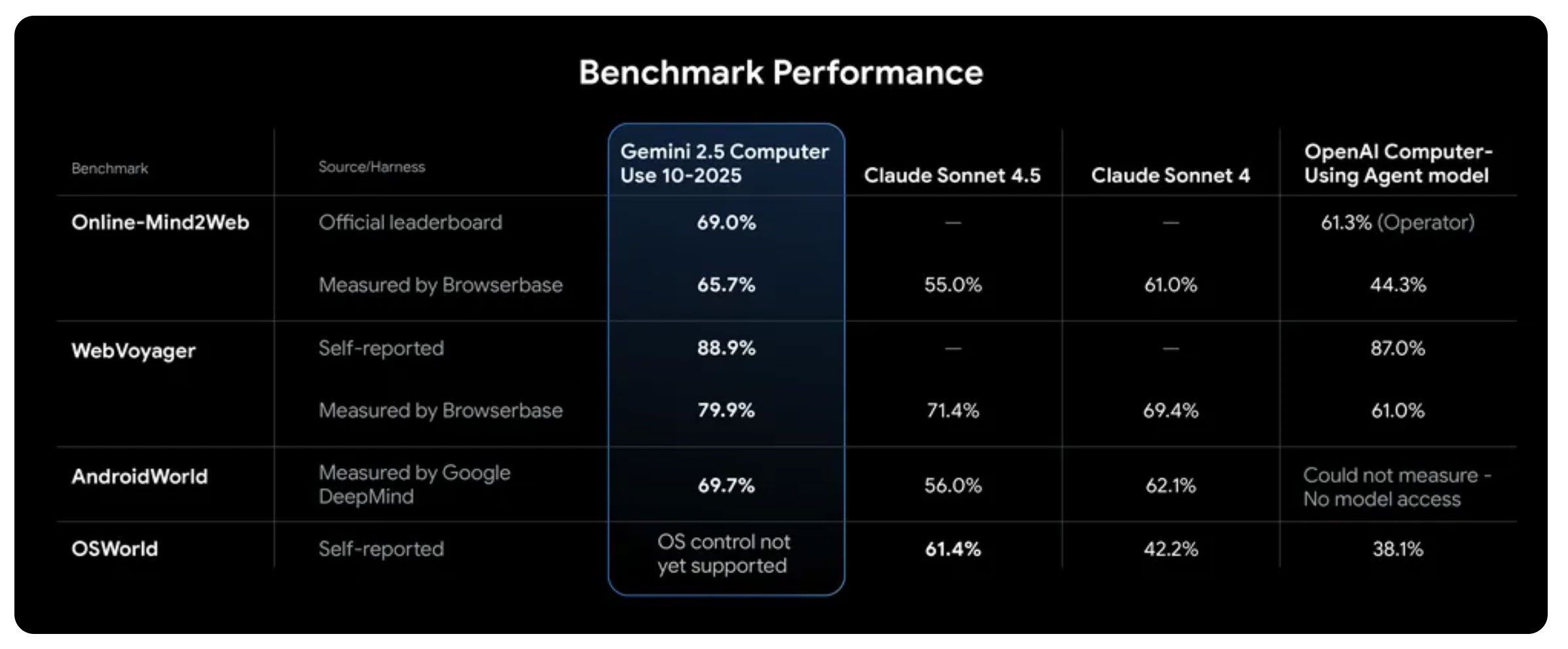
At launch, Google described the model as optimized for browsers, with promising mobile-interface results, rather than general desktop operating-system control. Its launch announcement reported comparative benchmark results. The image above belongs to that launch context and should not be read as a ranking of current models.
What developers should check now
Use the current model and tool documentation, test the supported actions, and implement confirmation and error handling in the client. Treat page content as input rather than authority to change the task or disclose data.
For broader context, see our Gemini access and API overview and the separate Copilot Studio update overview. These describe different products and should not be treated as interchangeable API instructions.
Related Articles
 Google Launches Gemini CLI, Bringing Gemini to the Terminal
 Google changes Bard's name to Gemini, launches mobile app and new Ultra 1.0 version
 Google Gemini 3 launch: benchmark results and what they mean
 Google Announces Gemini 2.5 Pro Deep Think, Beats OpenAI's o3 and o4 Models
 Gemini 3.1 Pro vs Gemini 3 Pro: What Changed?
 Google launches Gemini 2.5 Deep Think - surpassing OpenAI o3 and Grok 4 in performance
Reader Comments 0
Sign in with email or Google to join the discussion.