Table of Contents
This guide explains how to transfer money with momo wallet using a clear, step-by-step process. It also highlights the settings and checks that can help you avoid common errors.
The form of money transfer via self-made wallet in Vietnam is no longer strange, for many people who use online payment applications, the transfer of money between two e-wallet accounts is very frequent. Often users use popular electronic wallets to transfer money like Zalo Pay, ViettelPay, Payoo, Ngan Luong.
E-wallet Momo is also the most used online payment application in Vietnam, and users can also transfer money back and forth between two accounts for Momo together. If you are a new user of Momo e-wallet, please see the instructions for transferring money through Momo wallet in the following article of Tipsmake . If you don't have money in your Momo wallet account, take a look at the article 5 ways to deposit Momo wallet
- Download Momo for iOS
- Download Momo for Android
- Download Momo for Windowsphone
Instructions to transfer money via Momo wallet
Step 1: Sign in to your Momo account on the phone, then click the Funds transfer to make the transfer via your momo wallet account of a friend or relative.
Then enter the phone number you want to transfer, note that the person who is going to transfer money must also register to use momo wallet with the phone number, or click the next contact icon.
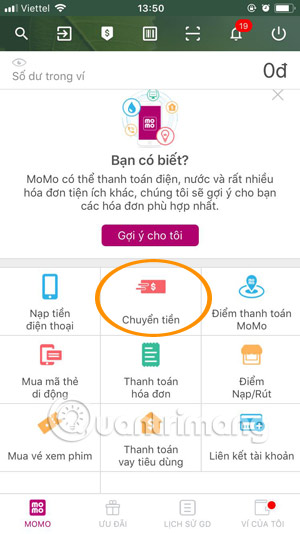
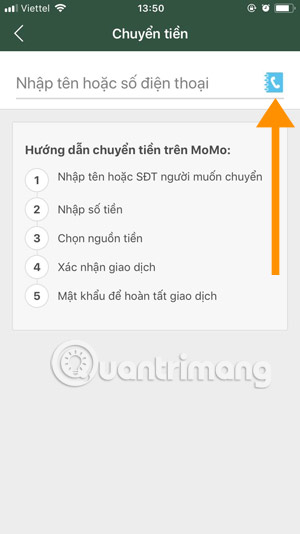
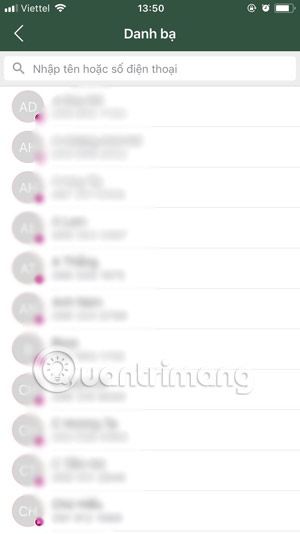
Step 2: Select the phone number of relatives and friends in the directory to transfer money. Those who use the Momo wallet will have a purple dot in the lower right corner, then write the amount to transfer.
The minimum is 10,000 VND and the maximum is 20,000,000 VND. Write a message for the transfer amount below, then click Continue To proceed with the transfer.
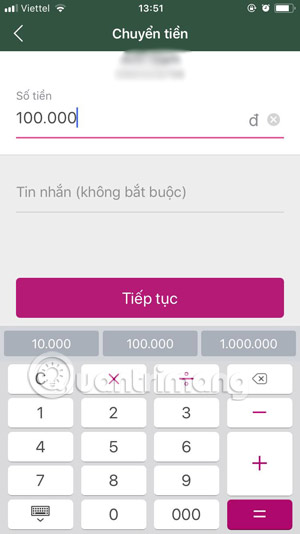
Step 3: If the money in your Momo wallet is not enough, you can take another money source to pay, mainly the bank ATM card.
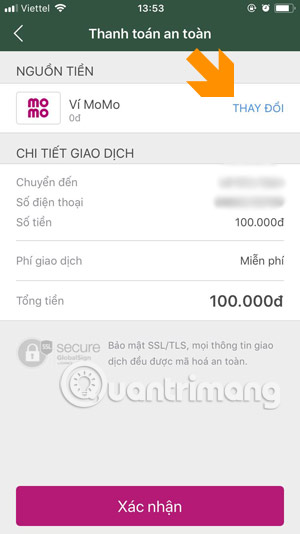
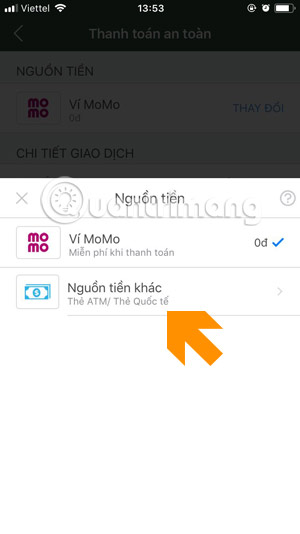
Step 4: The Affiliate Bank of wallet Momo includes the most popular banks in Vietnam, such as Vietcombank, VIB, VietinBank, Agribank. Depending on each bank link, you will provide bank account information. That item on Momo Wallet, for example Vietcombank is an Internet Banking Account .
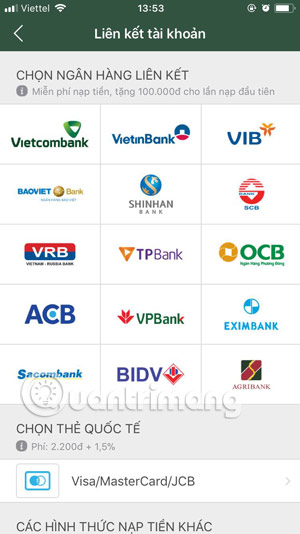
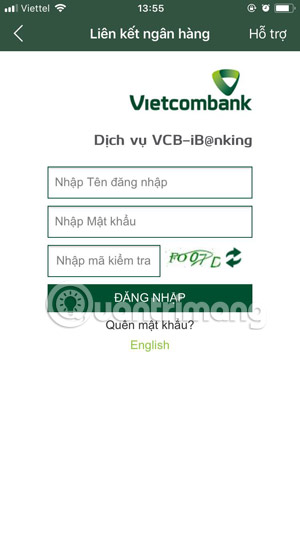
Step 5: Some other banks will have a request to provide card information, others will require a direct link at the bank's counter.
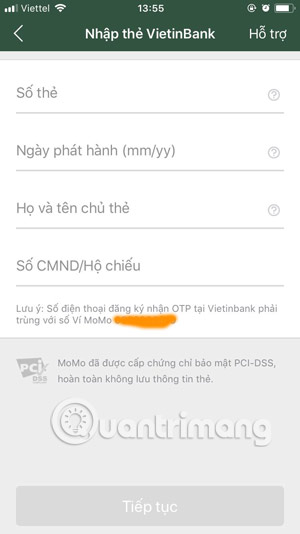
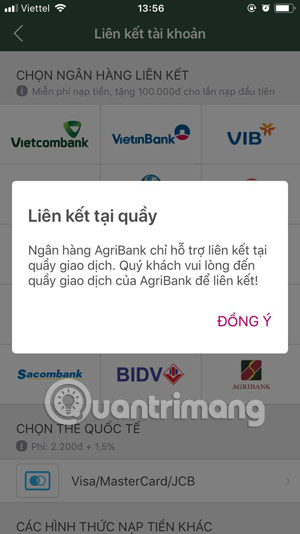
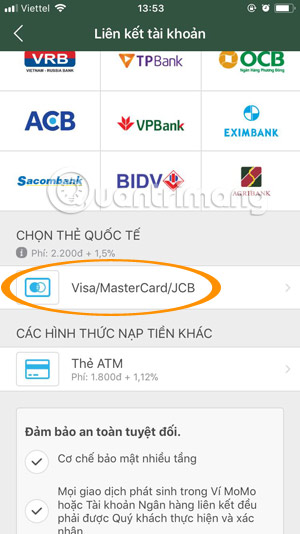
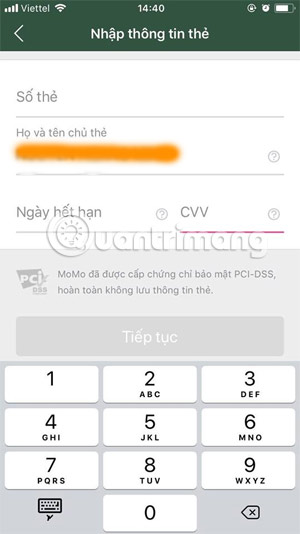
In addition to domestic ATM cards, you can also use VISA / Mastercard International payment Cards As a source of transaction money. With this type of card, the link is easier when you only need to provide card number, expiration date and CVV date.
Through the instructions to transfer money with Momo wallet above, you can see how the transfer of this e-wallet application is quite simple. From there you can transfer to friends and vice versa, use the money in Momo wallet to pay for services in this e-wallet.
An example is the booking of flights through the Momo wallet application, very convenient for those who do not want to spend time on the airport to buy tickets, refer to how to book flights with Momo wallet in the article How to book flights for Momo.
- Instructions for payment of electricity by Momo wallet
- Instructions for paying postpaid mobile bills on MoMo wallet
- Guide to recharge your phone with MOMO wallet
FAQ
What should I prepare before I transfer money with momo wallet?
Review the requirements in the guide, confirm that your device or software is compatible, and save important work before changing settings related to transfer money with momo wallet.
Why might transfer money with momo wallet not work as expected?
The most common causes are incompatible versions, missing permissions, incorrect settings, or an interrupted internet connection. Recheck each step and restart the app or device when appropriate.
Can beginners follow these transfer money with momo wallet steps?
Yes. Follow the steps in order, avoid skipping confirmation screens, and compare your interface with the screenshots because labels may differ slightly between versions.
Related Articles
 What Is E-wallet: What Is Momo Wallet?5 minutes read
 How to Get Free Lucky Money on Momo E-wallet4 minutes read
 5 Simple Ways to Recharge Your Wallet Momo5 minutes read
 How to Give Lucky Money to Friends and Relatives by E-wallet Momo6 minutes read
 Can I Top Up My Momo Wallet with a Phone Card?6 minutes read
 Instructions for Registering a Momo Account4 minutes read
Reader Comments 0
Sign in with email or Google to join the discussion.