Table of Contents
This article explores instructions for registering a momo account with straightforward explanations and useful context. It also highlights common questions and important details to consider.
Momo is in the top 5 safe and best e-wallets in Vietnam, this is an electronic wallet that supports users in issues of charging, withdrawal, payment of services anytime, anywhere including holidays, holidays, or Tet. Because of this convenience, Momo is loved and used by many young people. If you are learning about Momo and want to create a Momo account to experience, please see the steps below to learn how to do it.
- How to use Viettel Pay on the phone
- How to recharge your phone via Zalo Pay application
- How to register e-wallet VTC Pay
How to Register a Momo account
Step 1:
You download and install the Momo application for your Android phone or iPhone here.
- Download Momo for Android
- Download Momo for iOS
Step 2:
Next, you sign up for an account with Momo with the phone number you are using. Please Enter the correct phone number Then press Continue . You agree to the terms of use of Momo e-wallet by clicking on Continue .
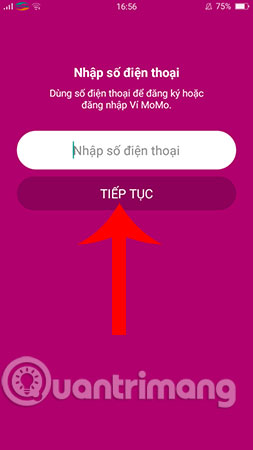
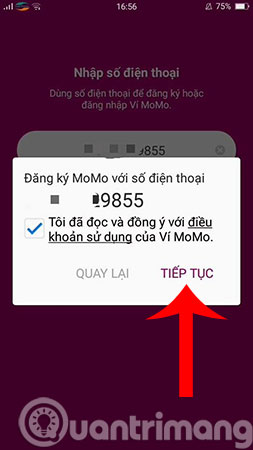
Step 3:
Immediately, you will receive an OTP code for the phone number you just used to register your Momo account in the previous step. At this point, you enter this code to switch to creating a password for your Momo account.
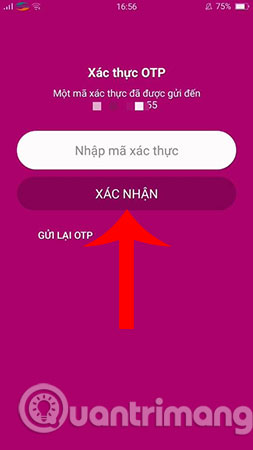
Step 5:
Enter a password To protect your Momo wallet, and then click Confirm .
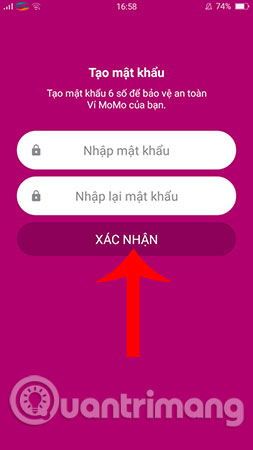
Step 6:
To authenticate and protect your Momo account better, you need to provide some additional information such as: Full name, email address and then click Confirm .
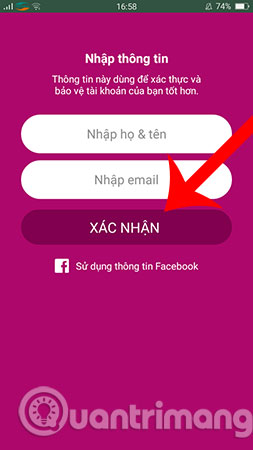
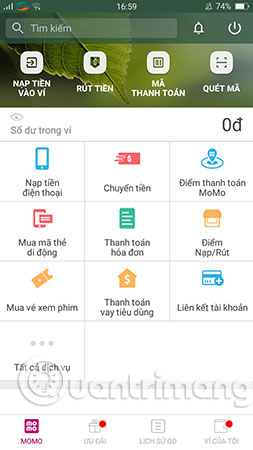
Once completed, you will be taken to the main Momo e-wallet interface and the Momo account registration process has ended. Now you can explore for yourself and experience the useful features Momo brings.
Hope you are succesful.
- How to pay QR Pay on Vietcombank
- How to add membership card to Samsung Pay
- Instructions on recharge into Grabpay
FAQ
What is the main benefit of instructions for registering a momo account?
The main benefit is a clearer understanding of the topic and a practical way to apply the information covered in this guide.
What should I check before using instructions for registering a momo account?
Confirm compatibility, review the required settings, protect important data, and use the latest supported version whenever possible.
What should I do if the result is different?
Repeat the steps carefully, verify permissions and version differences, and consult the product's official support documentation for changes not shown in the article.
Related Articles
 What Is E-wallet: What Is Momo Wallet?5 minutes read
 5 Simple Ways to Recharge Your Wallet Momo5 minutes read
 Instructions for Payment of Electricity by Momo Wallet5 minutes read
 3 Ways to Simply Retrieve the Momo Password6 minutes read
 How to Shake Momo Tet and Redeem Rewards3 minutes read
 How to Registering a Skype Account: Step-by-Step Guide4 minutes read
Reader Comments 0
Sign in with email or Google to join the discussion.