Table of Contents
How to Save Photos on Digital Cameras? is easier to understand when the core ideas are paired with practical examples. The sections below explain the topic clearly, highlight useful steps, and point out details that can prevent common errors.
When using digital cameras (MAS), the recording operation is not called 'shooting' but needs to be properly understood as 'capturing' the light onto the sensor, then put it into the reading bar and switch to the binary signal and then save it. photos into memory. * Single-image recording mode (-S-Single frame) : one-by-one recording. At low-priced MAS, users often complain about the time between two long shots - missed many opportunities - because of waiting for the process to save the image to be able to continue writing another image. To overcome this technical limitation, semi-professional and professional MASs are equipped with a Ram (Buffer) for temporary storage of images before writing to the memory card, To shorten the time. between two recordings. 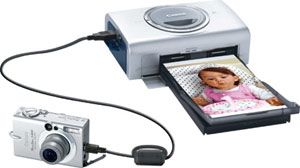 Each manufacturer chose to give MAS a different random access cache. Pre-caching: means that the received signal on CCD or CMOS is immediately inserted into the buffer memory and waits for processing to be put into memory. The limitation of this mode of operation is that MAS will be limited to the number of shots in a specified time. The following buffer memory: images are processed and the finished format is completed and inserted into the cache. In this method, if the file is set in a compressed format (JPEG) or low resolution, it will increase the number of shots at the same time compared to the raw format or the high resolution. * Continuous recording mode (-C - Continuous -) : is understood as the number of consecutive shots of MAS during a second. The level of continuous press will depend on the fast operating speed - slow shutter, high or low resolution of the file when installing and buffer memory capacity. Typically, semi-professional and professional MAS allows continuous pressing of about 6 - 10 styles with a speed of 4-5 pictures per second. When purchasing MAS you need to consult the recording mode (S) and continuous mode (C) of MAS through the manual, it is also advisable to press the on-site inspection machine with the seller's consent. With a compact MAS using a newly-charged battery, if the start time for the first press is slower for more than three seconds, the delay to save the image between two shots lasts more than two seconds and the time between two uses Flash continuously for more than 10 seconds, you should. choose another type!
FAQ
What is How to Save Photos on Digital Cameras??
When using digital cameras (MAS), the recording operation is not called 'shooting' but needs to be properly understood as 'capturing' the light onto the sensor, then put it into the reading bar and switch to the binary signal and then save it.
Why is How to Save Photos on Digital Cameras? important?
A clear understanding of How to Save Photos on Digital Cameras? helps you make informed decisions, avoid common mistakes, and use the relevant tools or techniques more effectively.
How should beginners approach How to Save Photos on Digital Cameras??
Start with the fundamental concepts, follow the examples step by step, and test each change in a safe environment before applying it to important systems or data.
Related Articles
 Card: How to Get Photos from Digital Cameras5 minutes read
 Basic Operations to Have a Beautiful Digital Photo9 minutes read
 Top Digital Cameras for Children: What to Know9 minutes read
 6 Tips to Help Take Better Night Photos with a Popular Digital Camera6 minutes read
 10 Tips for Taking Beautiful Photos with Digital Cameras8 minutes read
 Memories in a Shoebox: Digitizing Old Photos Unlocks a Flood9 minutes read
Reader Comments 0
Sign in with email or Google to join the discussion.