Table of Contents
This guide provides a clear overview of using digital cameras, including Here Are 6 Tips to Help You Take Better Night Photos with a Popular Digital Camera, Using Night Scenes - Night Scenes. Use it to understand the topic, compare the available options, and make a more informed decision.
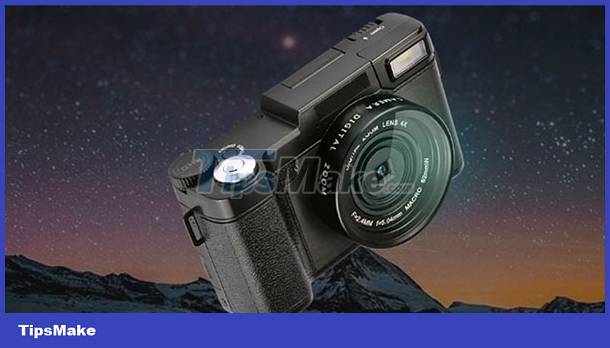 6 tips to help take better night photos with a popular digital camera
Here Are 6 Tips to Help You Take Better Night Photos with a Popular Digital Camera
first
Using Night Scenes - Night Scenes
When taking pictures at night you will have to slow down the shutter speed, and most high-end digital cameras have the ability to let you adjust the shutter speed to your liking. However, not all popular digital cameras allow this, so if your digital camera can't adjust the shutter speed, you should switch to the night photography modes - Night Scenes are available.
 Night Scenes
Night photography modes are usually Night Portrait - Night portrait, Night Landscape - night landscape. You can easily find them in the camera's Settings - Setting Menu.
2
Try Shooting with Different Speeds
We all know that the slower the shutter speed, the brighter the image will be. If you are shooting a cityscape at night, there may not be enough light, which means that when you slow down your shutter speed, your camera will also have to re-adjust the aperture so that the image has the right exposure. good light.
On the other hand, changing the shutter speed to a slower one also allows to capture extended headlight trails of varying degrees. The slow shutter speed and corresponding small aperture adjustment will help focus on distant buildings.
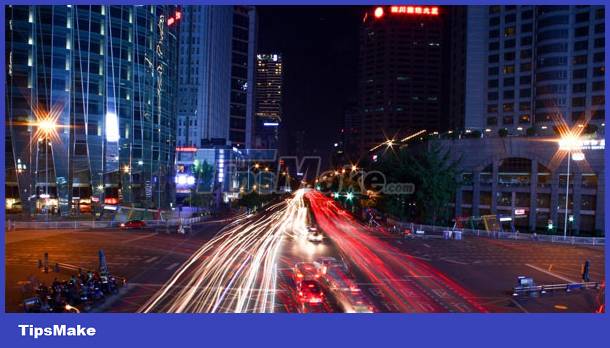 Changing the shutter speed also allows you to capture extended headlight trails of varying degrees
See the Learn about shutter speed in digital photography tutorial
3
Find Somewhere Solid
Can you shoot at a slow shutter speed of a few seconds without the need for a camera stand? Probably not, because during these few seconds, before the camera has finished recording, a lot of unwanted changes will occur due to the unstable hand grip.
So, if you don't have a tripod on hand, then find somewhere or anything sturdy to place your camera when taking slow shots.
4
Hold Your Breath Normally and Shoot
After you press the shutter button, keep your finger still on the shutter button, do not rush to release your hand as this may cause the camera to wobble. You don't need to hold your breath, just keep breathing normally and steadily.
Watch the tutorial Basic operations to have a good digital photo
5
Note When Using ISO to Shoot Night Scenes
ISO is the sensitivity of the image sensor, it is a parameter often set when taking photos in low light conditions. However, it can help you but can also harm you when shooting night scenes. When you increase the ISO, the brighter the image will be, but it will also be more grainy - Noise.
Ordinary cameras do not have noise reduction - Noise Reduction and these features are often not desirable. This makes photos taken with ISOs greater than 400 often grainy. Some people like it and some people don't like it. If you don't like this grainy image, be careful when changing the ISO settings.
See What is the ISO guide in digital photography?
6
Use the Reduction Feature If Possible
As mentioned above, not all digital cameras have the feature of noise reduction - Noise Reduction when shooting in low light conditions with high ISO settings, you will easily notice noise when zooming in on the image. However, if the camera has this feature, then you should use it because in many cases it is really effective, especially when shooting the sky at night and of course the camera will also take a bit more time to recover. noise handling.
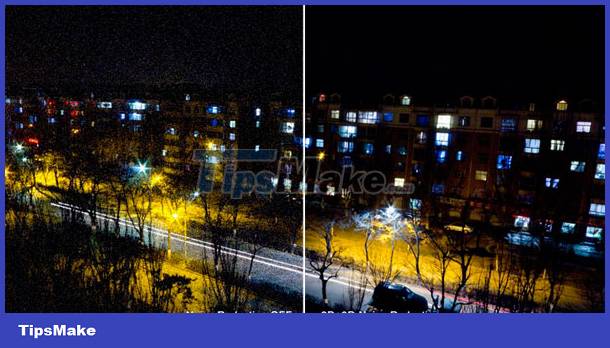 Compare images taken with noise reduction - Noise Reduction
In the illustration above, the photo was taken at night with a high ISO setting. The image on the left was taken without noise reduction while the image on the right was taken in Noise Reduction mode.
Conclusion
Understanding Using Digital Cameras makes it easier to compare options, avoid common mistakes, and apply the information in this guide more effectively. Review the relevant requirements before making changes or choosing a solution.
FAQ
What is Using Digital Cameras?
This guide provides a clear overview of using digital cameras, including Here Are 6 Tips to Help You Take Better Night Photos with a Popular Digital Camera, Using Night Scenes - Night Scenes.
Why is Using Digital Cameras important?
Understanding Using Digital Cameras helps you evaluate features, compatibility, performance, and potential limitations before you choose a product or follow a procedure.
What should you consider when using or choosing Using Digital Cameras?
Consider your specific goal, compatibility requirements, available features, cost, security, and the practical recommendations described in this guide.
Related Articles
 How to Adjust Aperture and Speed on Popular Digital Cameras6 minutes read
 Should You Choose a Digital Camera?6 minutes read
 10 Tips for Taking Beautiful Photos with Digital Cameras8 minutes read
 How to Take Beautiful Night Photos, Not Blurry8 minutes read
 This Application Can Help Smartphones with Tof Cameras See3 minutes read
 How to Choose a Semi-Professional Digital Camera9 minutes read
Reader Comments 0
Sign in with email or Google to join the discussion.