Table of Contents
When setting up an Android phone, the device is signed in to a Google account by default to sync contacts with this account. Deleted contacts will be moved to the Google Contacts trash folder, from which you can restore deleted contacts according to the instructions below.
How to restore contacts on Android
Step 1:
Go to your Google Contacts on your computer or phone and access the Google account you're using on your phone. If you're on your phone, open the Contacts app.
In the Google contacts interface, select Trash to view deleted phone numbers on your Android phone.
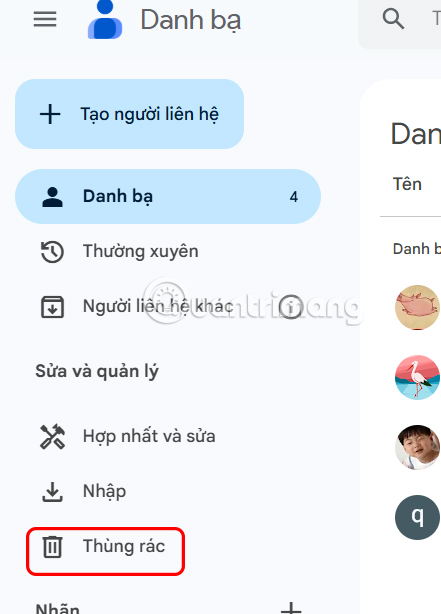
Step 2:
At this time, the user will see the deleted contacts on Android, select the contact you want to restore to the Android phone.
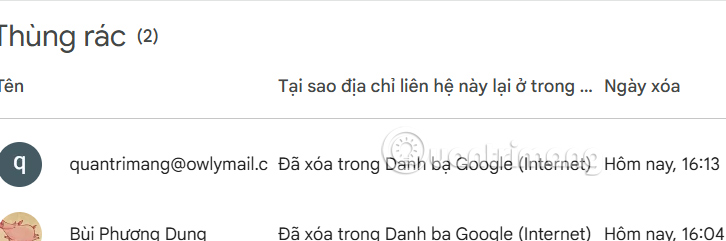
Step 3:
In the deleted contact information interface, you just need to click Restore to restore deleted contacts on Android.
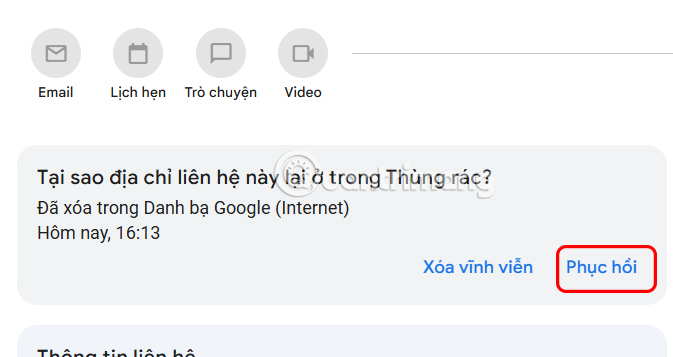
Contacts will be permanently deleted from the trash after 30 days. Also, if your phone hasn't backed up your contacts, deleted items won't show up here.
How to retrieve deleted numbers on Samsung phones
Recovering deleted contacts on Samsung phones is easier thanks to the recycle bin that stores this information. You have 30 days to recover deleted phone numbers before they are completely deleted.
Step 1:
Go to Settings > Battery and device care > Storage .
Step 2:
In the application interface, click Recycle bin , then select Contacts . Then select the contact from the list and select Restore .
Step 3
Your phone may save contacts to its internal memory or to your SIM card. Deleted contacts may still be in your backup, so you can import them again.
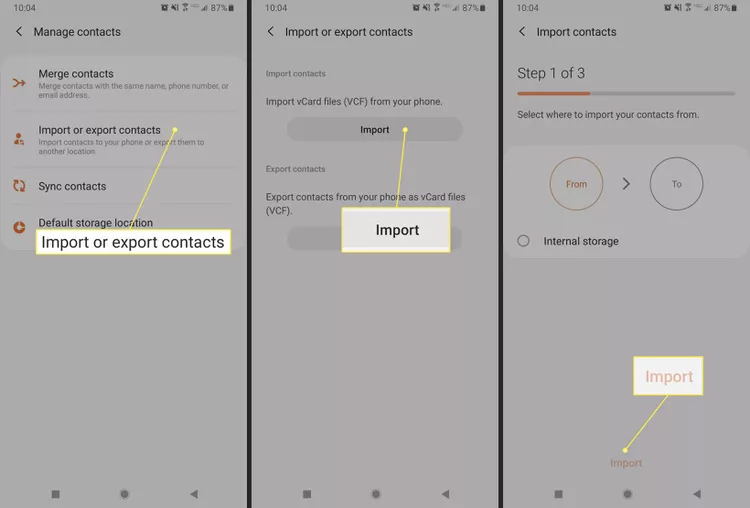
Tap Contacts > Menu > Manage Contacts.
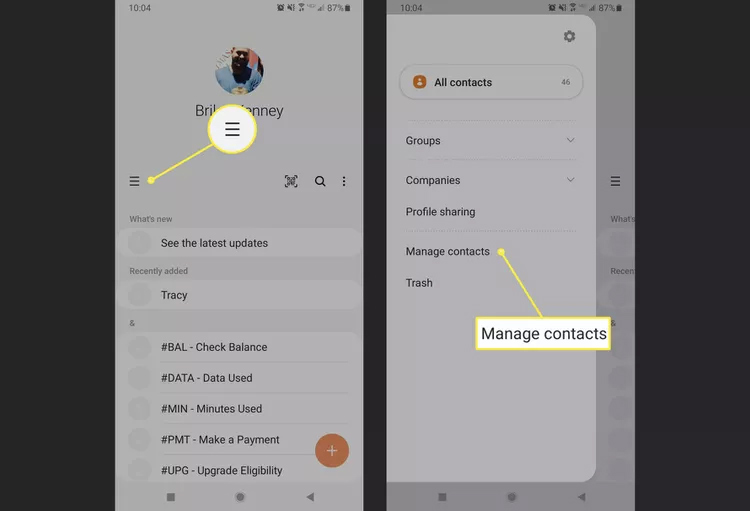
Then select Import or export contacts and then select Import . If there are any contacts saved on the SIM card or internal memory, they will be displayed in this interface.
Select the source to import contacts from, then tap Import.
Final Thoughts
Following the steps in order and checking version-specific settings should make it easier to Recover Deleted Contacts on Android. If an option looks different, verify the device, app, or operating-system version before changing additional settings.
FAQ
What is the best way to Recover Deleted Contacts on Android?
Start with the requirements described in the article and follow the steps in order. When setting up an Android phone, the device is signed in to a Google account by default to sync contacts with this account.
What should you know about How to restore contacts on Android?
Go to your Google Contacts on your computer or phone and access the Google account you're using on your phone. If you're on your phone, open the Contacts app.
What should you do if the instructions do not match your screen?
Check the device, software version, account permissions, and regional settings. Interfaces can change after updates, so use the closest matching option and consult the official support documentation when necessary.
Related Articles
 Contacts in Gmail, Android Phones Are Deleted, This Is How to4 minutes read
 Recover Deleted Contacts in Gmail2 minutes read
 Simple Way to Recover Deleted Contacts on Your Android Device4 minutes read
 How to Recover Deleted Photos on Android Device?10 minutes read
 Trick to Recover Android Data Is Lost5 minutes read
 How to Recover Deleted Phone Numbers4 minutes read
Reader Comments 0
Sign in with email or Google to join the discussion.