Table of Contents
EvilQuest, now commonly called ThiefQuest, is a Mac malware family discovered in 2020. It was initially described as ransomware because it encrypted files and displayed a ransom note, but later analysis found keylogging, backdoor, and possible data-theft behavior. The ransom demand may have been a distraction rather than the main purpose.
This is not a new outbreak, but the infection route remains relevant: researchers found it inside trojanized installers for pirated Mac software distributed through torrent and file-sharing sites. Current protection should focus on trustworthy software sources, macOS security controls, isolated backups, and a careful response to any suspected compromise.
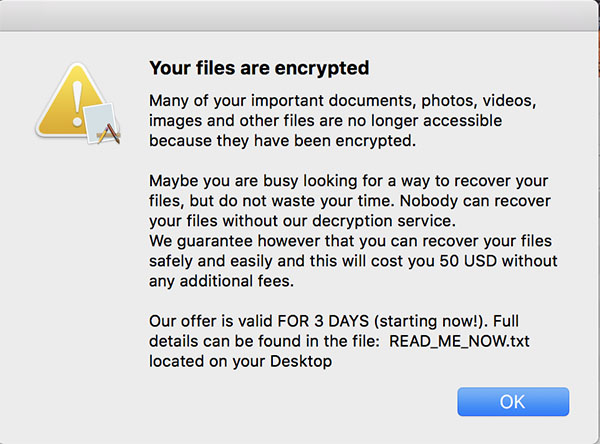
How EvilQuest spread
Reported samples were bundled with unauthorized copies of commercial apps, including installers impersonating Little Snitch, Mixed In Key, and Ableton Live. Warning signs included an unsigned installer, a generic package, and an unrelated executable presented as a “patch.”
Malwarebytes later renamed the threat ThiefQuest and concluded that it behaved more like a data stealer or destructive wiper than conventional ransomware. Its technical follow-up on ThiefQuest explains the keylogging, backdoor, encryption, and data-exfiltration findings.
How to reduce the risk
- Do not install cracked or pirated software. A working copy of the advertised app does not prove that its installer is clean.
- Use the App Store or the developer's official website. Check the domain carefully instead of following an ad or an unsolicited download link.
- Do not bypass a Gatekeeper warning casually. macOS checks whether downloaded software is from an identified developer, notarized, and unaltered. Apple's Gatekeeper documentation explains these checks.
- Keep macOS and apps updated. Apple's built-in defenses include Gatekeeper, Notarization, and XProtect. Apple describes the three protection layers in its macOS malware security guide.
- Use a standard account for routine work where practical. Be suspicious when an unexpected installer requests an administrator password.
- Maintain more than one backup. Keep at least one current copy offline or otherwise inaccessible to the Mac between backups. Malware can encrypt or delete a backup that remains mounted.
For local backup alternatives, see how to back up a Mac without Time Machine. If you want a second-opinion scanner, compare these Mac antivirus tools, but download security software only from its official source.
Warning signs that need investigation
- A ransom note or files that suddenly will not open.
- An installer that asks you to disable security protections or run an unexplained “patch.”
- Unexpected login items, background processes, or outbound network activity.
- Security alerts about an unsigned, modified, or known-malicious package.
- Accounts showing sign-ins or changes you did not make.
One symptom is not proof of ThiefQuest specifically. Preserve the alert, filename, download URL, and time of the event so a security professional can identify the actual threat.
What to do if the Mac may be infected
- Isolate it. Disconnect Wi-Fi and Ethernet. Unplug external drives and do not connect a clean backup to the suspected Mac.
- For a work or school device, contact the security team immediately. Do not erase evidence or attempt self-remediation unless instructed.
- Use another known-clean device to secure accounts. Change the email and Apple Account passwords first, then other important passwords, and enable multi-factor authentication. Assume anything typed on the infected Mac may have been captured.
- Have the Mac assessed. Use a trusted, current security product or qualified incident responder. Removing one detected file does not reverse possible data theft or repair every executable the malware may have modified.
- Erase and reinstall when compromise is confirmed. A clean macOS installation followed by a selective restore from a backup created before the infection is safer than continuing to use an uncertain system.
- Monitor accounts and connected services. Revoke unfamiliar sessions, application tokens, and saved credentials.
Do not assume paying will restore the files
ThiefQuest's payment design did not give victims a reliable way to identify a payment and receive a personal decryption key. More broadly, payment does not guarantee recovery and can fund further crime. CISA's ransomware response guidance recommends isolating affected systems and engaging the appropriate authorities or security team.
Do not download a random “EvilQuest decryptor” from an unfamiliar site. Researchers created tools for certain historical samples, but recovery depends on the exact variant and file state. Work from a duplicate of the affected storage with help from a reputable responder, not from the only copy of the data.
Recovery checklist
- Confirm the Mac is clean before reconnecting it to a network or backup drive.
- Restore only known-good documents and data, not unverified apps or installers.
- Reinstall apps from the App Store or their official developers.
- Update macOS fully before resuming normal work.
- Test that restored files open correctly and that backups run as expected.
Related Articles
 7 Effective Ways to Protect Businesses from Ransomware5 minutes read
 What Is Ransomware? How to Protect Your Device from Ransomware7 minutes read
 Can a VPN Protect You from Ransomware?8 minutes read
 List of the 3 Most Dangerous and Scary Ransomware Viruses6 minutes read
 Protect Your Computer Right Before the Return of Two Extremely Dangerous6 minutes read
 How to Protect Your Computer from Maoloa Ransomware7 minutes read
Reader Comments 0
Sign in with email or Google to join the discussion.