Table of Contents
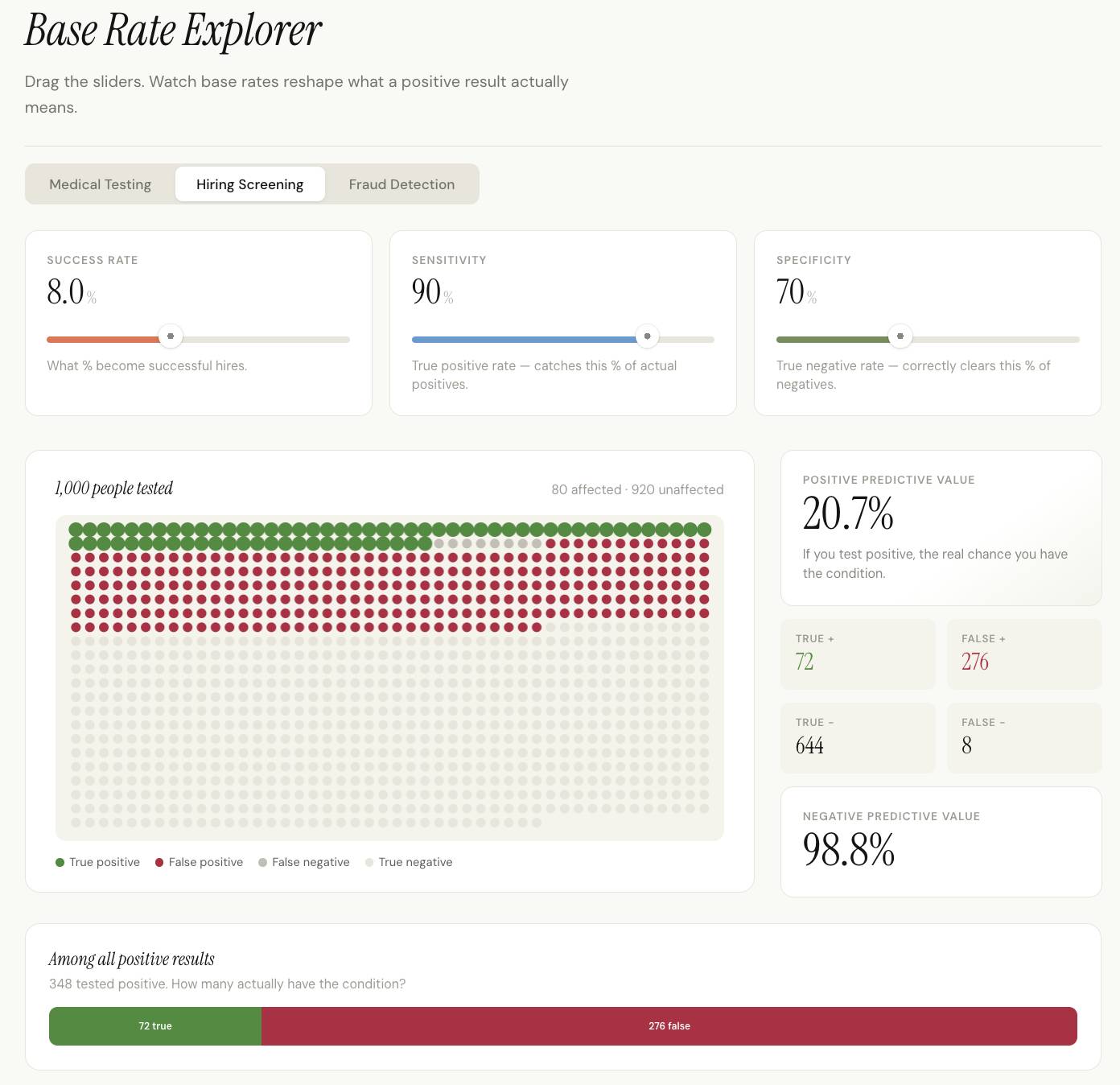
To use Claude as a learning assistant, begin with what you already understand and where your reasoning stops. Ask it to test that understanding before explaining the whole topic. Your answers can help narrow the next lesson to a specific misconception rather than another broad summary.
This is a prompting workflow, not a guarantee that Claude can accurately diagnose every learner. Treat its interpretation of your difficulty as a hypothesis and check it through practice.
1. Describe the gap in your own words
Name the topic, what you can already do, and one example that confuses you. A useful prompt is:
I understand basic probability, but I confuse the probability of a positive signal given a condition with the probability of the condition given a positive signal. Ask me one diagnostic question at a time. Wait for my answer, identify the exact step I misunderstand, and explain it using a small numerical example.Try the questions without asking for the answer immediately. If Claude misinterprets your explanation, correct it before continuing.
2. Work through a concrete misconception
Consider a hypothetical product-screening example. Of 100,000 items, 100 are defective: a base rate of 0.1%. A test detects 99% of defective items and correctly marks 99% of nondefective items as negative.
| Group | Items | Positive test results |
|---|---|---|
| Defective | 100 | 99 true positives |
| Not defective | 99,900 | 999 false positives |
| Total positive results | — | 1,098 |
Among the positive results, 99 ÷ 1,098, or about 9.0%, are defective. The test’s 99% detection rate is not the same as the probability that an item with a positive result is defective.
The base rate matters because the nondefective group is much larger. Also, “99% accurate” alone is insufficient to calculate this answer: the example explicitly supplies both the detection rate and the false-positive rate.
Ask Claude to change one input and let you predict what happens before it calculates the result. For example, increase the defect rate while keeping the test characteristics unchanged.
3. Request three useful learning outputs
Once you can explain the example, request outputs that help you apply and revisit it:
- An interactive exercise: a worked question followed by questions you answer independently. If interactive artifacts are available, request controls for the base rate and test characteristics.
- A workbook outline: inputs, formulas, expected outputs, and a few checked examples. Ask for a table or CSV if a downloadable workbook is not available.
- A concept map: connect base rates, conditional probability, true positives, and false positives, with a short explanation of each relationship.
Build these three outputs from the concept we just practiced. Label assumptions, separate exercises from solutions, and use only the hypothetical data above. Show how each formula follows from the counts.Anthropic describes a question-led tutoring approach in Claude for Education. Available lesson and file features depend on your account and tools; the learning check remains your ability to solve a new example.
4. Add data only when it helps
For a personal practice workbook, a small synthetic dataset is often enough. If you upload a file, ask Claude to confirm the column meanings, units, and rows it is using before calculating anything. Do not assume that an uploaded file has been fully or correctly analyzed.
Keep identifiable recruitment, customer, or health records out of a general learning example. Apparent patterns in a small dataset also should not be presented as proven predictive relationships.
5. Verify progress and plan the next lesson
Ask for a new problem with different numbers, solve it unaided, and explain why your answer makes sense. Check the arithmetic and compare the explanation with reliable course material. Revise any generated workbook formulas before relying on them.
Save a brief note recording what you now understand and what remains uncertain. Then choose one related concept for the next session. See planning a study program with Claude for sequencing and creating Claude-assisted lessons for a broader lesson-building workflow.
Related Articles
 A Guide to Using the Claude API to Build AI Applications11 minutes read
 Why Does Chatting with Claude Feel More Intimate Than ChatGPT?9 minutes read
 17 Invaluable Lessons That Love Has Taught Us9 minutes read
 How to Use Claude Cowork to Run Your Business with AI12 minutes read
 Guide to Creating AI-integrated Lectures Using Claude AI4 minutes read
![[Answer] What Do You Need to Build a PC?](/data8/thumbs_200x120/[answer]-what-do-you-need-to-build-a-pc_thumbs_200x120-XyOQ8C9LX.jpg) [Answer] What Do You Need to Build a PC?7 minutes read
[Answer] What Do You Need to Build a PC?7 minutes read
Reader Comments 0
Sign in with email or Google to join the discussion.