Table of Contents
This updated guide examines How to Insert and Write Arrow Symbols (↑(↑ ↓↓ ←← ↕↔↕↔ →→ and organizes the essential facts, background, and practical takeaways in clear American English.
- How to insert a picture of a book in Word
- How to insert music notes into Word
- How to insert tick marks in Word
- How to insert C symbol in Word and Excel like?
Instructions for writing arrows in Word
Method 1: Use Symbols in Word
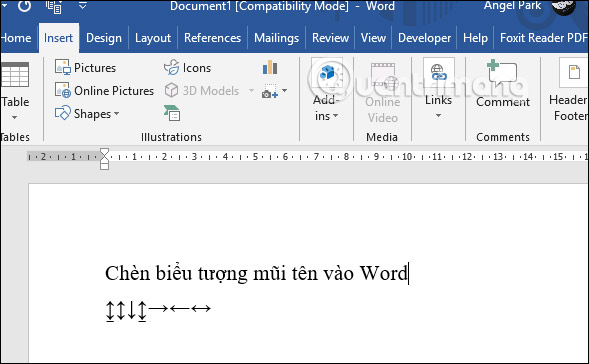
In Word, there is already a symbol table for users to insert the arrows ↑ ↓ ← ↕↔ → ↘↗↙↖.
At Word interface, click Insert and select Symbols . Click on More Symbols. to expand the list of symbols in Word.

Display a menu of icons. First of all users choose Font as Normal Text , Subset select Latin-1 Supplement . Under the Character Code section enter 21A8 . At this time will appear arrow icons for us to choose. Want to use any arrow, then click the arrow and then click on Insert to insert into Word.

The resulting arrow displays in Word as shown below.
Method 2: Use the Windows character table
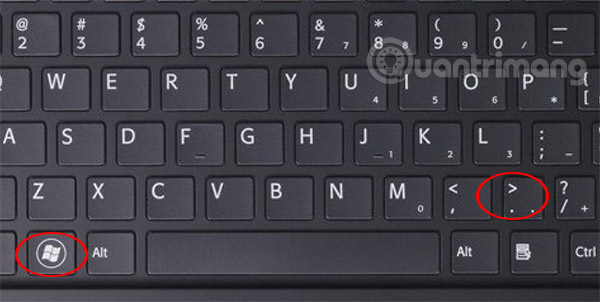
In Windows 10, there is an emoiji symbol table and other symbols for us to use. Users press the Windows + keyboard shortcut. to use.
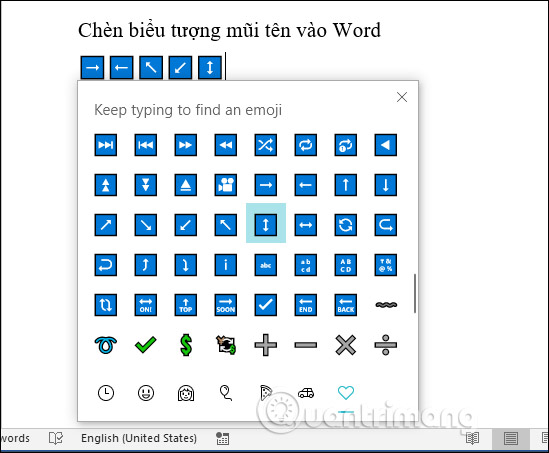
This will display the emoji table and icon, click the heart icon , and then search for the icon in the list. The arrow icons when displayed in Word will have more blue frames. You choose the type of arrow you want to use is. Not only Word, you can also use this shortcut to type the arrow on any input interface on the computer.
Method 3: Use the shortcut key combination Alt
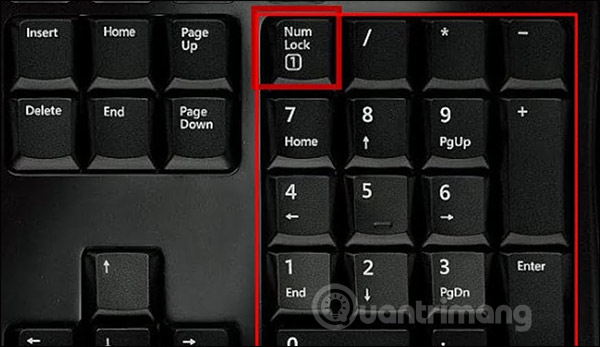
To use the Alt keyboard shortcut to write an arrow, the user must first press the Num Lock icon on the keyboard to activate the numeric keypad.
Then we look at the table below and then type the keyboard shortcut we want to use to show the arrow icon.
Key combinationSymbol ALT + 24 ↑ ALT + 25 ↓ ALT + 26 → ALT + 27 ← ALT + 29 ↔ ALT + 18 ↕ ALT + 23 ↨ ALT + 30 ▲ ALT + 31 ▼ ALT + 16 ► ALT + 17 ◄
Above are some different ways for you to type arrow types in Word or any interface to enter content on your computer such as email, chat on Facebook.
I wish you successful implementation!
FAQ
What is How to Insert and Write Arrow Symbols (↑(↑ ↓↓ ←← ↕↔↕↔ →→ about?
It provides a structured overview of ↑ ↓ ← ↕↔ → ↘↗↙↖, explains the main context, and highlights practical takeaways for readers.
Why does this topic matter?
Understanding the main concepts helps readers evaluate the issue, avoid common mistakes, and make better-informed decisions.
How should readers use this information?
Use the guidance as a practical starting point, confirm details that may have changed, and follow current product, safety, or security recommendations.
Related Articles
 How to Quickly Write Arrow Signs in Word3 minutes read
 How to Insert Symbols into Word Documents: Clear Instructions5 minutes read
 How to Add and Insert Non-symbols in Word (Ø Symbol in Word)3 minutes read
 MS Word - Lesson 9: Insert Pictures, Mathematical Characters4 minutes read
 How to Insert Equations in Microsoft Word: Practical Guide12 minutes read
Reader Comments 0
Sign in with email or Google to join the discussion.