Table of Contents
If your computer is using Windows Security, you can check for PUA applications on your computer that Windows Security has detected.
PUA or potentially unwanted application can slow down your computer. Any anti-malware or anti-virus tool can easily detect PUA or PUP on your computer. If your computer is running Windows Security, you can check for PUA applications on your computer that Windows Security has detected.
Instructions for viewing PUA applications on Windows
Step 1:
First you Type Windows Security in the search bar On Windows and then press to access.
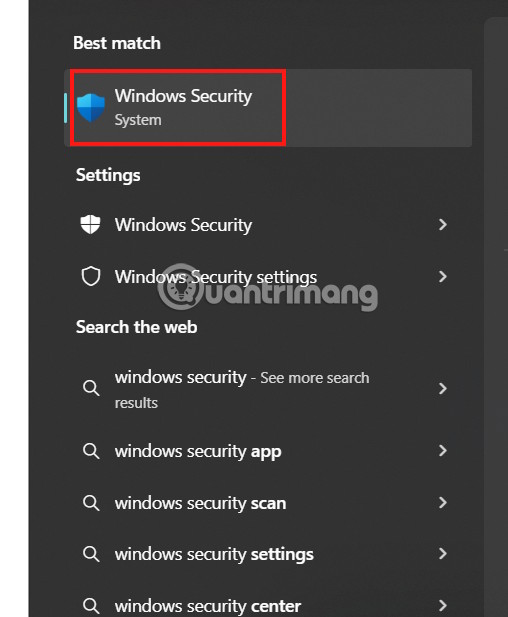
Step 2:
Go to the new interface on the left side and Select Protection History .
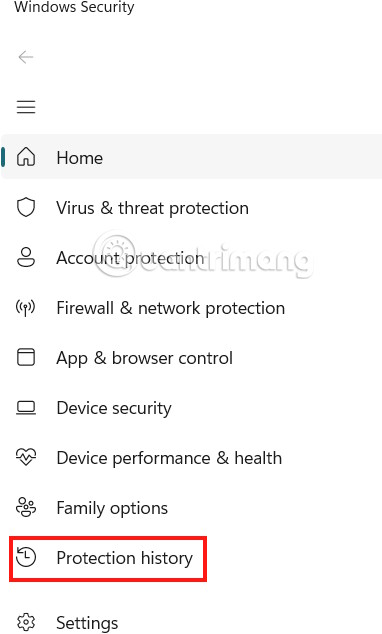
If any app or software is identified as a PUA, you will immediately see the list and the time it was detected.
Currently, there is no option to remove PUA detections on the computer.
That said, you can scan your entire PC with Malwarebytes to detect and remove potentially unwanted programs from your device.
FAQ
How do you find PUA apps on Windows: step-by-step guide?
In practical terms, if your computer is using Windows Security, you can check for PUA applications on your computer that Windows Security has detected.
What should you check before getting started?
Review the requirements, compatible device or software version, and any warnings described in the guide before making changes.
What should you do if the steps do not work?
Repeat the steps in order, confirm that your app or system is up to date, and review the troubleshooting details provided above.
Related Articles
 How to Find Hidden Apps on Android6 minutes read
 6 Ways to Find Discount Apps in the App Store10 minutes read
 11 Useful Windows Apps That Don't Come Pre - Installed7 minutes read
 12 Apps Windows 11 Users Should Install on Their New PC9 minutes read
 3 Apps to Change Your Windows 11 Experience5 minutes read
 7 Old Windows Apps You Need to Stop Using Right Now6 minutes read
Reader Comments 0
Sign in with email or Google to join the discussion.