Table of Contents
Progressive Web Apps (PWA) are now installed on Firefox so you can turn any website into a system app shortcut on your desktop, taskbar, or start menu.
Progressive Web Apps (PWAs) are now available for Firefox, allowing you to turn any website into a system app shortcut on your desktop, taskbar, or start menu. PWAs have a much better caching system, allowing for offline use if you have previously visited them on Firefox. Here are instructions for enabling PWAs in Firefox.
How to enable progressive web apps (PWA) on Firefox
Step 1:
You should update Firefox browser to the latest version and access any website. Then you will see A small download icon On the right of the address bar. This is the PWA installation icon.

Step 2:
Click the icon to install the website as an app. The website will turn into an app and display a new icon on the taskbar.

Click on this icon to access or access in another way.

Step 3:
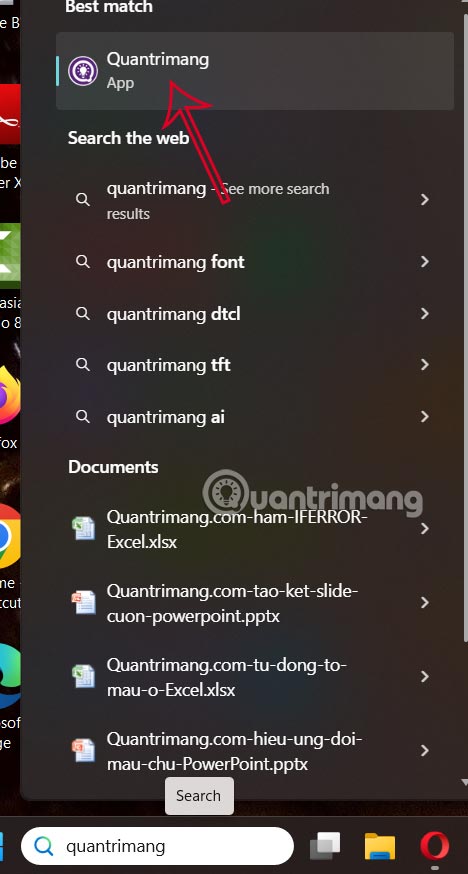
You can access this site instantly as an app from the start menu by searching for it. You can also pin it anywhere you want.
FAQ
How do you enable website web apps (PWA) in Firefox: step-by-step guide?
In practical terms, progressive Web Apps (PWA) are now installed on Firefox so you can turn any website into a system app shortcut on your desktop, taskbar, or start menu.
What should you check before getting started?
Review the requirements, compatible device or software version, and any warnings described in the guide before making changes.
What should you do if the steps do not work?
Repeat the steps in order, confirm that your app or system is up to date, and review the troubleshooting details provided above.
Related Articles
 How to Use Password Management Lockbox in Firefox Quantum6 minutes read
 Instructions to Enable Tab Groups in Firefox3 minutes read
 5 Cool Apps and Tools from Firefox Developers8 minutes read
 How to Take Photos of the Website, Capture the Whole Website on4 minutes read
 How to Enable Automatic Picture-in-picture in Firefox3 minutes read
 How to Enable Floating Window Video View in Firefox3 minutes read
Reader Comments 0
Sign in with email or Google to join the discussion.