Table of Contents
This practical guide explains how to enable ublock origin and manifest v2 extensions on Chrome. Follow the steps in order, review the requirements first, and use the troubleshooting notes when a setting or option does not work as expected.
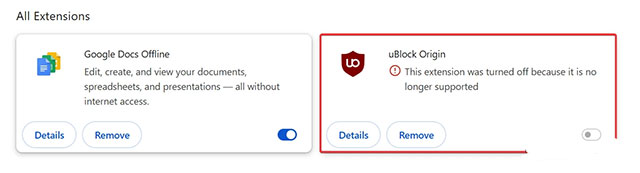
If you already have uBlock Origin installed in Chrome, follow these instructions. If you don't have it installed, download it from the Chrome Web Store, install it in your browser, then follow these steps:
- Open Google Chrome and go to chrome://flags.
- Find the flag called "Temporarily unexpire M137 flags" and set it to Enabled. Note: When Chrome 139 comes out, use the flag "Temporarily unexpire M138 flags".
- Restart your browser.
- Go back to chrome://flags page and disable the following flags:
- Extension Manifest V2 Deprecation Warning Stage
- Extension Manifest V2 Deprecation Disabled Stage
- Extension Manifest V2 Deprecation Unsupported Stage
- Enable the "Allow legacy extension manifest versions" flag. Tip: Type "MV2" into the search box on the page to find the necessary items faster.
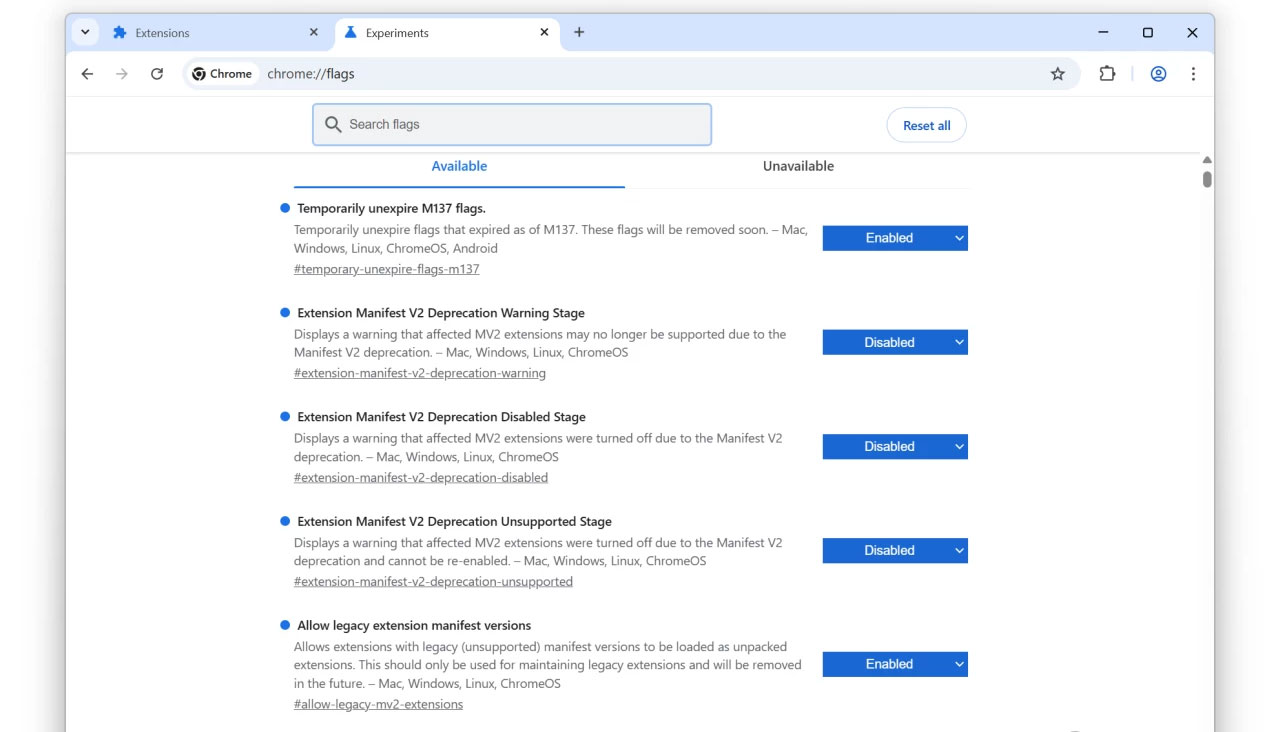
- Restart your browser.
Now all your Manifest V2 extensions, including uBlock Origin, should work again. It's also worth noting that after changing the above flags, you'll be able to load uBlock Origin using Developer Mode. However, with Chrome 140, Google will be removing these flags, and the only way to restore Manifest V2-based extensions will be to modify your Chrome shortcuts.
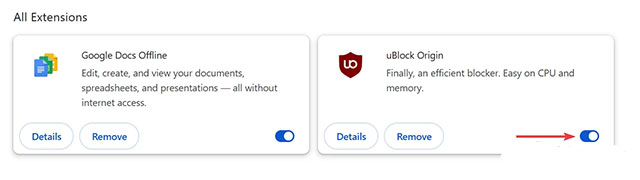
While users can still get uBlock Origin to work, it will eventually stop working completely, and there is no workaround. As a result, users will have to switch to Manifest V3-based ad blockers, such as uBlock Lite, or switch to browsers that still support Manifest V2. For example, Firefox, Opera, and Brave have no current plans to remove these extensions.
FAQ
What does this guide cover?
This guide explains enable ublock origin and manifest v2 extensions on Chrome, including the main steps, important details, and practical considerations.
Who is this guide for?
It is designed for readers who want a clear, practical overview and a reliable process they can follow without unnecessary complexity.
What should you check before getting started?
Review the requirements, confirm that your software or device is up to date, and save any important data before changing settings.
Related Articles
 Google Warns uBlock Origin Will Soon Be Disabled on Chrome: What You Need to Know5 minutes read
 Manifest V3 Rollout to Remove Google Extensions Is Being Pushed5 minutes read
 How to Use Ublock Origin Chrome to Block Ads4 minutes read
 How to Use Ublock Origin Block Ads on Edge Chromium4 minutes read
 4 Best Browser Extensions to Block Email Trackers6 minutes read
 5 Essential Extensions for Browsing the Web on Android: Explained7 minutes read
Reader Comments 0
Sign in with email or Google to join the discussion.