Table of Contents
Sometimes, when installing or updating Windows 10, errors may occur during the installation process or the system may not be completed correctly, leading to Windows 10 errors. The most serious issue is a missing graphics card, resulting in the computer being unable to boot or turn on the screen. Therefore, immediately after installing or updating Windows 10 , you should research and download a suitable VGA graphics card for your computer's configuration. However, the first step is to check your laptop's graphics card to see if it supports a dedicated graphics card.
How to download graphics card files for Windows 10
Table of Contents:
Method 1: Using Driver Booster software to download graphics card drivers for Windows 10. Method
2: Manually searching for graphics card drivers for Windows 10 on the developer's website .
Instructions on how to download and update graphics card (VGA) updates for Windows 10.
Method 1: Use Driver Booster software to download graphics card drivers for Windows 10.
To use Driver Booster, you first need to download and install it on your computer. This software is currently free to download and install quite easily.
Step 1
After downloading Driver Booster to your computer, install it as usual.
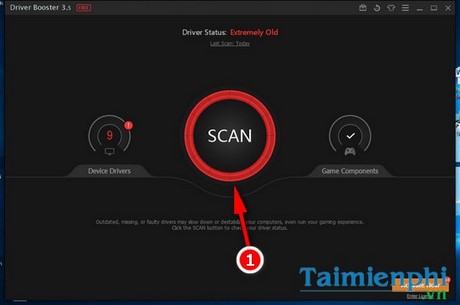
Step 2: In the main interface of the software, click the Scan button to start scanning for missing or necessary drivers on your computer.
Step 3
You can select the necessary drivers to download or update by ticking the boxes next to each driver. However, if you don't need them, you can skip downloading or updating drivers that are working properly, because in many cases, if you don't back up your drivers, errors may occur due to incompatible new driver updates.
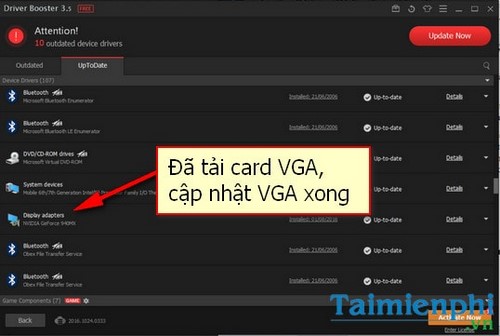
In the image, the graphics card (VGA card) of your computer will show up in the UpToDate section if it has been updated or newly installed .
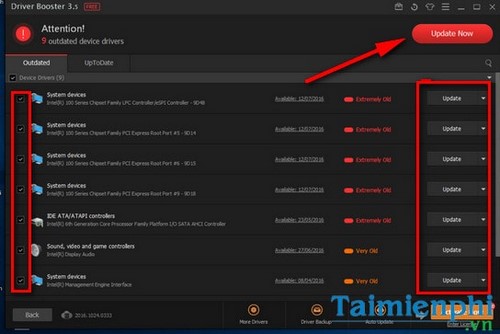
If you see a graphics card icon in the Outdated section , simply select the graphics card driver and click Update next to it.
You can also refer to this guide on how to take screenshots on Windows 10 to capture the steps for updating your graphics card and send them to your friends so they can follow along.
Method 2: Search for a graphics card for Windows 10 yourself on the developer's website.
This method is different from checking your laptop's graphics card, as users can use the Dxdiag command box to check the graphics card version and download the most accurate graphics card for Windows 10. Follow the instructions below to check your laptop's graphics card and download the VGA card for Windows 10.
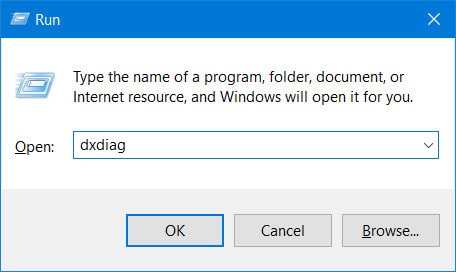
Step 1: Press the Windows + R key combination > type the command dxdiag > press OK or press Enter .
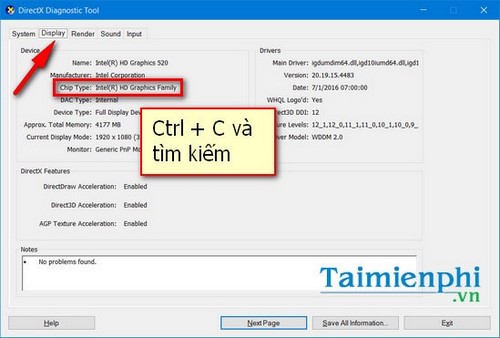
Step 2: In the DirectX Diagnostic Tool interface , switch to the Display tab .
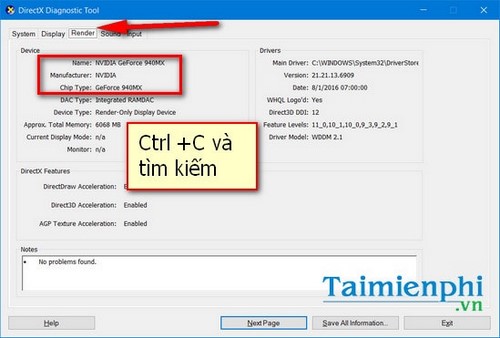
Next, switch to the Render tab to check the name and version of your dedicated graphics card.
From there, you can access websites that help you find drivers for specific laptop models from various manufacturers. You can access the driver download websites of each manufacturer, such as Asus, Lenovo, Acer, etc., because each manufacturer will have a different driver download file that is only compatible with their own computers.
Above are two of the quickest ways to download graphics card drivers for Windows 10. With these methods, you can be sure that your computer will automatically find and update the drivers to the latest version, thus helping your computer run much more smoothly and efficiently.
Besides the Driver Booster software that TipsMake introduced above, we also encourage you to try some other effective driver update software such as DriverEasy , Advanced Driver Updater, Driver Navigator, and DriverGenius. And if you are using one of these software programs like DriverEasy to download VGA card drivers, you can follow the method of downloading drivers from DriverEasy using IDM . TipsMake is sure that the download speed for large driver files will be very fast.
Good luck!
Related Articles
 Update AMD Graphics Card Drivers on Windows 104 minutes read
 How to Update Graphics Card: Step-by-Step Guide5 minutes read
 How to Update Itunes to the Latest Version6 minutes read
 Update Graphics Drivers in Windows 10 and 11: Step-by-Step Guide7 minutes read
 How to Download Windows 10 Anniversary Update Update?5 minutes read
 Notable New Features on the Windows 10 April Update 2018 Update10 minutes read
Reader Comments 0
Sign in with email or Google to join the discussion.