Table of Contents
Play Together VNG is the Vietnam-localized edition of the social life-simulation game. It is available through Google Play, and a Windows PC can run the Android version with an emulator such as LDPlayer. This guide shows the LDPlayer method while preserving the same Google Play installation flow used on a phone.
What you need
- A Windows PC with enough free storage for the emulator and game updates
- Hardware virtualization enabled for better emulator performance
- A Google account for Google Play
- Your existing game login method if you want to continue a saved account
Download the emulator only from its official website. Do not install Play Together VNG from an unverified APK source.
Install Play Together VNG on LDPlayer
- Install LDPlayer, then open it.
- On the emulator home screen, select the Google Play search box.
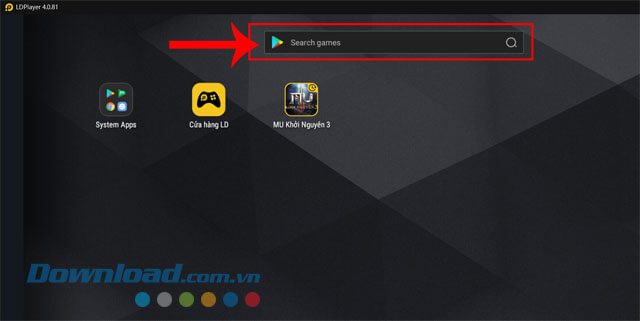
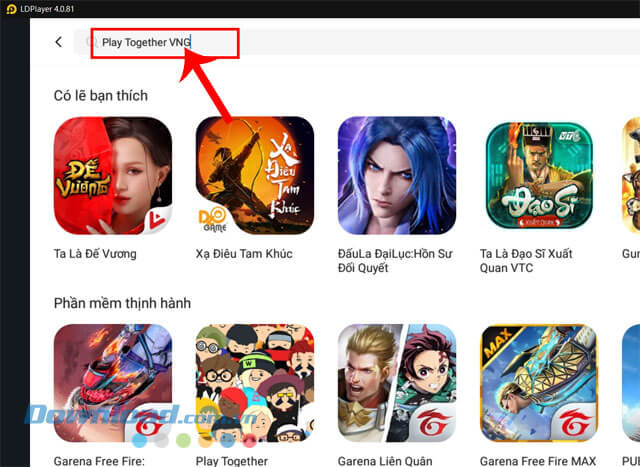
- Search for Play Together VNG. Confirm that you have selected the VNG edition, not a similarly named listing.
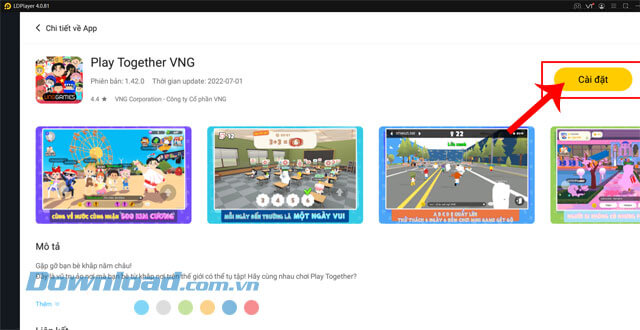
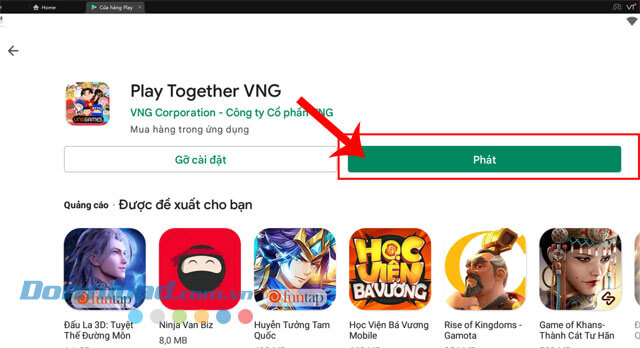
- Open the game's store page and select Install.
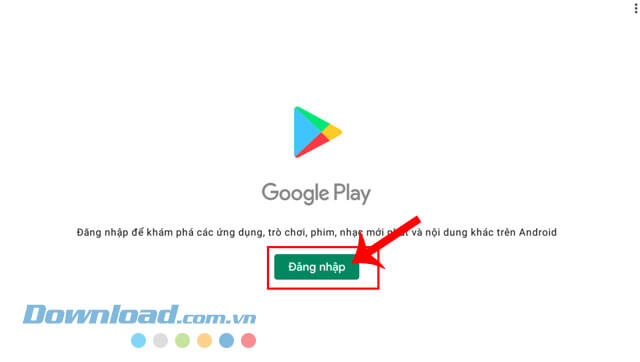
- If prompted, select Sign in and log in to your Google account. Complete any Google Play terms shown on screen.
- Wait for the download and installation to finish, then select Play.
Sign in without losing progress
Use the same supported sign-in method you used on your phone. A guest session may not be transferable, so link the mobile game to a supported account before moving devices if the game offers that option. Never assume that choosing the same Google account automatically restores progress if the game was originally linked another way.
Configure keyboard controls
LDPlayer can translate keyboard and mouse input into touch controls. Open the keyboard-mapping panel after the game loads, assign keys to the virtual joystick and action buttons, then save the layout. Test movement and interaction in a quiet area before entering a timed mini-game.
Troubleshoot common problems
- The VNG edition is missing: check the Google Play account region and search for the exact title. Availability can depend on region.
- Installation is stuck: check the internet connection and free storage, restart the emulator, and retry from Google Play.
- The game lags: enable virtualization, close demanding background programs, and lower the emulator resolution or frame-rate target.
- Black screen or visual glitches: update the graphics driver and switch between the available OpenGL and DirectX rendering modes in LDPlayer.
- Controls do not respond: reopen the key-mapping panel because a game update may have moved an on-screen control.
After the game launches successfully, allow it to finish any additional data download before judging performance. Configure graphics and key mapping one change at a time so it is easy to identify which setting causes a problem.
Related Articles
 How to Download and Install CH Play on Your Computer, Laptop Simple3 minutes read
 How to Download Google Play Store to Your PC3 minutes read
 Download Au Mix for PC, Install Au Mix on Your Computer3 minutes read
 How to Install and Play the Three Kingdoms on the Computer5 minutes read
 How to Download Apps from Google Play to Your Computer: Complete Guide8 minutes read
 How to Download and Play Thuc Son Ky Hiep Mobile on Computers and Laptops5 minutes read
Reader Comments 0
Sign in with email or Google to join the discussion.