Table of Contents
To unlock the Sakura Incubator in Roblox Steal an Egg, reach the Cherry Blossom Zone and sacrifice an Epic Crane at the machine. After the permanent unlock, collect Sakura Crystals during the Great Bloom event, place an unhatched egg in the Incubator, and charge it to apply a Bloom-family mutation.
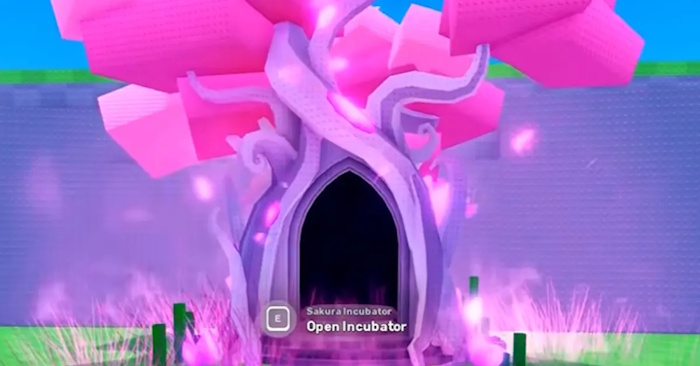
The Crane is consumed when you unlock the machine, and the Incubator works on eggs rather than already-hatched pets. Keep the egg you want to mutate in your inventory until you have enough crystals and are ready to use the machine.
Sakura Incubator requirements
| Requirement | Where to get it | Important detail |
|---|---|---|
| Cherry Blossom access | Final zone on the current map | The live zone sign shows the recommended Speed after updates |
| Epic Crane | Hatch eggs from the Cherry Blossom pool | The pet is permanently consumed to unlock the Incubator |
| Sakura Crystals | Hit crystal cherry trees during Great Bloom | Equip the Baseball Bat and collect before the short event ends |
| Unhatched egg | Your inventory | A pet that has already hatched cannot be placed in the machine |
Step 1: Reach the Cherry Blossom Zone
Cherry Blossom is the last standard biome in the current map route. Older guides cite Speed requirements between roughly 2.5B and 3.5B, but the game can rebalance progression. Use the number shown on the live area gate as the final requirement.
Increase Speed through the treadmill and base upgrades, and use higher-income pets to fund those upgrades. If a faster friend helps you transport an egg, keep the handoff away from crowded players; an exposed egg can be taken before you return it to your base.
Step 2: Get an Epic Crane
The Crane can hatch from the Cherry Blossom egg pool. It is an Epic pet, so obtaining one is random and may take several eggs. Do not trade away or place your only Crane in an income slot if the Incubator is your current objective.
- Steal a Cherry Blossom egg and return it safely to your base.
- Hatch eggs until you receive a Crane.
- Move the Crane to your inventory.
- Return to the Sakura Incubator in the Cherry Blossom Zone.
- Interact with the machine and confirm the Crane offering.
The unlock is intended to be permanent for that save or player profile, but verify that the sealed state has disappeared before leaving. Because the Crane is consumed, avoid clicking through the confirmation while a different pet is selected.
Step 3: Farm Sakura Crystals during Great Bloom
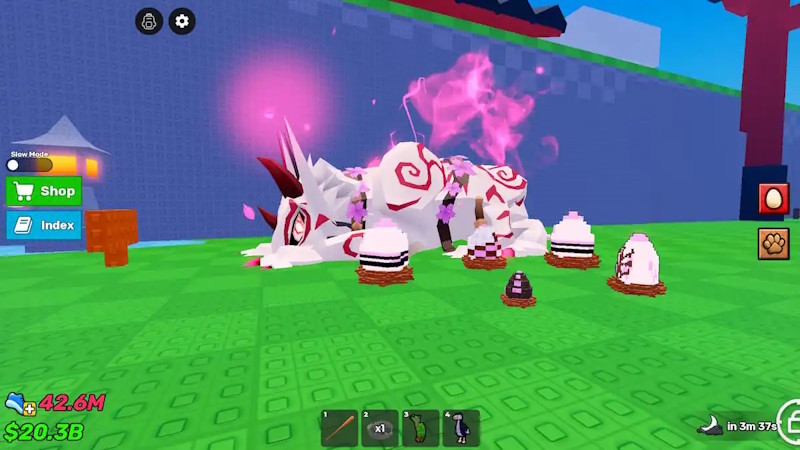
The Great Bloom event activates crystal cherry blossom trees in the Cherry Blossom Zone. A notification appears when it begins, and the Incubator area displays a countdown to the next cycle.
- Travel to Cherry Blossom before the countdown reaches zero.
- Equip the Baseball Bat.
- When Great Bloom starts, look for the crystal-covered cherry trees.
- Hit each active tree and collect the Sakura Crystals it drops.
- Move directly to the next tree rather than waiting beside an exhausted one.
Community guides report a cycle of about 30 minutes and an active window of roughly three minutes. Treat the on-screen timer and event notification as authoritative because server timing can change. Arriving early prevents most of the event from being lost to travel.
Efficient crystal route
- Wait near the first group of eligible trees with the Bat already equipped.
- Reduce graphics settings if particle effects make crystal trees difficult to identify.
- Use a low-population or private server if competition prevents you from reaching trees.
- Bank crystals for a valuable egg instead of spending every small batch immediately.
Step 4: Mutate an egg
- Open your inventory and confirm that the target is an unhatched egg.
- Interact with the unlocked Sakura Incubator.
- Place the intended egg in the machine.
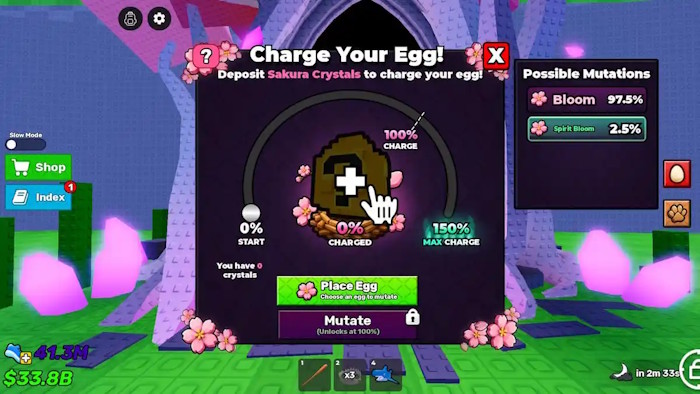
- Add Sakura Crystals and watch the charge indicator.
- Reach at least the required charge, then confirm the mutation process.
- Read the resulting mutation before removing or hatching the egg.
At the commonly documented 100% charge, the machine has offered Bloom at 97.5% and Spirit Bloom at 2.5%. Bloom is associated with a 1.5× income value and Spirit Bloom with 3×. Some versions allow charging above 100%, up to 150%, to improve the rare outcome. Always read the current percentages shown by the Incubator before committing crystals, because event balance can be adjusted.
Which egg should you put in the Incubator?
Use the machine on an egg whose expected pet value justifies the event currency. A Bloom mutation on a weak early egg may add less income than an unmutated high-tier pet. Prioritize:
- rare eggs from the best zone you can reach consistently;
- eggs you can replace if the common Bloom result is disappointing;
- an income upgrade that will noticeably shorten the next treadmill purchase;
- duplicate high-tier eggs before risking a unique collectible.
Do not hatch the target egg first. The Sakura Incubator cannot retroactively mutate a pet that is already active in your yard or inventory.
Troubleshooting
The Incubator is still locked
Confirm that the pet is specifically named Crane, has been moved to inventory, and is selected when you interact. Rejoin the server if the model remains sealed after a successful confirmation.
No crystal trees appear
Great Bloom must be active. Check the countdown and the server-wide notification, then make sure you are hitting the event version of the tree with the Baseball Bat. Ordinary cherry trees do not provide the event currency.
The egg cannot be inserted
Remove it from any hatch slot or base display and return it to inventory. If it has already hatched, choose another egg; the machine accepts eggs, not pets.
The event timer does not match a guide
Use the timer above the machine. Public-server age, a game update, or a restarted server can make an old schedule inaccurate.
Shortest reliable route
Progress until Cherry Blossom is reachable, hatch a Crane, sacrifice it to unlock the Sakura Incubator, wait beside the event trees with a Bat, and collect as many Sakura Crystals as possible during Great Bloom. Then mutate a high-value unhatched egg only after checking the machine's live charge requirement and displayed odds.
Related Articles
 How Much Is the Incubator: Incubator Price5 minutes read
 What Kind of Japanese Annealing Pot Is Worth Buying Today?5 minutes read
 Genshin Impact: Complete Guide: Location of the Sakura Trees in the5 minutes read
 God Sakura: Complete Guide6 minutes read
 How to Obtaining Tung Tung Tung Sahur in Steal a Brainrot7 minutes read
 Steal a Brainrot Duels Guide: Wagers, Rules and Tips9 minutes read
Reader Comments 0
Sign in with email or Google to join the discussion.