Table of Contents
Catch a Monster is a Roblox collecting game built around a simple loop: use an equipped pet to defeat a wild monster, attempt to capture it, then build a stronger and more flexible team. New players progress faster when they improve a small core team instead of spending every coin or upgrade resource on whichever monster they caught most recently.
Quick start: Fight creatures near the opening area, press the capture control when a defeated monster becomes available, equip the strongest useful result, and keep battling until you can handle the next zone. Capture attempts can fail, so earning a victory does not always guarantee a new pet.
Basic controls
- WASD: Move your character on a keyboard.
- Left mouse button: Select or initiate a battle with a nearby wild monster.
- E: Throw a capture ball when the defeated monster is ready to catch.
- Spacebar: Jump.
Touch and controller prompts can differ from the keyboard labels. Follow the action icon displayed by the current Roblox client if it does not show the keys above.
How battles and captures work
- Approach a wild monster that your active pet can reasonably defeat.
- Select the monster to begin combat.
- Wait for your pet to finish the battle; stronger enemies may defeat it first.
- When the capture prompt appears, press E or the equivalent on-screen control.
- Check whether the throw succeeds, then compare the captured monster with your equipped pets.
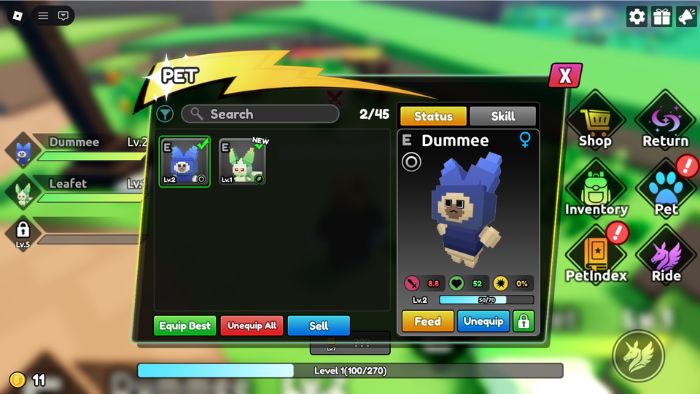
The version covered by the original guide starts players with two active pet slots and unlocks another slot through early progression. Check the slot panel for the current requirement, because updates can change level gates or add more capacity.
Level up without getting stuck
Winning battles grants experience and coins. Use the progress bar to see how close you are to the next level, but do not rush into a stronger area just because it is unlocked. A reliable team should be able to win several battles in a row without repeated returns to the spawn point.
- Farm the strongest enemy you can defeat consistently, not the strongest one you can barely beat.
- Replace a weak starter only after comparing rank, level, element, and combat stats.
- Keep at least one alternative element so a resistant enemy does not stop the whole team.
- If your pets are defeated, use the Return control to go back and restore them before trying again.
How to earn and spend coins
You receive coins from victories even when a capture fails. Extra pets can also have sale or upgrade value, depending on the current game menu. Early coins are usually most useful when they improve your repeatable farming loop rather than funding many small upgrades across pets you will soon replace.
Before selling a duplicate, check whether you need it for Fusion. Before buying an egg or upgrade, compare the likely improvement with the cost of strengthening the pets already carrying your team.
Upgrade pets efficiently
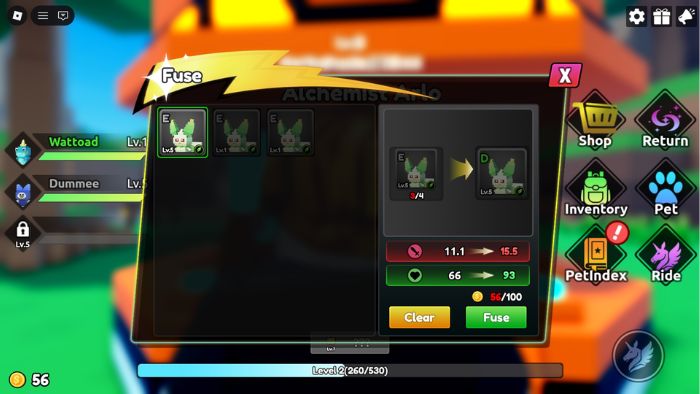
Gain levels through combat
Keep useful pets equipped while farming manageable enemies. This costs no duplicate pets and lets you earn team experience, coins, and capture chances at the same time.
Feed spare pets carefully
Feeding can convert unwanted pets into experience for a stronger one. Lock any rare, high-rank, or hard-to-replace pet first if the interface offers a lock feature, and review the confirmation screen so you do not consume a valuable monster by mistake.
Use Fusion for duplicates
The version covered here uses the Fusion NPC near the starting area and requires multiple copies of the same pet plus coins. The original requirement was four copies. Verify the number shown in the current Fusion menu before selling duplicates, because an update may alter the recipe or introduce new evolution paths.
How to build a balanced early team
- Prioritize reliable damage: A pet that wins quickly and consistently is more useful for farming than a rare pet that is still underleveled.
- Mix elements: Avoid filling every active slot with the same element unless you already know the next enemies are vulnerable to it.
- Compare rank as well as rarity: Two monsters with the same name or rarity can perform differently after upgrades.
- Keep an upgrade candidate: Save duplicates for the pet most likely to remain useful in the next zone.
- Test before committing resources: Use a new pet in several battles before feeding away the one it may replace.
Common beginner mistakes
- Chasing every capture: Capturing another weak duplicate is not always better than progressing or upgrading a core pet.
- Spending all coins immediately: Keep a reserve for Fusion, eggs, or a progression requirement you have not reached yet.
- Using unverified promo-code sites: Redeem codes only inside the game through its official interface. Never enter a Roblox password on a code website.
- Trusting an old tier list as permanent: Updates can add pets and rebalance stats. Use the current in-game details to confirm a recommendation.
- Feeding or selling without checking: Review rank, element, duplicates needed for Fusion, and whether the pet is locked.
For a related Roblox collecting system, see how to obtain evolution items in Evomon. More walkthroughs are available in the TipsMake game guide section.
Related Articles
 Guide to playing God of War for beginners
 Monster Hunter Rise tips for new gamers
 Black Beacon: Beginner's Guide
 Monster Sanctuary: A Guide to Evolving All Monsters
 3 observatories catch extremely strange radio rays from a 12.6 billion year old monster
 Instructions for playing Little Witch in the Woods for beginners
Reader Comments 0
Sign in with email or Google to join the discussion.