Table of Contents
You can't control the Google Drive files you receive from others. If this is the case, you can block others from sharing Google Drive files with you.
Google Drive has an option to block sharing your files, but it does not have an option to block sharing Google Drive files from others. This leaves you with no control over the files you receive from others on Google Drive. If you find yourself in this situation, you can block others from sharing Google Drive files with you.
How to block others from sharing Google Drive with you
Step 1:
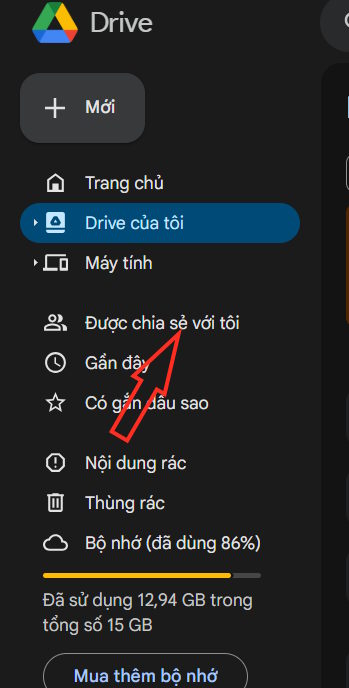
Open Google Drive on your computer and then click on Shared with me .
Step 2:
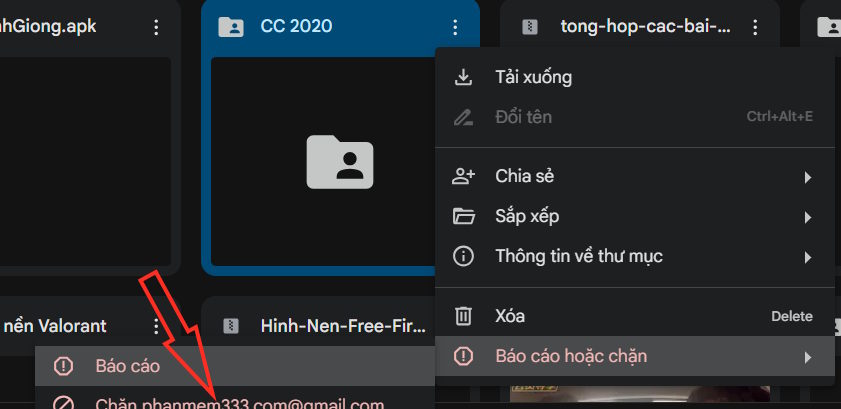
You will now see files shared by others. Click The three dots menu Of the file sent by the person you want to block.

Step 3:
In the menu that appears for that file, select Report or block , then Click Block the account name of The person who shared the file with you to do so.
Step 4:
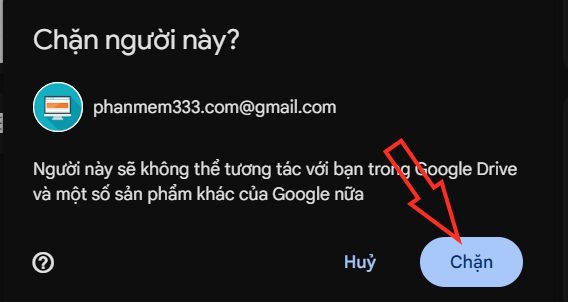
Now you are asked if you are sure you want to block this Google account, Click Block To confirm.
Blocking someone on Google Drive is the ultimate way to prevent unwanted file sharing in the first place.
FAQ
What should you know about block others from sharing Google Drive files with you?
In practical terms, you can't control the Google Drive files you receive from others. If this is the case, you can block others from sharing Google Drive files with you.
Why does block others from sharing Google Drive files with you matter?
The article highlights that if you find yourself in this situation, you can block others from sharing Google Drive files with you.
What is the main takeaway?
The main takeaway is that how to block others from sharing Google Drive with you Step 1: Open Google Drive on your computer and then click on Shared with me .
Related Articles
 How to Block Downloading Files and Videos on Google Drive4 minutes read
 Trick to Create a Copy of Text for Recipients When Sharing a Google4 minutes read
 How to Block File and Video Downloads on Google Drive5 minutes read
 How to Share Files on Google Drive: Share Google Drive Files4 minutes read
 7 Tips for Better File Searching on Google Drive7 minutes read
 From December 20, 2021, Google Drive Will Automatically3 minutes read
Reader Comments 0
Sign in with email or Google to join the discussion.