Table of Contents
Microsoft Edge can sometimes open too many new tabs when you select links in Bing search results, MSN news feeds, or the address/search bar. This can lead to too many tabs opening, which can be annoying and clutter your browsing experience. In this guide, you'll learn how to stop Edge from automatically opening tabs.
How to stop Microsoft Edge from opening new tabs
Step 1:
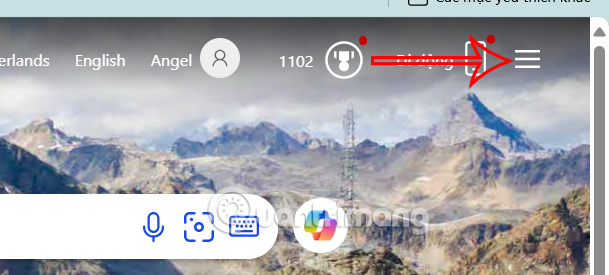
In Edge browser, you access Bing website, then in Bing interface, you select 3 dashes icon .
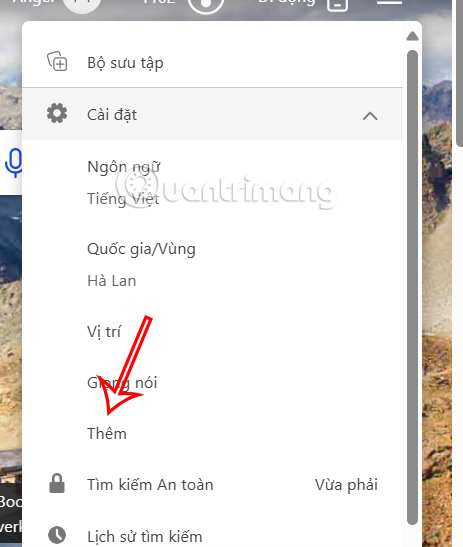
Display the menu, click Settings to expand and then click More in the list displayed below.
Step 2:
Switch to the Bing settings interface, scroll down to the Results section and you will see 2 default settings enabled as shown below.

You will need to turn off Open links from search results in new tab or window and turn off Open links from news results in new tab or window and then press Save below to save your settings.
If you delete your cookies, you will need to make these changes again.

When you select a Bing search result, it opens in the same tab instead of opening a new tab.
How to stop MSN from opening new tabs in Edge
By default, a new tab in Edge loads the MSN news feed, which can lead to more tabs opening when you select a headline. If you don't want to see MSN anymore, you can change the new tab page in Edge to Google or any other website.
Step 1:
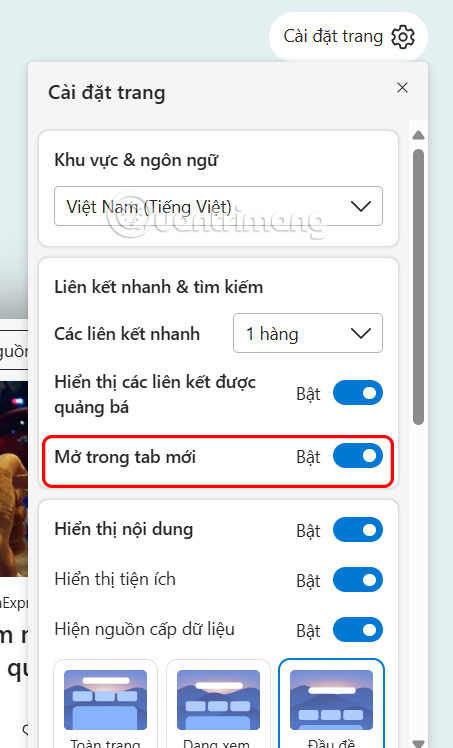
You open a new tab on the browser to display the MSN feed, then you select the gear icon in the right corner as shown. Show the new settings below and you will see the default Open in new tab enabled.
Step 2:
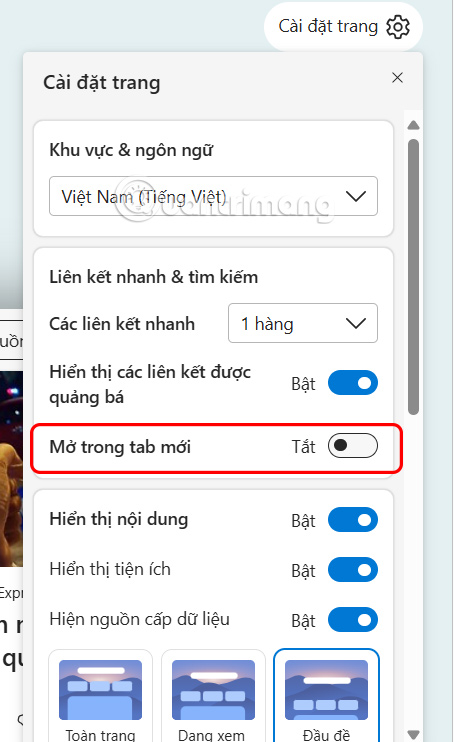
You will need to turn off Open in new tab to reduce the number of unwanted tabs when browsing from MSN feeds.
Opening a new tab for every search result or link in Edge can be annoying when browsing the web. By adjusting Bing settings and MSN new tab behavior, you can organize your tabs in a logical way and avoid unnecessary clutter.
Video tutorial on how to turn off automatic opening of new tab links on Edge
Final Thoughts
Following the steps in order and checking version-specific settings should make it easier to Prevent Microsoft Edge from Opening New Tabs. If an option looks different, verify the device, app, or operating-system version before changing additional settings.
FAQ
What is the best way to Prevent Microsoft Edge from Opening New Tabs?
Start with the requirements described in the article and follow the steps in order. Microsoft Edge can sometimes open too many new tabs when you select links in Bing search results, MSN news feeds, or the address/search bar. This can lead to too many tabs opening, which can be annoying and clutter your browsing experience.
What should you know about How to stop Microsoft Edge from opening new tabs?
In Edge browser, you access Bing website, then in Bing interface, you select 3 dashes icon.
What should you do if the instructions do not match your screen?
Check the device, software version, account permissions, and regional settings. Interfaces can change after updates, so use the closest matching option and consult the official support documentation when necessary.
Related Articles
 How to Prevent Microsoft Edge from Automatically Opening4 minutes read
 How to Quickly Freeze Tabs on Microsoft Edge3 minutes read
 How to Use Vertical Tabs on Microsoft Edge: Step-by-Step Guide3 minutes read
 Turn on // Off the Prompt 'Do You Want to Close All Tabs?' in3 minutes read
 Microsoft Edge: Complete Guide6 minutes read
 6 Cool Microsoft Edge Features You Shouldn't Miss: Practical Guide6 minutes read
Reader Comments 0
Sign in with email or Google to join the discussion.