Table of Contents
Meta AI can create interactive visual explanations from a prompt or an uploaded image. This is useful for showing how a geometry formula works, turning a diagram into a draggable model, or converting a puzzle image into a playable web experience. Muse Spark powers Meta AI's multimodal reasoning and coding features; newer model versions may be applied without the interface showing the exact version number.
The generated result is a draft, not a verified teaching resource. Check formulas, labels, units, initial values, controls, accessibility, and edge cases before sharing it with students or publishing it.
What you need
- Access to Meta AI on the web or in the Meta AI app.
- A model or mode that supports deeper reasoning and interactive visual output. The label may appear as Thinking or vary by rollout and region.
- A clear learning objective, such as “show why the trapezoid area formula works,” rather than only a topic name.
- For image-based work, a sharp image you have permission to upload, without private or confidential information.
Features are released gradually, so an account may not yet show every control in these screenshots. If interactive output is unavailable, Meta AI may return a written explanation or static graphic instead.
Create an interactive visual explanation
1. Select the reasoning mode
Open Meta AI and choose the available Thinking or deeper-reasoning option from the model selector.

Use this mode when the task requires a proof, several coordinated steps, an interactive model, or code generation. A normal chat mode may be sufficient for a short factual answer.
2. Describe the learning goal and interaction
Tell Meta AI what the learner should understand, which visual objects to show, what controls should be interactive, and what explanation must accompany the model. For example:
Create an interactive visual proof of the area formula for an isosceles trapezoid.

Show the trapezoid split and rearranged into a shape whose area is easy to calculate. Label both bases, the height, and the resulting formula A = (a + b)h / 2.

Add sliders for a, b, and h. Keep all labels readable, explain each transformation in short steps, and prevent invalid values.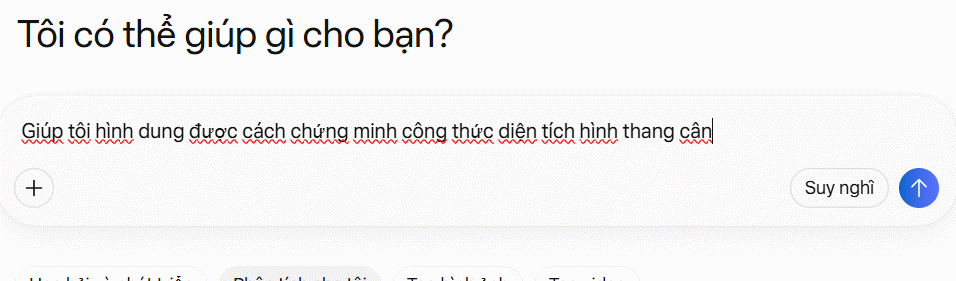
This prompt is more reliable than “explain the trapezoid area” because it specifies the proof strategy, labels, controls, and validation.
3. Open and inspect the result
Meta AI may return a preview with explanatory text and an interactive model. Select Open when available to move the output into a larger side panel or dedicated view.
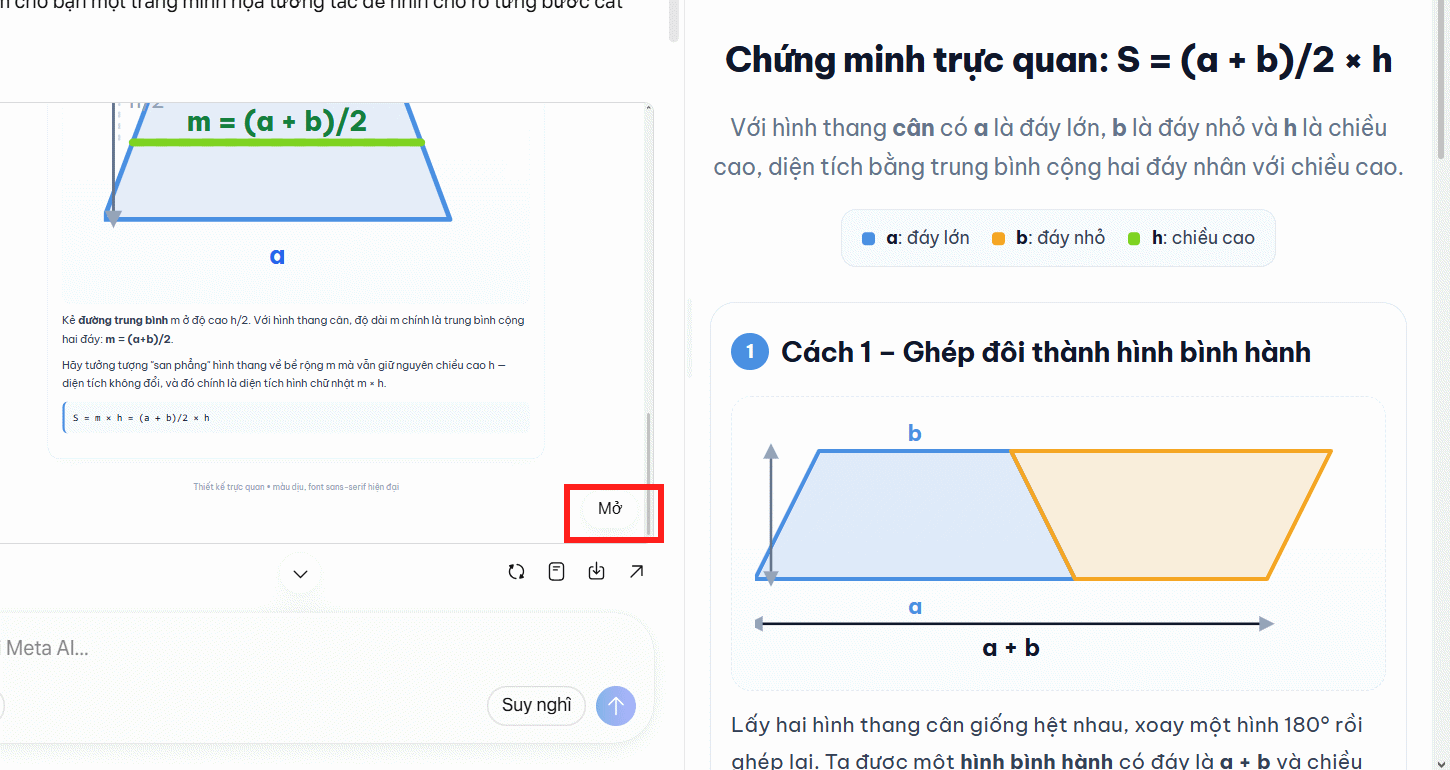
Before accepting it, move every slider to its minimum and maximum, check the equation against a manual calculation, and confirm that the diagram still matches the numbers. Ask Meta AI to correct one specific problem at a time.
Example: visualize the area of a circle
A useful circle-area simulation should do more than display A = πr². Ask for a rearrangement that explains why the formula works:
Build an interactive explanation of why the area of a circle is πr².

Let the learner divide the circle into 4, 8, 16, and 32 sectors, then alternate the sectors to form a shape that approaches a rectangle. Label the approximate base as πr and the height as r.

Add a radius slider, show the numerical area, and explain why the approximation improves as the number of sectors increases.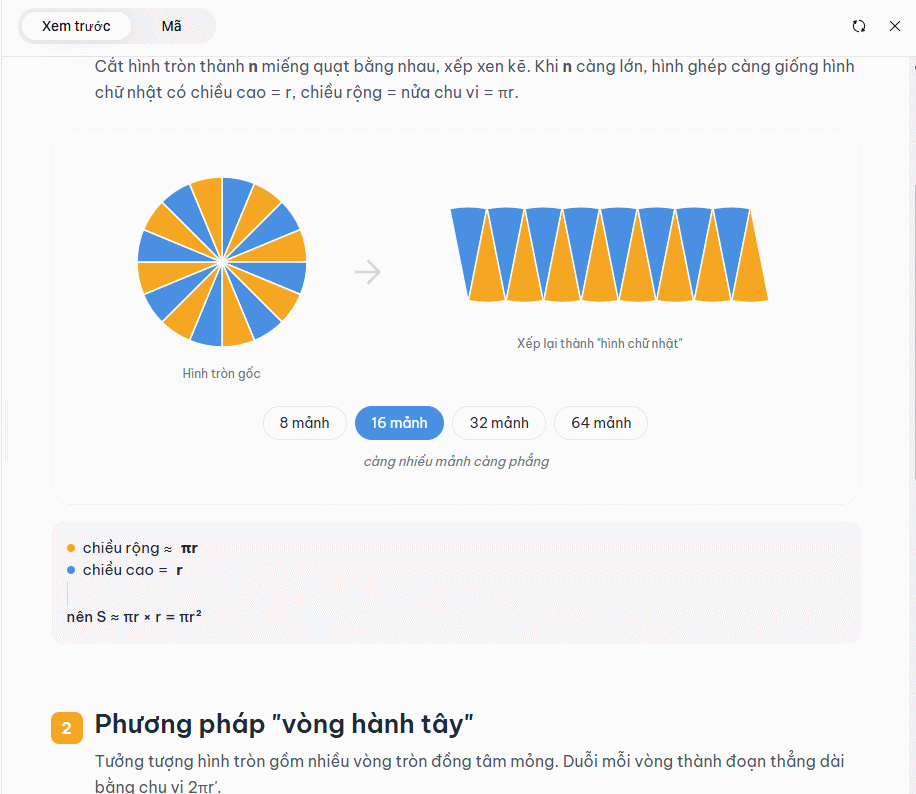
Check that the rearranged sectors are not described as an exact rectangle for a small number of pieces. The shape approaches a rectangle as the sectors become narrower.
Turn an uploaded puzzle into an interactive page
Muse Spark can reason across an image and generated code, which allows Meta AI to attempt an interactive version of a photographed or scanned puzzle.
1. Prepare and upload the image
Crop the image to the puzzle, straighten it, and make sure every digit or symbol is legible. Remove names, notes, location data, or other information that should not be uploaded.

2. Request the complete behavior
Convert this image into an interactive Sudoku puzzle that I can play in the browser.

First transcribe the grid and show it to me for confirmation. Keep the original clues fixed. Let me enter and erase digits, highlight conflicts without revealing the solution, add optional pencil marks, reset the board, and check whether the completed grid is valid.

Use keyboard controls and visible focus states. Do not start building until the transcribed clues have been confirmed.
Requiring a transcription check is important. A single misread clue can create an invalid or unsolvable puzzle.
3. Test the generated game
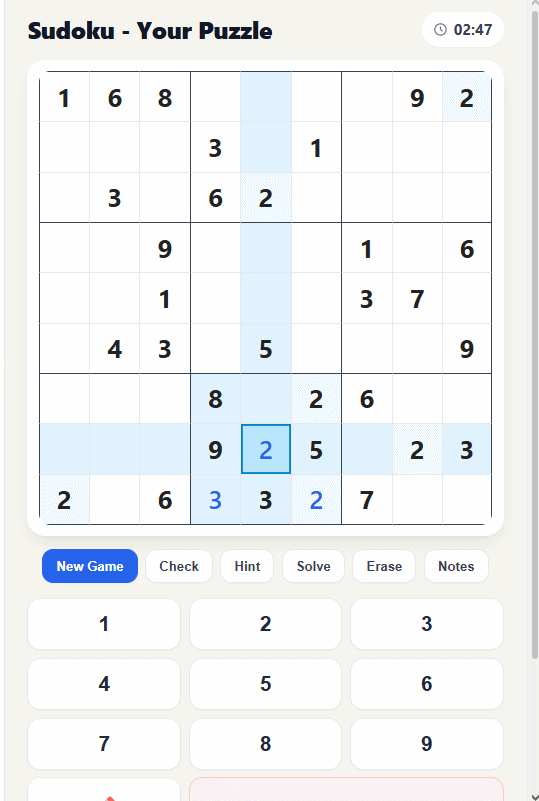
- Compare all fixed clues with the source image.
- Confirm that fixed cells cannot be edited.
- Enter a duplicate digit and verify that the conflict logic is correct.
- Test reset, undo, pencil marks, keyboard navigation, and mobile controls.
- Complete or validate the puzzle with an independent solver if accuracy matters.
Ask explicitly for an interactive simulation
If Meta AI returns only text, state the desired output and interaction directly. For a Pythagorean theorem model, try:
Create an interactive visual proof of the Pythagorean theorem.

Show a right triangle with squares on all three sides. Let me drag the triangle's legs while keeping a right angle. Update a, b, c, a², b², and c² live.

Include a rearrangement proof, a short step-by-step explanation, keyboard-accessible controls, and a warning when the triangle becomes too small to display clearly.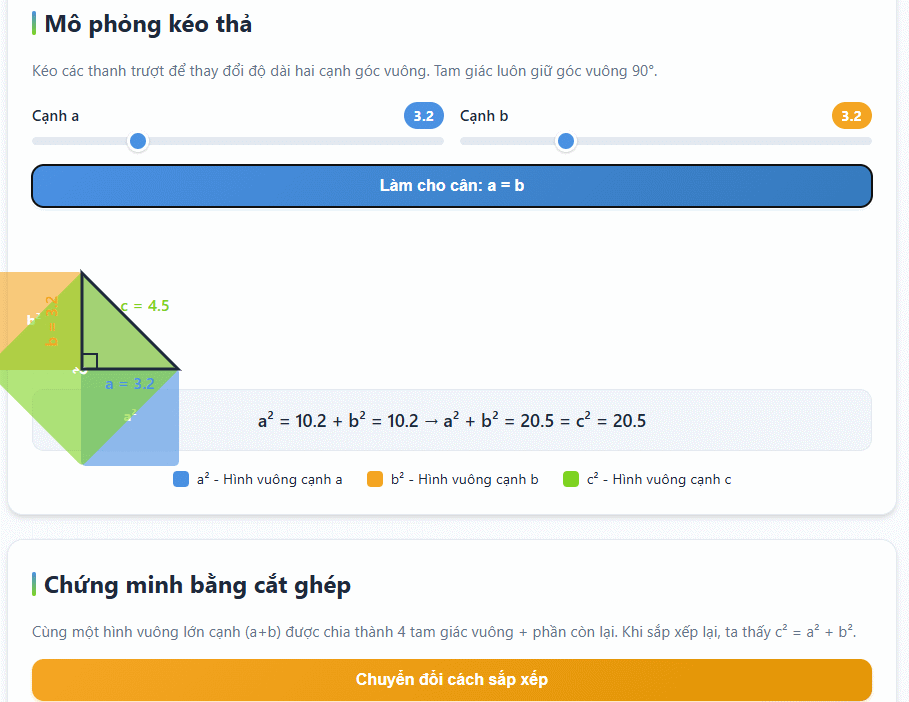
A prompt pattern that produces better simulations
Use these six parts:
- Goal: what the learner should understand or be able to do.
- Representation: diagram, timeline, graph, rearrangement, game, or comparison.
- Controls: sliders, drag handles, buttons, text fields, or step navigation.
- Constraints: valid ranges, preserved relationships, units, and fixed values.
- Explanation: labels, definitions, proof steps, hints, and feedback.
- Quality checks: accessibility, responsive layout, error handling, and test cases.
Create an interactive [representation] that teaches [goal].

Show [objects and labels]. Let the user [controls]. Preserve [constraints] and reject [invalid states].

Explain [steps or reasoning] in concise language. Make it usable on mobile and by keyboard. Test [specific cases] and show the assumptions.
How to refine a weak result
| Problem | Follow-up instruction |
|---|---|
| The visual is static | “Add draggable controls and update every label and calculation live.” |
| Labels overlap | “Rework the responsive layout and keep labels readable at 320px width.” |
| The proof skips a step | “Add a numbered transformation between steps 2 and 3; do not assume the equality.” |
| Invalid inputs break it | “Constrain the inputs to these ranges and explain why values outside them are invalid.” |
| The model reveals the answer | “Give progressive hints and conflict feedback without displaying the solution.” |
| The result is inaccessible | “Add keyboard operation, visible focus, text alternatives, and do not rely on color alone.” |
Accuracy, privacy, and sharing limits
- AI can generate plausible but incorrect equations, proofs, labels, or code. Verify important content independently.
- Do not upload student records, confidential work, unpublished assessments, personal identification, or copyrighted material you lack permission to process.
- Generated pages can contain broken controls or unsafe assumptions. Test them before allowing others to use them.
- Do not treat a generated health, engineering, financial, or safety simulation as professional analysis.
- Availability and sharing controls may differ by account, region, device, and Meta AI version.
For a broader view of available assistants, see TipsMake's free AI tools comparison and the Claude versus ChatGPT comparison. Whatever tool you use, a simulation becomes genuinely useful only after its logic and interaction have been tested.
Related Articles
 How to Create Visual Vector Simulations3 minutes read
 Guide to Creating Videos from Images Using Meta AI6 minutes read
 Guide to Creating Realistic Working Circuit Simulations4 minutes read
 Transform Experiment Images into Visual Experiments in Canva3 minutes read
 Create Interactive Simulations of Mathematical Concepts on ChatGPT5 minutes read
 6 Pros and Cons of Meta AI14 minutes read
Reader Comments 0
Sign in with email or Google to join the discussion.