Table of Contents
Google Docs can generate a spoken summary with Gemini so you can hear the main points of a document without listening to every sentence. The summary can cover multiple document tabs. It is separate from Listen to this tab, which reads the current tab's content aloud.
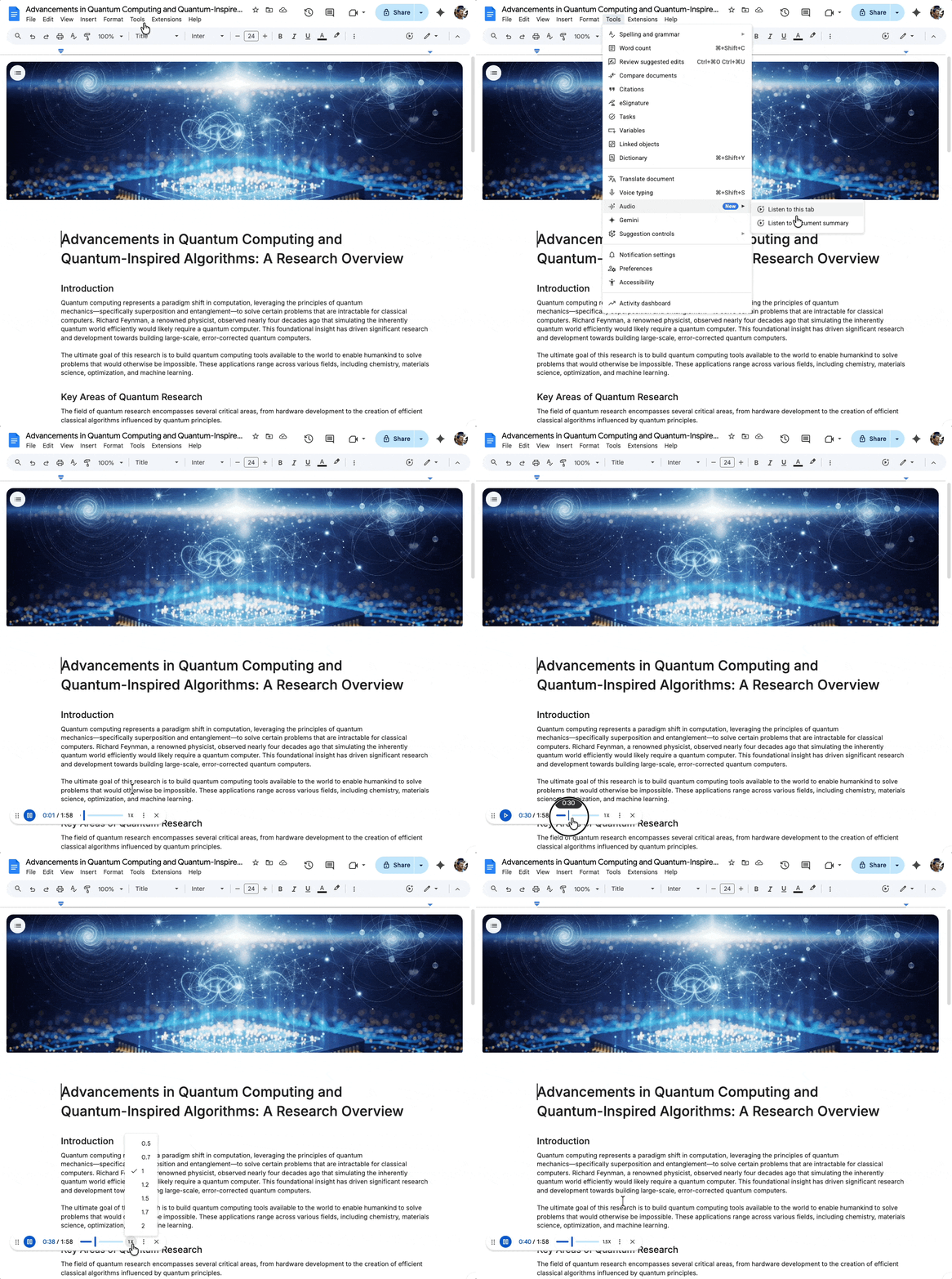
How to start an audio summary
- Open a document containing text in Google Docs on your computer.
- Open Tools > Audio and choose Listen to document summary, where available.
- Use the player to listen, pause, and choose the playback speed.
- Open the player's more menu and choose Change voice if you want a different narration style.
For the current interface, see Google's audio generation instructions.
Summary or full-tab reading?
Choose the summary when you need an orientation to meeting notes, a report, or a draft before reading it closely. Use Tools > Audio > Listen to this tab when you want to hear the wording of the current tab, including details a summary may omit.
Authors can also insert a Listen to tab audio button from Insert > Audio buttons. That provides a convenient playback control within the document; it does not convert a summary into a complete reading of every tab.
Which accounts have access?
The feature requires an eligible Google Workspace or Google AI plan. Google's launch announcement lists Business Standard and Plus, Enterprise Standard and Plus, selected business and education AI add-ons, and Google AI Pro and Ultra.
If the option is absent, check the signed-in account, current plan eligibility, and supported language. A personal Google account alone does not guarantee access.
Check important details in the source
A summary may leave out exceptions, names, dates, figures, or action items. Return to the relevant text before making a decision or quoting the document. Faster playback can save time, but it does not make the generated synopsis more complete.
For audio work across a collection of sources, compare the NotebookLM workflow. Google Search's Audio Overview is another distinct feature; it should not be confused with a summary generated inside Docs.
Related Articles
 How to Turn Off Gemini in Google Docs10 minutes read
 Use Gemini Canvas to Transfer Photos to Google Docs: How-To Guide3 minutes read
 Instructions for Translating Text on Google Docs3 minutes read
 How to Add Frames Around Text on Google Docs11 minutes read
 How to Stretch LINE Spacing in Google Docs4 minutes read
 Detailed Guide on Creating Images in Google Docs Using Gemini5 minutes read
Reader Comments 0
Sign in with email or Google to join the discussion.