Table of Contents
If Windows audio is too quiet, check the app volume, output device, and driver controls before installing a booster. For genuinely low recordings, FxSound is the simplest free system-wide option, while Equalizer APO provides precise preamp and equalizer control for advanced users.

Digital amplification cannot increase the physical power of a speaker. Pushing gain too far causes clipping, harshness, and possible speaker stress. It also increases the risk of uncomfortable listening levels, especially with headphones. Raise volume gradually and stop if you hear crackling or distortion.
Check Windows before adding software
- Click the speaker icon and confirm the master volume is not muted.
- Open Settings > System > Sound > Volume mixer. Make sure the quiet app has not been turned down separately.
- Confirm that Windows is using the intended speakers, headphones, monitor, or Bluetooth device. HDMI monitors often become the output automatically.
- Check the physical volume wheel or buttons on the speaker, headset, keyboard, and monitor.
- Disconnect and reconnect Bluetooth audio. If the sound is thin or very quiet, confirm Windows is using the stereo playback profile rather than a call-oriented headset profile.
- Test another audio file and another app. One quiet recording does not prove the computer's output is faulty.
Turn on Loudness Equalization when available
Some audio drivers expose a Loudness Equalization enhancement that raises quieter material and reduces large level differences. It is useful for speech and videos with inconsistent volume, but it changes dynamics and is not ideal for every music or production task.
On Windows 10, the path shown in these screenshots starts by right-clicking the speaker icon and opening Sound settings.
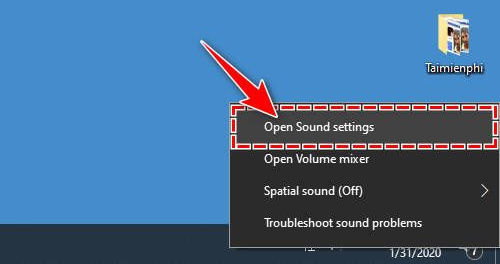
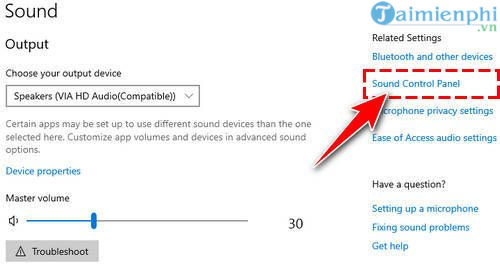
Select Sound Control Panel.
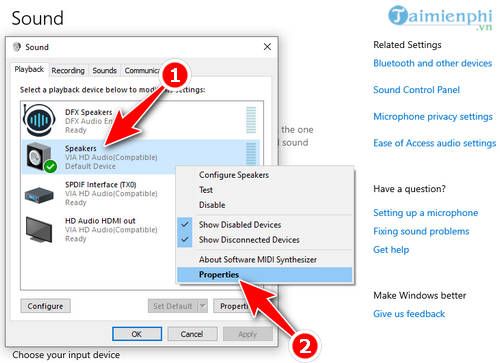
On the Playback tab, open the properties for the active speakers.
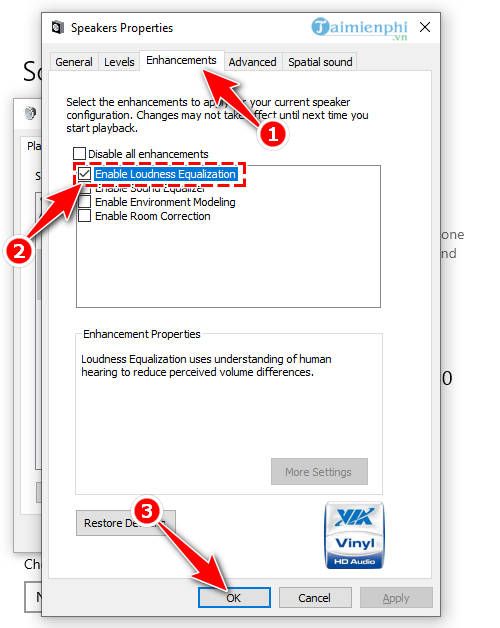
If an Enhancements tab appears, enable Loudness Equalization, click Apply, and compare the same passage at a safe volume.
Windows 11 and some modern drivers place related controls under Settings > System > Sound > [output device] > Audio enhancements. If Loudness Equalization is absent, the device driver does not provide it. Do not install a random Realtek package intended for a different computer just to obtain the checkbox.
1. FxSound: the easiest free option
FxSound is a free, open-source Windows audio enhancer with volume, equalizer, effect, and preset controls. It is the current successor to DFX Audio Enhancer.
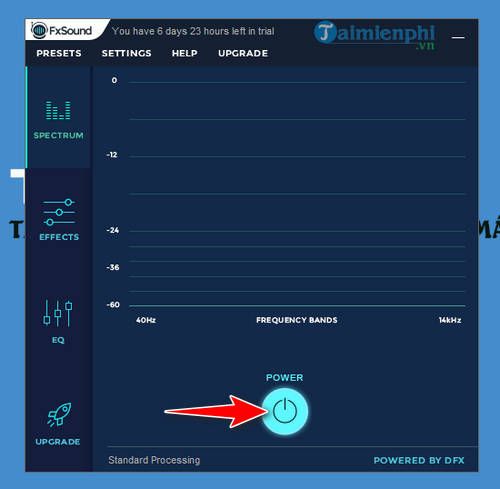

Install the current FxSound version rather than the legacy DFX download. Start with a preset designed for the content, then adjust the main boost and equalizer gradually. If bass causes rattling on laptop speakers, lower the lowest bands instead of increasing every control.
2. Equalizer APO: precise free control
Equalizer APO is a free, open-source system-effects equalizer for Windows. It can add preamp gain and filters to a chosen output device, but setup is more technical than FxSound.
- Install Equalizer APO from its developer's SourceForge project.
- In the Configurator, select only the playback device you intend to process.
- Restart Windows when prompted.
- Open the Configuration Editor and add a small positive preamp value.
- Test a loud section and reduce the preamp immediately if meters peak or sound becomes harsh.
Equalizer APO processes applications that use the Windows system-effects path. Programs using ASIO or WASAPI exclusive mode can bypass it. Create a restore point before changing audio-processing components on a work-critical PC.
Paid tools with free trials
Letasoft Sound Booster
Letasoft Sound Booster amplifies Windows application audio from a tray control. It is not permanently free: the developer offers a time-limited trial with interruptions, followed by a paid license.
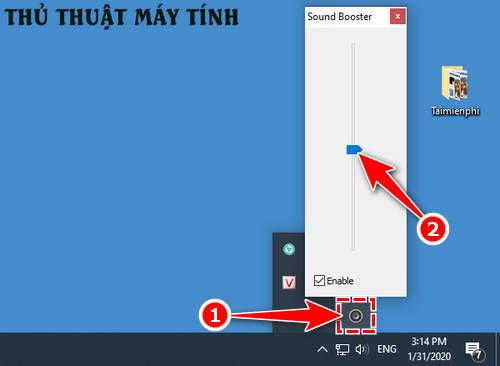
Use it for occasional very quiet sources, not as a reason to run headphones or small speakers at extreme output. Its “boost above maximum” setting can clip recordings that already peak near full scale.
Boom 3D
Boom 3D is a paid Windows and Mac audio enhancer with a trial, preamp, equalizer, presets, device controls, and virtual surround features.
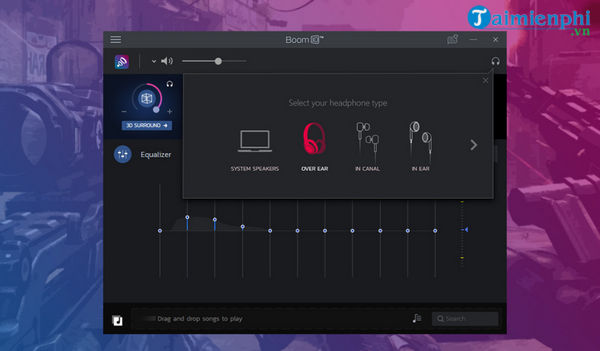
Choose it when you want its broader enhancement and device-management features, not merely because one file is quiet. Virtual surround changes spatial presentation; it does not create real additional speakers.
Tools from the old list that no longer fit
DFX Audio Enhancer is a legacy FxSound product. FxSound still provides the old download, but the current FxSound application is the maintained starting point. Moo0 Audio Effect processes audio files rather than acting as a dependable system-wide volume solution, so it does not belong in a list focused on live Windows playback.
If the computer is still too quiet
- Update the audio driver from the PC or motherboard manufacturer, not a generic driver-download site.
- Inspect speaker vents and headphone connectors. Dust, a loose plug, or a damaged cable can reduce output or remove one channel.
- Disable conflicting enhancements and test again; stacking several boosters can create instability and distortion.
- Try known-good headphones or powered speakers. If they are loud, the built-in laptop speakers may simply have limited output.
- If one earbud or speaker is quieter, check the left/right balance in the device properties.
- For a single quiet video, use a player with its own gain control instead of changing the whole system.
See our general guide to increasing computer volume and this comparison of Windows equalizer software. For microphone input rather than speaker output, use the separate guide to adjusting microphone sensitivity.
Related Articles
 Top Software to Increase the Volume of PC and Laptop7 minutes read
 How to Increase the Volume of Laptop Speakers4 minutes read
 Free Laptop Volume Increase Software, Did You Know: Main Insights8 minutes read
 How to Increase PC Volume, Amplify Sound, Increase Computer7 minutes read
 7 Best Free Volume Booster Software for Windows7 minutes read
 5 Extremely Simple Ways to Increase Laptop Volume When Speakers Are Too Low10 minutes read
Reader Comments 0
Sign in with email or Google to join the discussion.