Table of Contents
A laptop can start slowly for very different reasons: firmware may pause before Windows loads, Windows may spend time on updates or disk activity, or too many apps may open after sign-in. Note where the delay occurs before changing settings; that observation usually points to the right fix.
Identify where startup is slow
- Before the manufacturer's logo: suspect power, firmware, an attached device, or hardware detection.
- At the logo or spinning dots: Windows, a driver, an update, or the system drive may be responsible.
- At a black screen before sign-in: test display output and graphics-driver issues.
- After the desktop appears: startup apps and background services are the most likely cause.
If the laptop never reaches Windows, skip to the recovery section below rather than repeatedly forcing it off.
1. Finish updates and restart properly
Do not disable Windows Update as a performance tweak. An update can make one or two restarts take longer, but interrupting it can create a more serious startup problem. Connect the charger, open Settings > Windows Update, install pending updates, and use Restart when prompted.
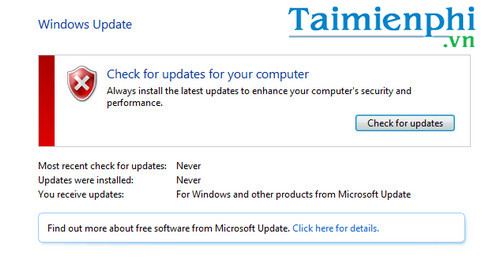
If a specific update repeatedly fails, note its error code and troubleshoot that update rather than turning off updates permanently.
2. Reduce apps that launch at sign-in
Press Ctrl + Shift + Esc, open Startup apps in Task Manager, and disable nonessential entries with a high startup impact. Leave security software, input-device utilities, and unfamiliar organization-managed tools alone until you identify them.
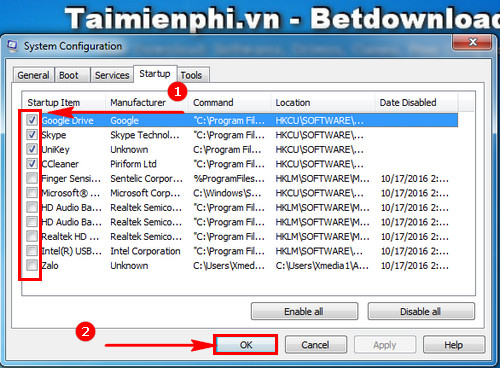
Restart and compare the result. The detailed guide to making Windows start faster explains safe startup-app changes and legacy Windows steps.
3. Check the system drive and free space
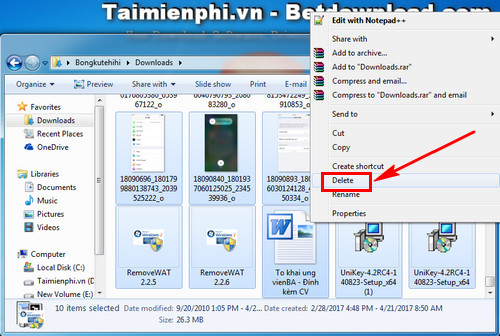
Open Settings > System > Storage. Remove temporary files you recognize, uninstall unused applications, and move large personal files if the system drive is nearly full. Downloads do not slow boot merely because they exist, but a drive with very little free space can hinder updates and normal Windows operation.
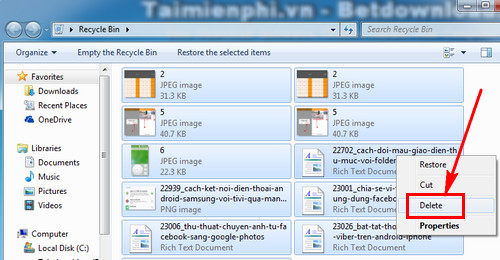
Empty the Recycle Bin only after checking that it contains nothing you need; this deletion is difficult to reverse.
If Task Manager shows the disk near 100% for a long time after every boot, back up important files and run the laptop manufacturer's storage diagnostics. Repeated read errors, unusual noises from a hard drive, or very long stalls can indicate a failing drive. Replacing a mechanical hard drive with an SSD can materially improve boot time, but hardware work should match the laptop's service instructions.
4. Scan for unwanted software
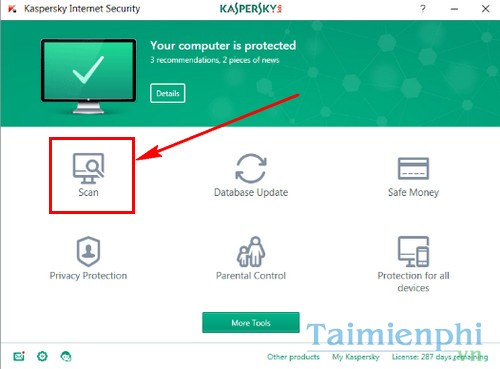
Open Windows Security > Virus & threat protection and run a scan, especially if the slowdown appeared with pop-ups, browser redirects, or unknown startup entries. Use only one real-time antivirus product at a time; multiple security suites can conflict and add overhead.
5. Test simple hardware and power causes
- Shut down, disconnect nonessential USB drives, docks, memory cards, and external displays, then start the laptop again.
- Keep the charger connected during updates and diagnostics.
- If the delay occurs before Windows appears, check for a firmware update and built-in diagnostics on the laptop manufacturer's official support page. Install firmware only for the exact model and do not interrupt the process.
- If the laptop has very little memory and remains slow after sign-in, review memory use in Task Manager before considering an upgrade.
For a machine that is also slow during everyday use, follow the wider slow-computer checklist.
When Windows will not finish starting
Windows may enter the Recovery Environment automatically after repeated failed starts. Choose Troubleshoot > Advanced options > Startup Repair; Microsoft's Startup Repair guide explains the process. An encrypted device may require its BitLocker recovery key.
If the problem began after installing a driver or app, Safe Mode or a restore point may help isolate it. A clean boot is appropriate only when Windows still loads and you need to identify a background-software conflict.
Back up recoverable files before resetting or reinstalling Windows. Reinstallation is a last step: it will not fix failing storage, insufficient memory, or a firmware delay, and it can remove apps and settings.
Related Articles
 How to Fix a Mac That Hangs on a Gray Screen on Startup12 minutes read
 Microsoft Is Committed to Fixing Updates on Windows 103 minutes read
 How to Reduce PC Boot Time Without Disabling Startup Apps7 minutes read
 Computer: 5 Simplest Ways to Fix Windows 10 Slow Startup Error7 minutes read
 Fixing the Problem of a Laptop Not Shutting Down or Restarting5 minutes read
 Windows Starts Slowly: Tracing 'Guys' Makes Windows Boot Slowly5 minutes read
Reader Comments 0
Sign in with email or Google to join the discussion.