Table of Contents
During live streaming on Facebook, many users encounter frustrating Facebook Video Stream errors that prevent them from broadcasting live videos as desired.
Errors During Facebook Live Video Streaming: Overview
However, software like OBS, Open Broadcast, or Xsplit often encounter errors due to compatibility issues between the browser and certain software features. To resolve live video streaming errors on Facebook, the best approach is to thoroughly investigate the cause to find the most accurate solution.
Errors during Facebook live video streaming.
Error: Live stream window not displaying when using Chrome browser.
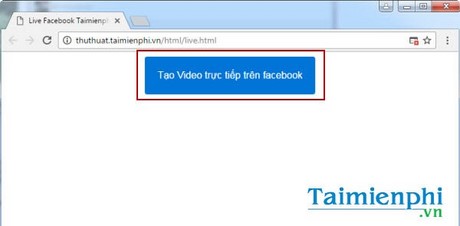
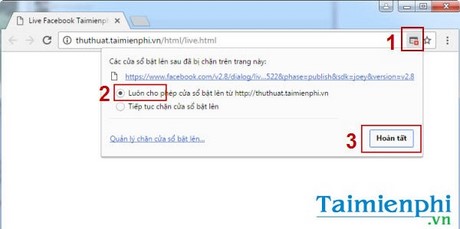
When clicking the "Create Live Video" icon in Chrome, many users don't see a new window appear to enter information. This error is because Chrome is blocking the opening of new pop-up windows.
How to fix it: To resolve this issue, follow these steps.
Click the red 'X' icon, select Always allow pop-ups from… then click Done .
After completing the steps above, simply try creating a live video stream on Facebook through the Chrome browser to experience it.
The OBS software installation and startup errors occurred.
Open Broadcaster, or OBS, is software that supports live video streaming for many social media platforms on computers. However, users often encounter frustrating errors when trying to live stream on Facebook. One such error is the inability to install or open OBS.
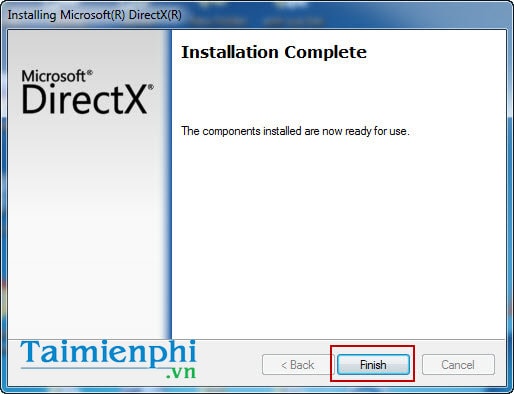
If you are unable to install or launch OBS, this error is usually due to the absence of the necessary add-ins such as DirectX and. NET Framework 4.0 or later. These are essential components for many Windows applications and are required not only for installing OBS on your computer.
Solution: To fix this, simply download and install these supporting software programs on your computer before attempting to install or restart OBS.
After successfully fixing the OBS installation error, readers may encounter several common errors when live streaming with OBS. These errors are quite common and significantly impact the user experience, if not almost completely disabling functionality.
Connection error between Facebook and OBS.
If you encounter this error, it's usually because you haven't turned off your computer's firewall. Therefore, OBS cannot connect to Facebook and stream live video from Facebook to your friends' or family's screens.
Solution : To fix this Facebook live video streaming error, you need to disable your firewall that is blocking the connection.
Step 1 : From the desktop, go to Start > Control Panel > Windows Firewall
Step 2 : In the Windows Firewall settings interface, select "Turn off" under " Turn Windows Firewall on or off". Click OK to save the changes.
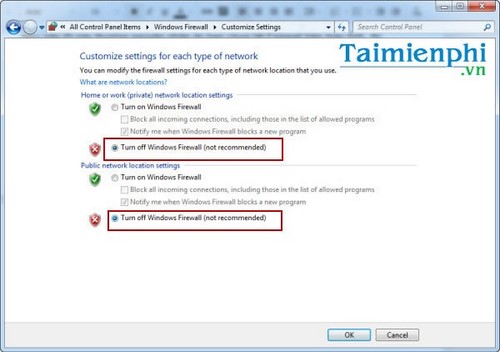
After fixing the connection issue between Facebook and OBS, readers should be able to reconnect Facebook and OBS and easily start streaming live videos on Facebook.
Above, TipsMake has guided you on how to fix some basic and common errors when live streaming on Facebook. Typically, many people choose to use OBS software, but you can also live stream on Facebook using Xsplit . Interestingly, both Xsplit and OBS allow you to live stream on TalkTV, a social network popular among young people today.
With their rapid growth, most social networks, including Zalo, Instagram, TalkTV, Bigo Live, and now even YouTube, have gradually offered video streaming features on Zalo and live streaming on Instagram. Meanwhile, in addition to its main live streaming function, Facebook also supports easy video calls via Messenger on computers. However, these video streaming tools on Zalo and Instagram are certainly formidable competitors to Facebook.
If you encounter any errors during use, you can send the error message to TipsMake for assistance in fixing it.
Good luck!
FAQ
What should you know about errors during facebook live video streaming?
During live streaming on Facebook, many users encounter frustrating Facebook Video Stream errors that prevent them from broadcasting live videos as desired.
Do the steps or features vary by device or software version?
They can. Menu names, available settings, and compatibility may differ by device, region, account type, or software version, so check the options shown on your own screen.
What should you do if the recommended method does not work?
Repeat the steps in order, confirm that the requirements are met, and restart the relevant app or device when appropriate. Also check for updates and review any error message before trying again.
Related Articles
 How to Live Stream on Facebook, Broadcast Live Video on Facebook15 minutes read
 Guide Interactive Statistics Reactions When Livestream on Facebook7 minutes read
 How to Fix Common Errors When Live Streaming Facebook with OBS5 minutes read
 The Way to Stream Live Videos to Facebook Does Not Require Open7 minutes read
 Facebook Live Now Has a Screen Sharing Tool3 minutes read
 Facebook Issued a Tougher Policy with Live Stream Activities, Limiting Potential Violations6 minutes read
Reader Comments 0
Sign in with email or Google to join the discussion.