Table of Contents
To share a YouTube video on a Facebook Page, copy the video's public YouTube URL, switch into the Page or open Meta Business Suite, create a post, paste the link, add useful context, and publish or schedule it. This creates a Facebook link post with a preview; it does not upload or permanently embed the YouTube file inside Facebook.
Sharing versus uploading a video
Before posting, choose the format that matches your goal:
- Share the YouTube link when you want viewers to open the original video, preserve its source and analytics, and avoid uploading another copy.
- Upload a native Facebook video only when you own the footage or have permission to publish it separately. Native uploads can use Facebook-specific captions, thumbnails, and formatting.
- Embed a Facebook post on a website is a different task. A Page post cannot be “embedded into Facebook” because it is already on the platform.
If you need to trim, caption, or resize video you own before uploading it, compare these online video editing tools.
Method 1: Post the YouTube link directly from your Facebook Page
1. Copy the correct YouTube URL
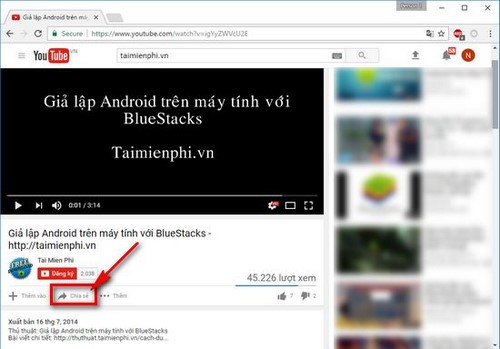
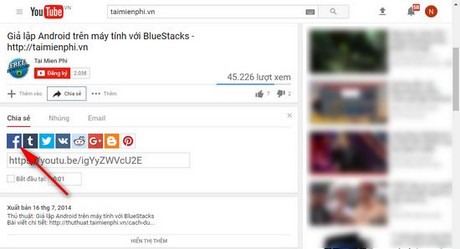
Open the YouTube video and select Share, then copy the link. Make sure the video is public or otherwise visible to the audience you plan to reach. A private video will not become viewable simply because its link appears on Facebook.
2. Switch to the Facebook Page
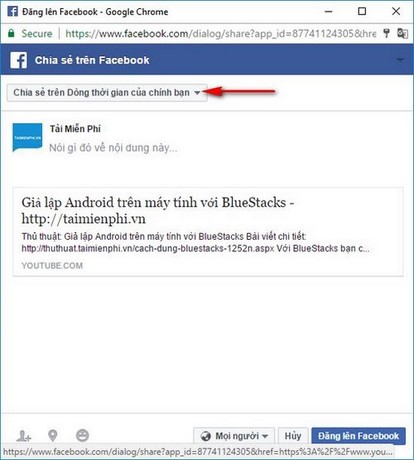
On Facebook, switch from your personal profile to the Page identity or open the Page you manage. Confirm the Page name and profile image before composing the post; people who manage several Pages can easily publish to the wrong one.
Older Facebook layouts offered a “Share on a Page you manage” choice from the YouTube sharing window. Current menus may differ, so copying the link and creating the post from the Page is usually clearer.
3. Create the link post
Select Create post, paste the YouTube URL, and wait for Facebook to retrieve the preview. Add a short introduction that explains why the video matters to the Page's audience. Useful post text might identify the topic, the problem answered, or the most important segment rather than repeating the video title.
Meta's current help documentation confirms that a Page link post may include a preview. See Meta's guide to sharing a link from a Facebook Page.
4. Review the Page identity and post settings
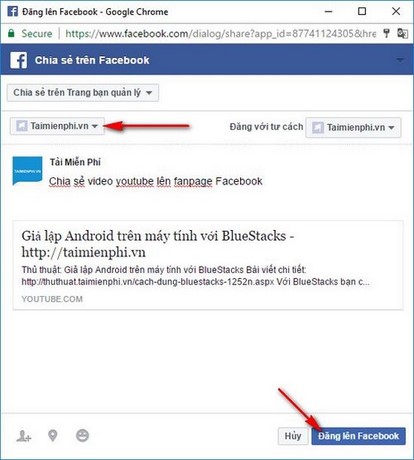
Check that the post will be published as the intended Page and that the visibility, language, audience restrictions, and other available controls are correct. Do not assume that a personal profile's settings apply to the Page.
5. Publish and test the link
Publish the post, then open it from the Page timeline and test the preview and link. If the Page serves an international audience, check whether the YouTube video has region, age, sign-in, or copyright restrictions that may prevent some followers from watching.
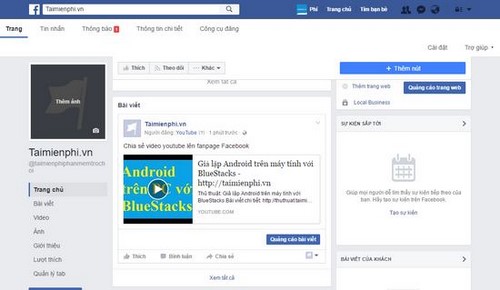
Method 2: Use Meta Business Suite
Meta Business Suite is helpful when several people manage the Page or when the post should be scheduled.
- Open Meta Business Suite and select the correct business or Page.
- Choose the option to create a post.
- Select Facebook as the destination and confirm whether any connected profiles are also selected.
- Paste the YouTube link and wait for the preview.
- Add the post text, then review the preview and available audience settings.
- Publish immediately, save a draft, or schedule the post for a suitable time.
After scheduling, open the Planner or scheduled-content view to confirm the correct Page, date, time, and time zone. A mistaken time zone is a common reason a post appears earlier or later than expected.
How to write a better YouTube link post
A bare URL gives followers little reason to click. Add enough context to help them decide whether the video is relevant:
- Lead with the specific benefit, question, or moment covered by the video.
- Explain who the video is for.
- Mention the runtime when the video is long.
- Point to a useful timestamp when only one section is relevant.
- Add a genuine discussion question instead of generic engagement bait.
- Credit the creator when sharing someone else's work.
For a short highlighted section, YouTube's Clips feature may be more focused than linking to a long video. See how to create and share a YouTube clip.
What to do when the link preview is missing
Wait before editing the post
Facebook may need a few seconds to retrieve the title, thumbnail, and description. Keep the composer open until the preview finishes loading.
Check the YouTube video's visibility
Open the URL in a private browser window. If the video is private, removed, age-restricted, blocked by region, or still processing, Facebook may not create the expected preview and followers may not be able to watch it.
Use the canonical Share link
Copy the URL from YouTube's Share control rather than a long address containing playlist, tracking, or session parameters. If you want a specific start time, create a timestamped YouTube link and test it before posting.
Do not repeatedly delete and repost
First save the text and URL, then try a fresh draft or Meta Business Suite. Repeated posting can create duplicate notifications and make Page moderation harder. If the preview remains unavailable, publish only after confirming that the plain link still opens the intended video.
Copyright, privacy, and moderation checks
- Sharing a public link is not the same as receiving permission to download, edit, or re-upload the video.
- Do not imply that your Page created or endorses third-party content when that is not true.
- Review music and footage rights before uploading a separate native copy.
- Avoid sharing unlisted client, workplace, school, or personal videos without approval.
- Monitor comments for impersonation, scam links, and misleading claims about the video.
A well-prepared link post should give readers a clear reason to watch, preserve the original source, and work correctly for the intended audience. Test the finished post rather than assuming the thumbnail alone proves that the video is accessible.
Related Articles
 3 Ways to Post and Share YouTube Videos on Facebook Wall3 minutes read
 How to Embed YouTube Videos Into Facebook: Step-by-Step3 minutes read
 How to Embed Videos and Articles from Facebook into Any Website5 minutes read
 How to Insert YouTube Videos into Facebook Fanpage Page3 minutes read
 Facebook Is Ready to Confront YouTube with Its Brand New Watch, Video Service5 minutes read
 Embed Video into Simple Website with 6 Ways3 minutes read
Reader Comments 0
Sign in with email or Google to join the discussion.