Table of Contents
This article examines Apple Allows Users to Download All Data on iPhone. It presents the main facts, practical implications, and key points in a clearer, easier-to-follow format.
Understanding Apple Allows Users to Download All Data on iPhone
Recently, Appple has provided the feature to download user data through the new privacy management page. Earlier, Google and Facebook also provided this feature to users.
Accordingly, users can download a backup copy of all information related to their Apple account including Apple ID profile, application downloaded on the App Store, iCloud documents, iTunes purchases and even Releases are the history of AppleCare.
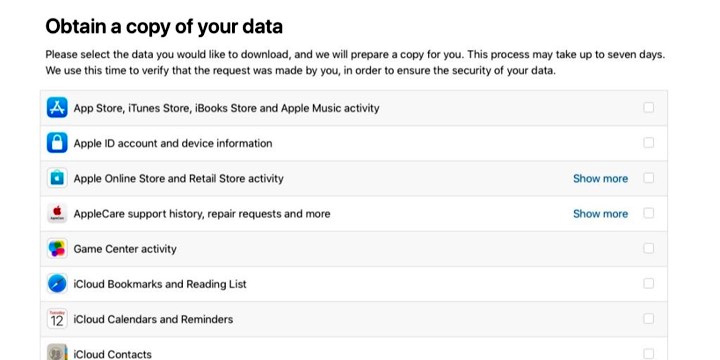 The data related to Apple ID that you can download.
In addition, Apple also plans to allow users to edit personal information, disable or permanently delete Apple ID accounts.
Previously, to delete an account or download data users were required to contact Apple directly.
Currently, Apple's data download feature only applies to European Union (EU) countries to comply with the EU's Common Data Protection Regulations that take effect from May 25, 2018. Other countries will have to wait in the next few months to provide this feature.
When accessing Apple's private account page, users in Vietnam can only edit the information and delete the account but cannot see the new feature (Obtain a copy of your data).
Apple privacy account page: https://privacy.apple.com/.
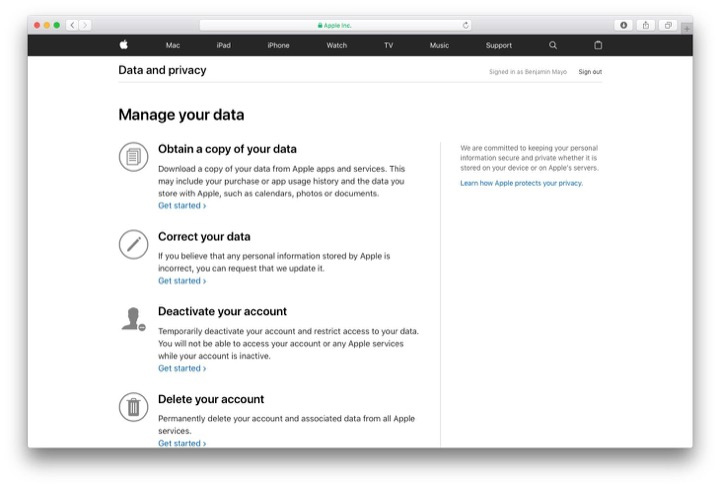 Downloading data when supported will display as this image.
FAQ
What is the main point of Apple Allows Users to Download All Data on iPhone?
Recently, Appple has provided the feature to download user data through the new privacy management page. Earlier, Google and Facebook also provided this feature to users.
Why is Apple Allows Users to Download All Data on iPhone important?
Apple Allows Users to Download All Data on iPhone matters because it can affect how readers understand, choose, use, or respond to the subject discussed in the article.
What should readers verify about Apple Allows Users to Download All Data on iPhone?
Check the date, product or software version, compatibility, and any current guidance before acting, especially when technology, security, health, or pricing is involved.
Related Articles
 How to Download Data from Apple ID to Computer6 minutes read
 What Do You Need to Do Before Upgrading to iOS 10?6 minutes read
 9 Default Settings You Should Change After Buying a New iPhone10 minutes read
 How to Download Free Stock Wallpapers of Apple Devices3 minutes read
 12 Things to Do When Buying an iPhone10 minutes read
 How to Switch Apple ID on iPhone/iPad Without Losing Data4 minutes read
Reader Comments 0
Sign in with email or Google to join the discussion.