Table of Contents
This guide provides a clear overview of 3d emoji windows 11, including the main concepts, practical steps, and common questions. Use it to understand the topic, compare the available options, and make a more informed decision.
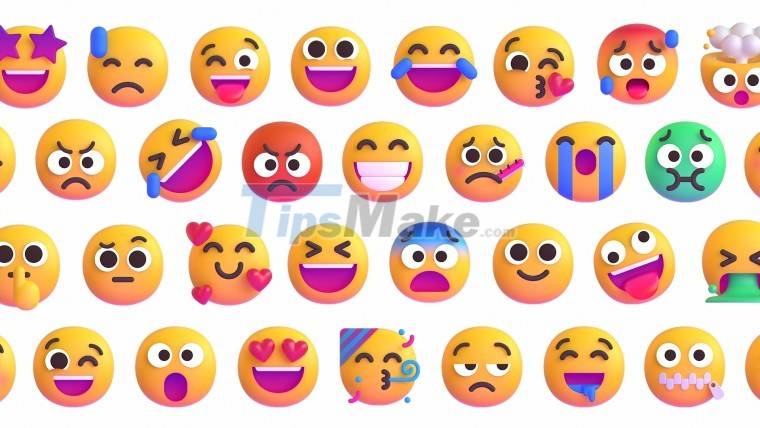
Of course, users still cannot be satisfied with Microsoft's explanation. Therefore, the software giant is forced to change.
According to the latest statement from Nando Costa, Head of Design at Microsoft, after all Windows 11 will have 3D emoji.
"Agreed and thanks (for the comments around 3D emoji). We are designing them (3D emoji)," Mr. Costa shared on Twitter.
In addition, Mr. Costa published a lengthy article on LinkedIn explaining Microsoft's thinking and methodology on designing new emotions.
Before getting excited, you should also be a little skeptical because this is still not an official announcement from Microsoft. The possibility that this is yet another misinformation cannot be ruled out. Also, as Costa said, Microsoft is only designing 3D emoji for Windows 11 and there is no guarantee that it will be successful or will be released.
Hopefully Microsoft will be successful!
Conclusion
Understanding 3d Emoji Windows 11 makes it easier to compare options, avoid common mistakes, and apply the information in this guide more effectively. Review the relevant requirements before making changes or choosing a solution.
FAQ
What is 3d Emoji Windows 11?
Therefore, the software giant is forced to change.
Why is 3d Emoji Windows 11 important?
Understanding 3d Emoji Windows 11 helps you evaluate features, compatibility, performance, and potential limitations before you choose a product or follow a procedure.
What should you consider when using or choosing 3d Emoji Windows 11?
Consider your specific goal, compatibility requirements, available features, cost, security, and the practical recommendations described in this guide.
Related Articles
 How to Use Emoji on Mac3 minutes read
 Instructions to Display Emoji on Windows 11 Taskbar3 minutes read
 Interesting Facts About Emoji, Emoticons Are Used Daily on the Internet4 minutes read
 How to Insert Emoji in Word, Insert Emoticons into Word3 minutes read
 6 Tools to 'Play' with Super-toxic Emoji That You Never Knew5 minutes read
 This Is Why the New Emoji Doesn't Work on Your Windows 10 Fall Creators Update3 minutes read
Reader Comments 0
Sign in with email or Google to join the discussion.