Table of Contents
This updated guide examines 5 Best Software to Convert Vce Files to PDF and organizes the essential facts, background, and practical takeaways in clear American English.
All tests basically follow the same format: You sit in front of the computer in the exam room and answer questions about the topic related to the certificate. One common point of these tests is that they are built with Visual Certification Exam software and have VCE file format. If there is a copy of the test to practice, you will need Visual CertExam Suite to open the file.
The problem is, not many computers are preinstalled with this program. If you have not installed Visual CertExam Suite software on your computer, you can always use the PDF version of the test. In this case, you will need to convert VCE to PDF. In this article, TipsMake.com will introduce you to the best free VCE to PDF converters to use.
1. VCE to PDF
Download link: http://vcetopdf.gamerspedia.com/
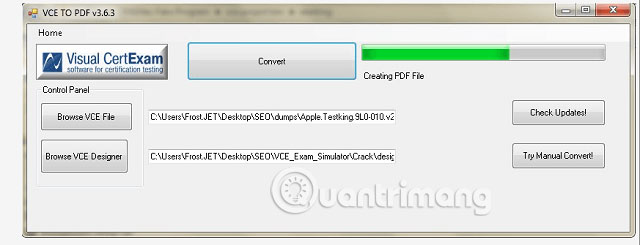
VCE to PDF is probably the easiest and fastest tool you can use to convert VCE files to PDF format. All you need to do is upload the VCE file or link, then click the Convert button and the tool will convert the file in seconds. VCE to PDF also gives you the option to share PDF files or send it via email.
Another great thing about the VCE to PDF converter is that it is completely free and takes up very little space on the hard drive.
2. DoPDF
DoPDF is another great tool you can use to convert VCE to PDF. This free software is not only a VCE converter to PDF. After installing on a PC, it acts as a virtual printer, which can be used to print PDF files. You can also see it in your printer list.

However, DoPDF does not work independently. To convert VCE to PDF, you will need to install another tool called VCE Designer (link download: http://www.vceplayer.net/training/vce-designer.html). Basically, this is a VCE tool that allows you to create, edit and print VCE files. Once you have installed both of these programs on your computer, open the VCE file with VCE Designer, go to Print Options , then select DoPDF as the printer. The program will convert your VCE file into PDF in seconds.
3. VCEPlus
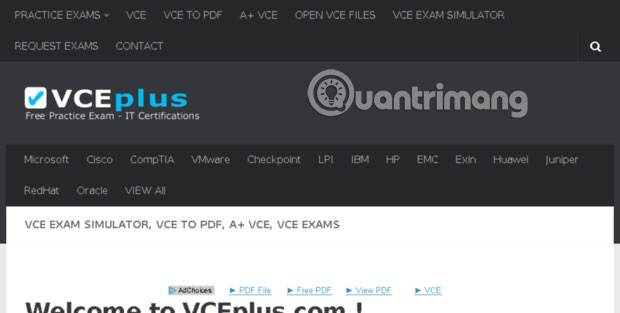
VCEPlus is a website that converts VCE files into PDF for free. To convert VCE, you first need to upload your file to the cloud memory. After uploading, send a link to the administrator of VCEPlus. They will convert your file to PDF format, then email you the converted file within 12 to 24 hours. VCEPlus is definitely not the fastest conversion tool, but it does a pretty good job of converting.
4. VCEConvert

VCEConvert is another great online tool that you can use to convert VCE files to PDF format. Unlike VCEPlus, VCE Convert has the advantage that it can convert your files in minutes.
Another great benefit of using this program is that it will convert VCE into 3 PDF files: Portrait, Landscape and Questions Only. This ensures you get exam preparation materials in the easiest way to understand.
5. CutePDF Writer
Download link: http://www.cutepdf.com/Products/CutePDF/writer.asp

CutePDF Writer works the same way as DoPDF. To convert VCE to PDF, this free software interacts with extensions like VCE Designer. Just open VCE file with VCE Designer, then select CutePDF as a printer. The program will convert your file and save it as PDF.
VCE conversion tools make it easy to access many exam preparation materials created with Visual Certification Exam software. The above tools and services will help you convert VCE files to PDF without any cost.
However, if you want a program that can do more than just convert VCE to PDF, you might consider using a high-end program. For example, some paid VCE to PDF converters also provide VCE test emulators, allowing you to perform online VCE-based tests for practice.
Wish you find yourself the right choice!
FAQ
What is 5 Best Software to Convert Vce Files to PDF about?
It provides a structured overview of convert VCE to PDF files, explains the main context, and highlights practical takeaways for readers.
Why does this topic matter?
Understanding the main concepts helps readers evaluate the issue, avoid common mistakes, and make better-informed decisions.
How should readers use this information?
Use the guidance as a practical starting point, confirm details that may have changed, and follow current product, safety, or security recommendations.
Related Articles
 How to Convert AI Files to PNG, JPG Without Software5 minutes read
 Professional PDF File Conversion Software for Word7 minutes read
 How to Convert PDF to JPG: Practical Guide9 minutes read
 Instructions to Convert FLV Files to AVI Quickly2 minutes read
 How to Convert a JPG Image to a PDF5 minutes read
 How to Convert MP4 to MP3, the Best Software to Convert MP47 minutes read
Reader Comments 0
Sign in with email or Google to join the discussion.