Table of Contents
4 Free Firefox Utilities Are Very Useful for Businesses is easier to understand when the core ideas are paired with practical examples. The sections below explain the topic clearly, highlight useful steps, and point out details that can prevent common errors.
In the past few years, a number of business users have abandoned Internet Explore to switch to using Firefox because of the advantages of this browser.
Firefox is really powerful with extensions (extension or add-on) developed and provided by third parties. However, there are free utilities that significantly increase the power of Firefox when used in businesses and few people pay attention.
For each Firefox add-on, you can easily search and install using the built-in Addon Manager tool in Firefox (from the Tools menu select Add-ons, then click the Get Add-ons button on the door). window appears).
Forex Currency Converter - currency conversion
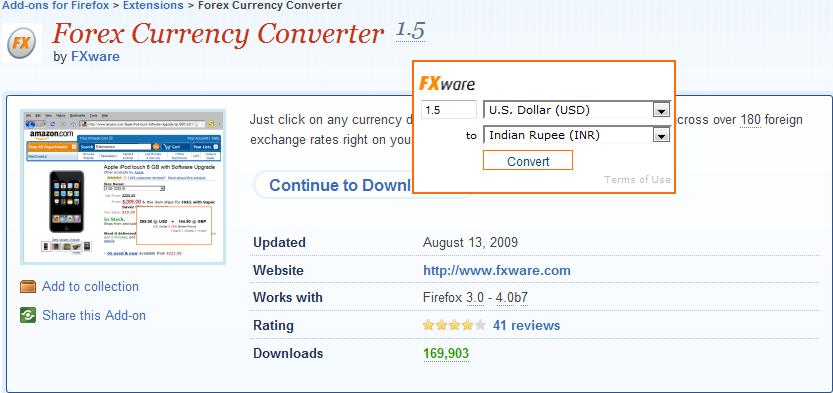
This plugin is really convenient for those who often convert currencies when browsing Web sites. When the utility is installed on Firefox, it will convert the amount of value (in numbers) on the Web into links. When you click on these links, a small window pops up so you can convert the value to any other currency at the current exchange rate, with the data taken from the iforex page. com.
Thus, if you are browsing a country page in Europe and calculating the order, just click on the price (denoted in Euro), you will immediately know how much to convert to USD.
The defect of this add-on is that it does not automatically detect the currency, so you will need to select from the drop-down list on the pop-up window. However, this utility will remember your last choice, so suppose you frequently convert from Euro to USD, you only have to choose the first time, not choose for the next time. Another thing is that all values (in numbers) on the Web are interpreted as currencies.
LinkedIn Companion
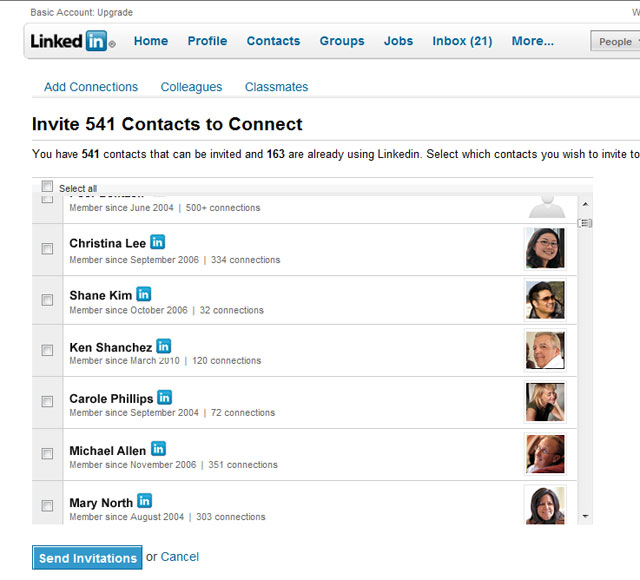
LinkedIn is called the Facebook of the business. LinkeIn is an environment that makes it easy to connect with people from the same career. If you are participating in this social networking activity, you cannot lack the LinkedIn Companion for Firefox utility.
Once installed, a toolbar will appear directly below Fifefox's Boomarks toolbar, including two Share on LinkedIn and LinkedIn buttons, to help you quickly find jobs, acquaintances, services. on the page. LinkedIn; Allows you to share the Web page you are browsing on your LinkedIn profile, and keep track of new profiles to be viewed.
Interestingly, the utility added a small LinkedIn icon to the side of the contacts when opening emails in Webmail services (like Gmail and Hotmail). When you hover your mouse over this icon, the utility will pop up a window showing the person's LinkedIn profile summary, if available. Clicking on the link will show the entire profile and you can add it to the connection list.
The only thing that wasted on the screen space was that the added toolbar included only two command buttons.
gPDF
Despite its name as gPDF , the utility allows to quickly and simply view office files with Firefox, not just in PDF format. This utility is extremely simple to use: after being installed, when surfing the Web, click on any link pointing to a PDF file, Word document (.doc and.docx format), table Excel (.xls and.xlsx), or PowerPoint presentation, the utility will open them in Google Docs view. And unformatted document files (.rtf), spreadsheets in.csv format or OpenOffice.org files will be opened in the Zoho Viewer online text viewer.
Viewing office files in Firefox with gPDF does not require you to have a Google Docs or Zoho Office account.
Thanks to gPDF, you can read most office files without spending time downloading related software.
You can download the files manually by right-clicking on them and selecting Save As , although in both Google Docs and Zoho Viewer you can choose to save the file after viewing it.
OutWit Docs
OutWit Docs is a 'small but smart' plug-in that helps turn Google into an office document search engine. Just click the OutWit button located next to the home icon on the browser toolbar and an independent search window is opened. Enter search content in the regular search field in the upper right corner, then Google will search and return results with office files: Microsoft Office, OpenOffice.org, CSV or PDF.
When you double click on any file in the search results, the file will be downloaded and opened immediately. You can also keep (catch) the documents for later research by dragging them into the Catch box (bottom left). If the 'Save incoming docs' box is checked, these files will be downloaded automatically
Although not the best add-on, OutWit Docs is obviously extremely useful for those who regularly search online documents for daily work.
FAQ
What is 4 Free Firefox Utilities Are Very Useful for Businesses?
In the past few years, a number of business users have abandoned Internet Explore to switch to using Firefox because of the advantages of this browser.
Why is 4 Free Firefox Utilities Are Very Useful for Businesses important?
A clear understanding of 4 Free Firefox Utilities Are Very Useful for Businesses helps you make informed decisions, avoid common mistakes, and use the relevant tools or techniques more effectively.
How should beginners approach 4 Free Firefox Utilities Are Very Useful for Businesses?
Start with the fundamental concepts, follow the examples step by step, and test each change in a safe environment before applying it to important systems or data.
Related Articles
 Top Best VPN for Firefox: Best Free VPN for Firefox10 minutes read
 Download the $ 19.99 Glary Utilities Pro Repair and Protection4 minutes read
 20 Useful Sidebar Add-Ons for Firefox: Firefox Sidebar9 minutes read
 Mozilla Firefox - Free, Fast and Private Web Browser: Main Insights15 minutes read
 Free Unused Memory on Firefox Browser3 minutes read
 How to Check for Extensions Will Stop Working in Firefox 574 minutes read
Reader Comments 0
Sign in with email or Google to join the discussion.