Table of Contents
Who Is Thunderbolt For? is easier to understand when the core ideas are paired with practical examples. The sections below explain the topic clearly, highlight useful steps, and point out details that can prevent common errors.
Apple and Intel have introduced ThunderBolt - a new interconnect cable technology, combining data transfer and video. But what benefits will users benefit from this technology?
Intel said the cost of Thunderbolt technology is only suitable for ' high-performance technologies ', meaning that Thunderbolt-based devices will cost more than the current USB standard. Another part is due to new technology, so devices that use Thunderbolt are not much, the number of users will be small.
Future Thunderbolt user classes will often be multimedia experts. Thunderbolt is like FireWire in the past, allowing users to transfer large amounts of multimedia data between devices with high speed, low latency, and high integrity data. That means that when you send the data, the recipient of the data is still intact without any change, even if it is the smallest.
Digital cameras with Thunderbolt integration will be Intel's next development step. Thunderbolt can use fiber optic cable, with this speed and length are much more extended. The technology market will be marked with easy transmission of multimedia data with large content between computers, servers and between different devices.
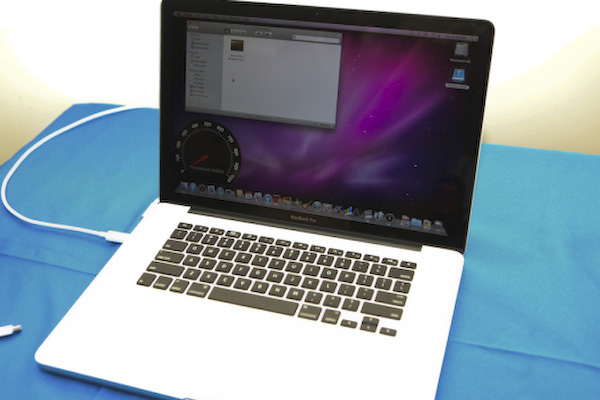
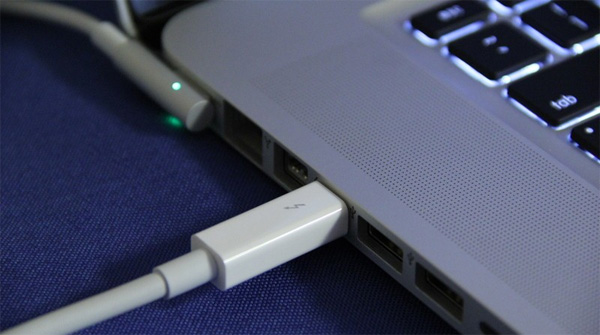
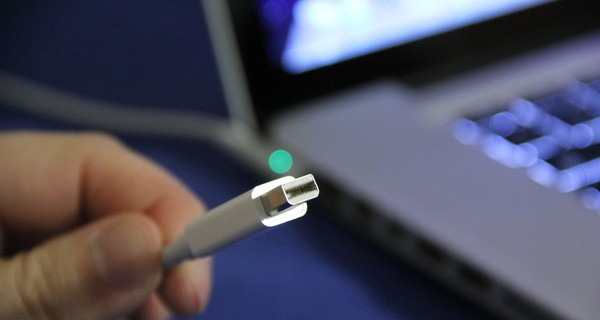 ThunderBolt appears in the new MacBook Pro, Replace for Mini DisplayPort on a notebook.
Experts appreciate Thunderbolt's support for connection and display connectivity. That means when you connect a hard drive to a Thunderbolt port and plug in a Thunderbolt port on the screen, you can both display the image in the best possible way while still receiving data on the same connection.
Intel has confirmed that Thunderbolt is designed not to compete with USB3.0. Intel also confirmed that users will feel great when using Thunderbolt even though there are still limitations and recommendations. With the price of Thunderbolt technology, Mac users probably have a long time to go, until the price falls to feel the best of Thunderbolt.
Apple has not yet decided whether to speed up the integration of Thunderbolt technology into its products, although Intel has noted many times that Thunderbolt is the perfect technology for small devices that require space. narrow of the device. Consider the size of the Mini DisplayPort that Apple is using on its devices (MacBook Pro and may also be Ipad or iPhone) although this may cause the product to increase the width of the edge to match.
Thunderbolt connection makes sense for Apple iOS devices because it has the ability to sync large data in a few seconds instead of a few minutes as it is today. Thunderbolt also supports video and audio export, so it fits the idea of a complete A / V connection cable design. The Thunderbolt connection may cause Apple to delay building and completing a wireless sync solution for devices running iOS. To be able to link Thunderbolt, the device must have an Intel controller chip to manage the transmission, but this cannot eliminate the possibility of Thunderbolt being used in Apple products.
Thus, Apple has many advantages when adopting new Thunderbolt technology next year, according to Intel, which creates a close link between devices running iOS together.
FAQ
What is Who Is Thunderbolt For??
Apple and Intel have introduced ThunderBolt - a new interconnect cable technology, combining data transfer and video.
Why is Who Is Thunderbolt For? important?
A clear understanding of Who Is Thunderbolt For? helps you make informed decisions, avoid common mistakes, and use the relevant tools or techniques more effectively.
How should beginners approach Who Is Thunderbolt For??
Start with the fundamental concepts, follow the examples step by step, and test each change in a safe environment before applying it to important systems or data.
Related Articles
 What Is Thunderbolt 3: Compare Thunderbolt 3 and Usb-c11 minutes read
 Comparing Thunderbolt and USB-C: Explained9 minutes read
 6 Best Uses of Thunderbolt 37 minutes read
 How Does Thunderbolt Actually Work: What You Need to Know7 minutes read
 Compare USB4 and Thunderbolt 45 minutes read
 The Reason Thunderbolt 3 Is the Preferred Connection Standard7 minutes read
Reader Comments 0
Sign in with email or Google to join the discussion.