Table of Contents
You can start Windows installation from files stored on an internal drive, provided the existing system or a compatible recovery environment can still access them. This is useful when you have no installer USB, but it is not a replacement for independent recovery media if the disk or boot configuration fails.
Choose the method based on your goal: running Setup inside Windows can offer an in-place reinstall, while starting a clean installation from a recovery environment can remove applications and data. Always check the final installation summary.
Before you begin
- Download an official Windows ISO matching the computer, language, and licensed edition.
- Back up important files to another physical device or trusted backup location.
- Keep encryption recovery keys accessible outside the PC.
- For an offline clean-install workflow, store extracted setup files on a partition that will not be formatted or deleted.
- Have a fallback recovery method available if practical.
A folder on another partition of the same disk is a place to store installation files, not a backup against disk failure. Do not erase or repartition the disk containing your only installer.

Method 1: run Setup from the working Windows desktop
For a compatible reinstall or upgrade, mount the ISO in File Explorer and run setup.exe from the mounted image. Follow Setup and review what it offers to keep. Keeping files and applications depends on the source image and installation path; it is not available in every scenario.
See Microsoft's reinstallation guidance. If the option to keep what you need is unavailable, cancel and resolve the mismatch rather than assuming your data will be preserved.
Method 2: start extracted Setup files from recovery
1. Extract the installation files
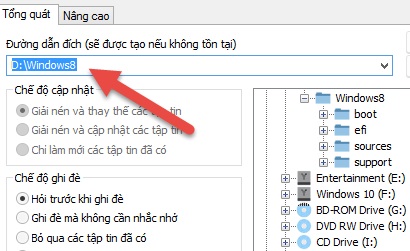
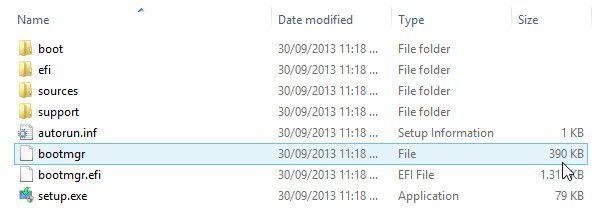
Extract the complete ISO into a clearly named folder on a partition you will keep. For example, use D:WinSetup. Keep the folder structure intact and confirm that it contains setup.exe and the sources folder.
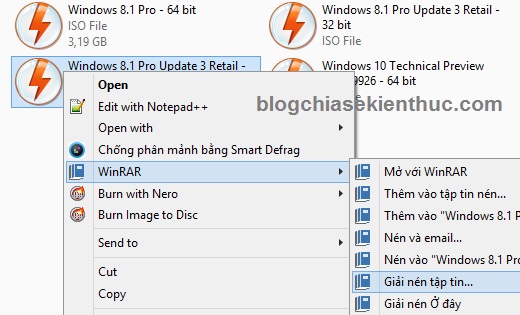
Extract the Windows installation files to a separate source folder.
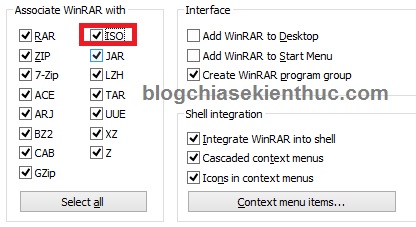
If an archive tool does not offer ISO extraction in its context menu, open the ISO from the application's file menu. The older WinRAR integration screens below show another way to associate ISO files; changing file associations is optional.
2. Open Windows Recovery Environment
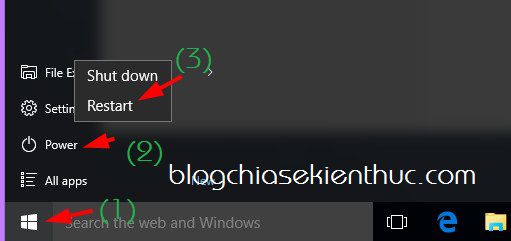
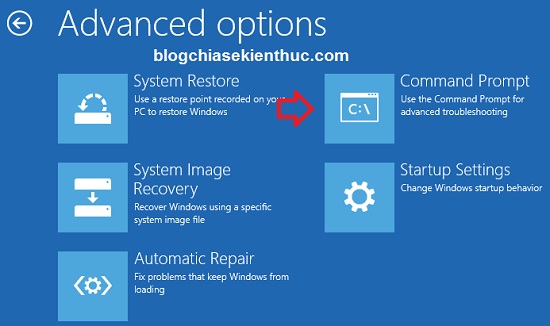
On supported modern Windows installations, hold Shift while selecting Restart, then choose Troubleshoot > Advanced options > Command Prompt if available. You may need account credentials or an encryption recovery key.
This is Windows Recovery Environment, not Safe Mode. Do not repeatedly force the computer off merely to reach it.
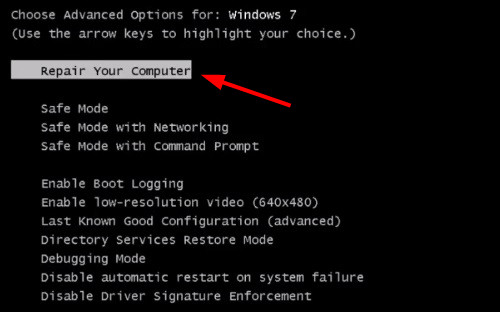
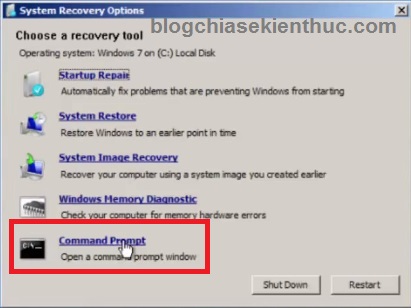
Older Windows 7 systems may show Repair Your Computer in the F8 startup menu and then provide Command Prompt. These screenshots are historical; the option depends on a working recovery configuration.
3. Find the source folder's actual drive letter
Recovery can assign different drive letters from normal Windows. Check folder contents before launching Setup. For example:
dir D:
dir D:WinSetup
If the folder is absent, inspect the other accessible volumes. Do not assume that the normal Windows C: or D: labels have stayed the same. You can use DiskPart's read-only list volume command to inspect volumes, then exit DiskPart before continuing. Do not run disk-cleaning commands.
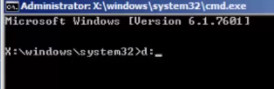
4. Launch Setup from the verified folder
If the verified source folder is D:WinSetup, run:
cd /d D:WinSetup
setup.exe
Replace the example path with the actual path. A compatible Setup interface should open. Review disk selection carefully, and do not format the partition containing the installation files.
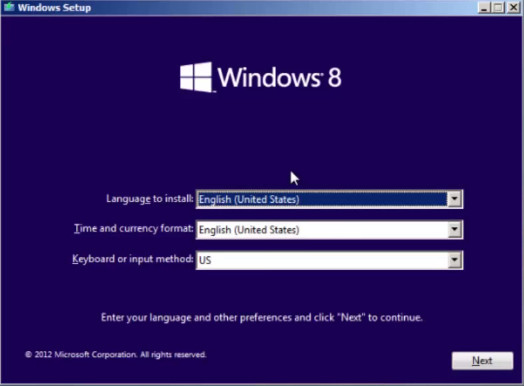
This older workflow is not guaranteed for every Windows version, architecture, or recovery image. If Setup will not run, use compatible external installation media or a suitable WinPE environment rather than modifying partitions to force it.
Method 3: a dedicated installation partition
A technician can create an internal installation partition and a boot entry for it. That requires a boot configuration appropriate for UEFI/GPT or legacy BIOS/MBR. BOOTICE is a boot-management tool, not a universal one-click installer, and an incorrect change can stop the existing system from starting.
Use a complete procedure matched to the machine if you need that approach. For most users, a separate Windows installation USB is easier to recover from if something goes wrong. For offline deployment, see installing Windows with WinNTSetup.
Older video demonstrations
These videos illustrate earlier hard-drive installation workflows. Treat their menus as examples, and check compatibility with your Windows image before following them.
If the internal disk is failing, inaccessible, or contains the only copy of important files, prioritize recovering those files before attempting an installation.
Related Articles
 Install Win 7 from your hard drive, no need for USB, install Win disk
 Instructions to install Ubuntu directly from the hard drive
 How to Run Windows 11 or 10 from an External USB Drive
 Things you need to know about how to install Windows today
 5 ways to check hard drive effectively to help periodically check the hard drive
 Causes and ways to fix external hard drive slow on Windows 10
Reader Comments 0
Sign in with email or Google to join the discussion.