Table of Contents
This article examines Zalo Could Not Access It Again, the Entire VNG System Collapsed. It presents the main facts, practical implications, and key points in a clearer, easier-to-follow format.
Understanding Zalo Could Not Access It Again
Just recently, many users cannot access the Zalo homepage, nor login to Zalo PC, the Zalo Web page will report an internet connection error.
Updated September 23, 2018:
As of 12h32 on September 23, 2018, all Zalo services have been stopped for nearly 1 hour, the web is not accessible, the app on the phone and the PC cannot be logged in. This is probably an error from Zalo server, users need to wait until the error is fixed, all user intervention is not effective.
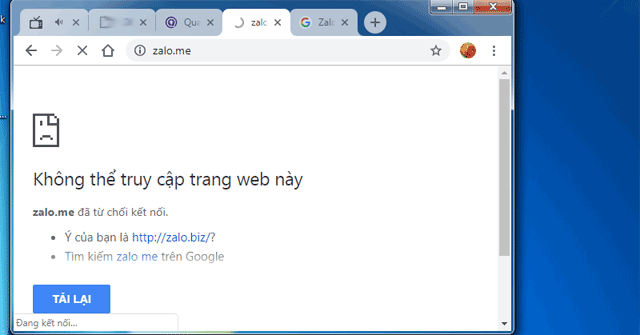 The message cannot access the website when entering Zalo.me.
In addition, other VNG services such as Zing News, Zing MP3, baomoi, Zalo Pay,. are also not accessible.
The last time Zalo happened this phenomenon was November 27, 2017, but there were still a few services that could be used. This time, all of Zalo's services were stopped and the time stopped.
 Zalo web images cannot be accessed in November 2017.
Updated 12:51 on September 23, 2018: Zing News and Bao Moi have entered, but very slowly. Zalo web is not up yet. The cause of the incident was confirmed by VNG fanpage of the company, specifically: "VNG would like to share clearly: on September 23 morning, VNG system had trouble with electricity during the time of power cut at the Park part. Quang Trung software This is the main reason affecting VNG's products and services ".
Early morning on September 24, 2018: Other services of VNG, including Zalo have been accessed again.
FAQ
What is the main point of Zalo Could Not Access It Again, the Entire VNG System Collapsed?
Just recently, many users cannot access the Zalo homepage, nor login to Zalo PC, the Zalo Web page will report an internet connection error. Updated September 23, 2018: As of 12h32 on September 23, 2018, all Zalo services have been stopped for nearly 1 hour, the web is not.
Why is Zalo Could Not Access It Again, the Entire VNG System Collapsed important?
Zalo Could Not Access It Again, the Entire VNG System Collapsed matters because it can affect how readers understand, choose, use, or respond to the subject discussed in the article.
What should readers verify about Zalo Could Not Access It Again, the Entire VNG System Collapsed?
Check the date, product or software version, compatibility, and any current guidance before acting, especially when technology, security, health, or pricing is involved.
Related Articles
 How to Use Zalo Web Without Installing Software6 minutes read
 How to Delete Applications That Grant Access to Zalo3 minutes read
 How to Pin a Conversation to the Top of the Zalo PC3 minutes read
 YouTube Has Just Had Problems with Embedded Videos3 minutes read
 Instructions on How to Share and Send GIF Images Via Zalo5 minutes read
 The Whole City Had to Return to the 'Stone' Era Using Typewriters Because the3 minutes read
Reader Comments 0
Sign in with email or Google to join the discussion.