Table of Contents
This guide provides a clear, practical overview of Windows 10 sun valley: a brand new version of Windows 10, with useful context, important details, and straightforward takeaways for everyday readers.
Expected, Windows 10 Sun Valley will be launched in the second half of this year. Here's everything we know about this edition of Windows 10.
New UI and animations on Windows 10 Sun Valley
The interface of Windows 10 Sun Valley will be built based on Fluent Design, not completely eliminating this design language. Besides, Microsoft will also integrate WinUI, a new layer of user interface that contains modern controls and styles.

With the combination of WinUI and Fluent Design, Microsoft will activate the same rounded corners as Windows 7, transparent backgrounds, support for advanced animations, motion, lighting .
Design improvements on Windows 10 Sun Valley
With Sun Valley, Microsoft plans to improve and replace features and areas with interfaces inherited from previous versions. For example, Microsoft may update the existing File Explorer with additional enhancements such as a dark background mode for pop-up menus (property tabs).
On GitHub, Microsoft has also confirmed that they are looking at new ideas for application elements such as ListView, buttons, sliders etc.
Below, we can see the design patterns that Microsoft plans to use to refresh the Windows 10 UI.
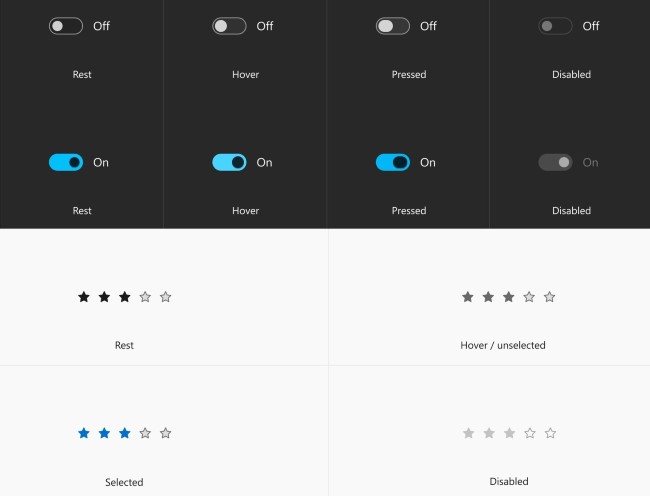
According to Microsoft, the new UI controls will "align with other platforms while looking familiar on Windows".

Windows 10 Sun Valley will enter RTM (sent to computer manufacturers) in June 2021, but the update for users will not be released before October 2021. Naturally, these improvements will also be updated to Windows 10X, the modular version of Windows for Chromebook-like devices.
TipsMake will continue to update if new information about Windows 10 Sun Valley is available for you to follow!
Key Takeaways
Use the information above as a practical reference for Windows 10 sun valley: a brand new version of Windows 10. Review each step carefully, confirm any requirements, and choose the option that best fits your situation.
FAQ
What does this guide explain about Windows 10 Sun Valley: a Brand New Version of Windows 10?
It explains the main concepts, practical considerations, and useful steps related to Windows 10 sun valley: a brand new version of Windows 10 without requiring advanced knowledge.
Who can benefit from learning about Windows 10 Sun Valley: a Brand New Version of Windows 10?
This information is useful for readers who want a clear overview, practical guidance, and reliable steps related to Windows 10 sun valley: a brand new version of Windows 10.
What should I check before applying this information?
Review the requirements, confirm that your device, software, or situation matches the instructions, and back up important data before making major changes.
Related Articles
 Windows 11: Complete Guide: Older PCs Running Windows 11 Will Be Faster3 minutes read
 Windows 11 Is About to Add a Pretty Useful Malware Prevention Feature4 minutes read
 Image Confirmation Microsoft Will Give up the Windows Phone Brand3 minutes read
 What Is Silicon Valley? Explained2 minutes read
 Microsoft Quietly Confirmed the 22H2 Feature Update for Windows 113 minutes read
 System Requirements: Complete Guide5 minutes read
Reader Comments 0
Sign in with email or Google to join the discussion.