Table of Contents
Explore the new whatsapp clear chat tool will allow you to control message deletion.
After updating WhatsApp iOS to version 25.37.10.72, users can try out a more efficient and accurate message deletion feature. Instead of just displaying a simple confirmation message, Clear Chat shows a pop-up at the bottom of the screen, clearly explaining which content will be deleted. Starred messages and saved media are displayed as separate categories so users understand exactly what is affected. The process is designed to prevent accidental deletion by allowing users to review their selection before proceeding.
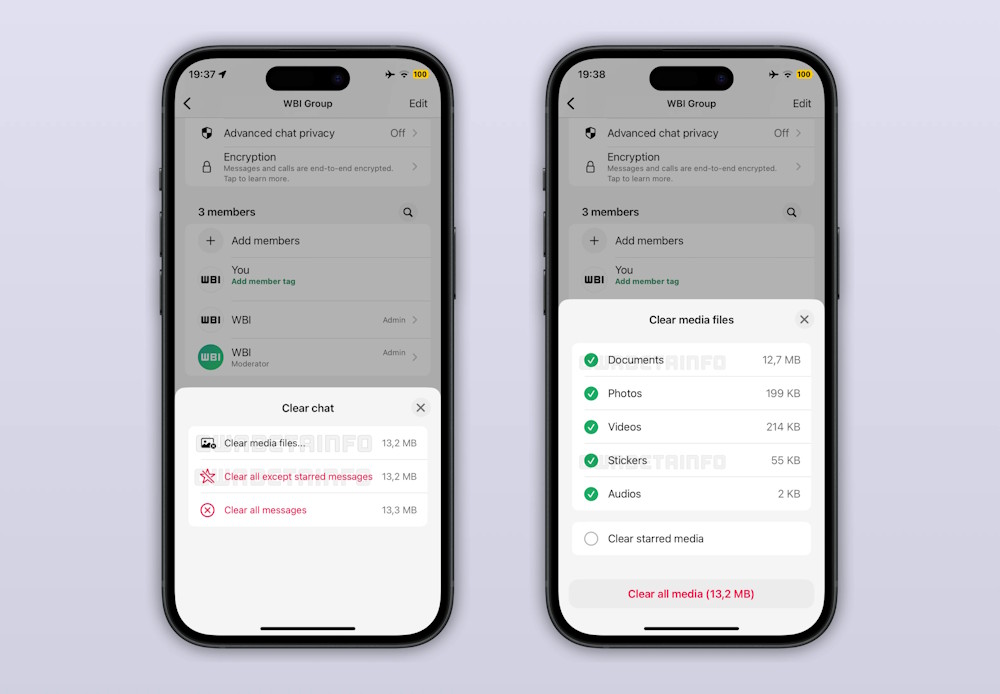
Starred messages will prompt you to delete or keep them. This makes it easier to clean up long conversations without losing saved information.
Users can also choose to delete specific media types such as images, videos, documents, audio, stickers, or voice messages and see an estimate of how much storage space will be freed up.
Final Thoughts
Understanding the new whatsapp clear chat tool will allow you to control message deletion makes it easier to evaluate the information and apply the most relevant recommendations. Focus on the key points above and verify details that may change over time.
FAQ
What is the new whatsapp clear chat tool will allow you to control message deletion?
Explore the new whatsapp clear chat tool will allow you to control message deletion.
What key points does this article cover?
The article explains the core concept, important considerations, and practical details readers should understand.
How can you use this information in practice?
Use the explanations to compare options, verify important details, and make a more informed decision. Apply the recommendations that best match your goals and situation.
Related Articles
 How to Enable WhatsApp Enhanced Chat Privacy: Step-by-Step Guide3 minutes read
 WhatsApp Updates New Message Notifications3 minutes read
 How to Quote Messages When Chatting on Whatsapp3 minutes read
 How to Mute Whatsapp Chat Group Notifications on Iphone and Android4 minutes read
 How to Only Allow Admin to Send Messages in Whatsapp Group Chat on3 minutes read
 How to Use Whatsapp to Chat, Call, Message Your Friends3 minutes read
Reader Comments 0
Sign in with email or Google to join the discussion.