Table of Contents
ngrok gives a local web application a public HTTPS endpoint. The ngrok agent opens an outbound connection to ngrok, which forwards incoming requests to the local port you chose. Developers use it to show a temporary demo or receive a test webhook on a machine they control.
Test the connection with a disposable demo
- Start a test application on
127.0.0.1:8080and confirm it responds locally. Use sample data and make sure the app contains no private files or credentials. - Install the agent for your OS from the ngrok quickstart. Configure it with the authtoken from your account. Keep that token out of screenshots, logs, and source control.
- Run
ngrok http 8080and open the HTTPS URL shown by the agent. If the URL opens but returns a gateway error, confirm the local app is still running and that its port matches. - Terminate the foreground agent with Ctrl+C once you are done. Verify the endpoint no longer forwards to your local app.
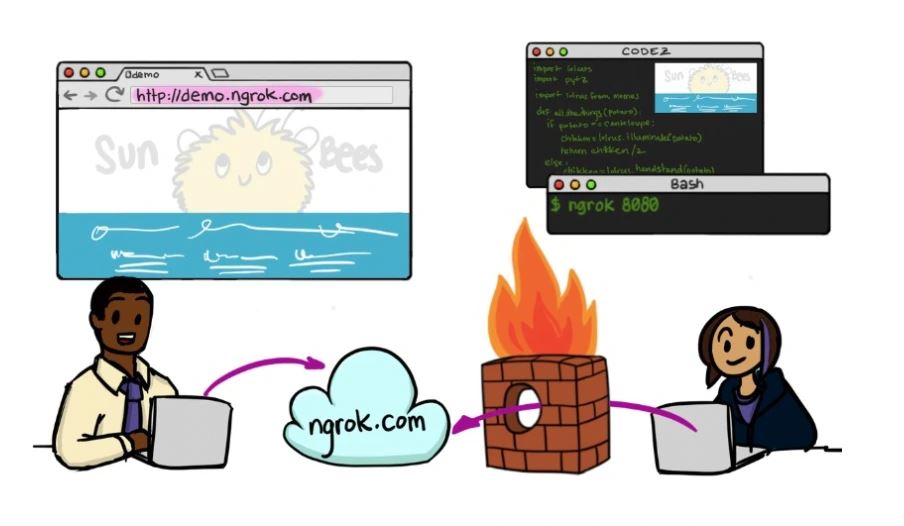
An ngrok endpoint can route traffic to a selected service and apply an access policy.
Control who can use the endpoint
The URL can be reachable from the internet. For a private demo, configure an authentication policy that limits who can sign in before sharing it. Test from an unauthorized session to confirm access is blocked. HTTPS protects a connection in transit. It doesn’t restrict who can open the URL.
For a webhook test, use a dedicated route and verify the sender’s signature using the provider’s documentation. Keep private dashboards, databases, and internal admin interfaces off a public demo endpoint. For background on HTTP routing and request handling, see the backend development learning path.
Related Articles
 Detailed and simple instructions for transferring Windows from HDD to SSD!
 The Forge Codes: No Active Codes in August 2026
 Instructions on how to install Windows 10 (32bit and 64bit) in the most detailed!
 Detailed instructions on how to Fake IP on Windows 10
 Detailed instructions on how to use Webhook Trigger in n8n
 Reset Windows 10 to the state it was in when it was first installed, detailed instructions for each step
Reader Comments 0
Sign in with email or Google to join the discussion.