Table of Contents
FxSound is a free, open-source audio-processing application for Windows. It sits in the playback path and applies an equalizer, effects, presets, volume control, and output routing to sound from compatible Windows applications. It can make audio clearer or better suited to your speakers and hearing preferences, but it cannot recreate information that is absent from a poor recording or repair damaged hardware.
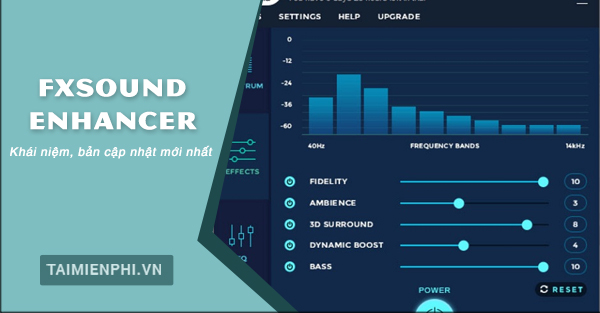
FxSound, DFX, and FxSound Enhancer
DFX Audio Enhancer and FxSound Enhancer are older names or legacy product lines. The current product is simply FxSound. According to the developer, it became free in 2022 and open source in 2023, so the original article's paid demo and one-computer license restrictions no longer describe the current app.
Download the current Windows build from the official FxSound website. The developer states that current FxSound is for Windows PCs; it does not offer equivalent system-wide versions for macOS, Android, or iOS.
What FxSound changes
- Equalizer: raises or lowers frequency ranges to change tonal balance, such as reducing boominess or making dialogue more intelligible.
- Effects: adjust characteristics such as bass, clarity, ambience, dynamics, or spatial impression, depending on the installed version.
- Presets: provide starting points for music, games, voice, movies, and different playback needs.
- Volume control: can increase perceived loudness, but the output must still be checked for clipping and harshness.
- Output selection: routes processed sound to the selected speakers, headphones, or other compatible playback device.
FxSound works on playback, not on the original media file. Closing or bypassing it removes the processing, and it does not permanently rewrite an MP3 or video.
What an audio enhancer cannot do
Equalization can emphasize frequencies that are already present, and dynamic processing can alter level relationships. It cannot reconstruct the original data removed by lossy compression, turn a mono source into true multichannel audio, or make small speakers reproduce bass below their physical capability. Claims that it “restores high-definition sound” should therefore be understood as a description of perceptual processing, not literal recovery of lost samples.
How to start using FxSound
- Install and open FxSound, then play familiar audio at a moderate level.
- Select the actual output device you want to hear. If sound stops, verify the device in both FxSound and Windows Settings > System > Sound.
- Choose a preset close to the task—for example, dialogue or music—then compare it with processing disabled.
- Adjust one control at a time. Small changes are easier to judge than raising every band.
- Match loudness before comparing. A louder signal often seems better even when the tonal balance is not.
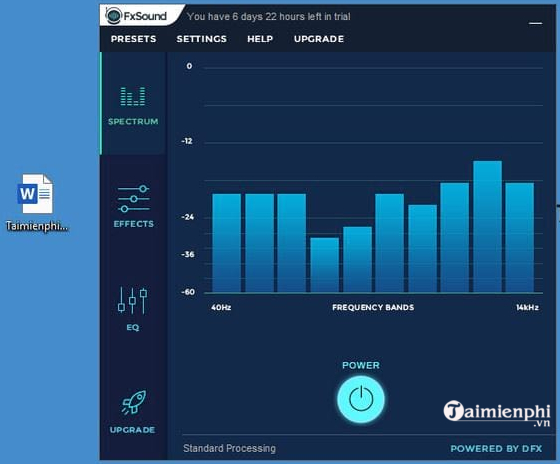
Basic equalizer approach
- If speech sounds muddy, reduce some low-mid energy before boosting treble.
- If laptop speakers sound thin, add bass cautiously; too much low-frequency boost can cause distortion without producing deeper bass.
- If music sounds sharp or tiring, reduce the offending upper-mid or treble range instead of lowering the entire volume.
- After boosting several bands, reduce the overall level to preserve headroom.
For other system-wide options, compare TipsMake's Windows equalizer software and free Windows volume boosters.
Presets are starting points
A preset cannot know the frequency response of your speakers, room, source, or hearing. Use it as a quick baseline, then bypass the processing and adjust by ear. Save separate settings for headphones and speakers because the same curve may not suit both.
If FxSound has no effect or no sound
- Confirm that FxSound is running and the intended playback device is selected.
- Make sure Windows and the source app are sending audio to that device.
- Temporarily disable other virtual audio tools or equalizers that may be taking control of the same playback route.
- Set the physical device as the Windows default before reopening FxSound.
- Restart the app after reconnecting USB or Bluetooth audio hardware.
- Install the latest stable FxSound release and the current driver for the playback device.
The official FxSound support forum maintains current troubleshooting discussions and release information.
Is FxSound worth using?
FxSound is useful when you want a simple Windows-wide equalizer, clearer dialogue, different tone for headphones and speakers, or modest volume and bass adjustment. Leave it disabled when your audio interface uses an exclusive professional driver path, when another application already supplies the required processing, or when accuracy to the unprocessed source matters more than a personalized sound.
Related Articles
 How to Use FxSound Enhancer to Improve Sound Quality4 minutes read
 Aiarty Video Enhancer - Revive Old Videos11 minutes read
 How to Use Fxsound to Improve PC Sound Quality6 minutes read
 Increase Video Quality on Media.io Video Enhancer: Step-by-Step Guide4 minutes read
 How to Remove Malicious Programs Gs. Enabler, Sk. Enabler, Sk.10 minutes read
 Improve the Quality of Music Playback on Your Computer with DFX3 minutes read
Reader Comments 0
Sign in with email or Google to join the discussion.