Table of Contents
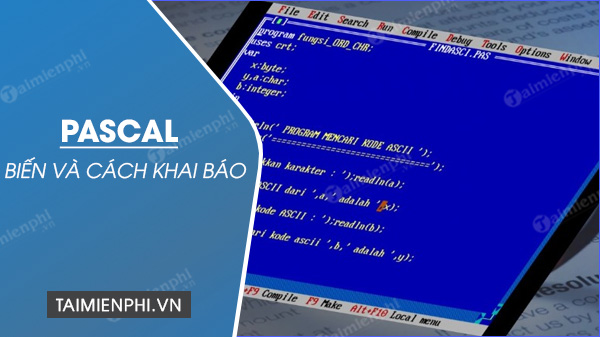
A Pascal variable is a named storage location whose value can change while a program runs. Every variable has a type, which determines the values and operations the compiler accepts. Declare variables in a var section, then assign a value with := before reading or using it.
Basic declaration syntax
A variable declaration places one or more names before a colon and a type after it:
var
  VariableName: Type;
  FirstName, SecondName: Type;
This example declares several common Free Pascal variables:
var
  Age, DaysInWeek: Integer;
  TaxRate, NetIncome: Double;
  IsReady: Boolean;
  Initial, Grade: Char;
  FirstName, Surname: String;
Names in the same declaration must share the stated type. A semicolon ends each declaration.
Rules for variable names
- Use letters, digits, and underscores, following the identifier rules of your compiler and language mode.
- An identifier cannot start with a digit.
- Reserved words such as
begin,type, andprogramcannot be ordinary variable names. - Pascal identifiers are case-insensitive, so
Total,TOTAL, andtotalrefer to the same identifier. - Prefer descriptive names such as
StudentCountorAverageScoreover names such asx1.
Free Pascal conventions often use PascalCase for variables and a leading T for named types, but the compiler does not require that style.
Common variable types
| Type | Typical use | Example value |
|---|---|---|
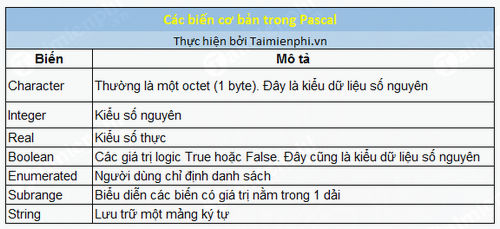
Integer | Whole-number calculations | 42 |
Int64 | Whole numbers that need a defined 64-bit type | 9000000000 |
Double | Floating-point calculations | 19.95 |
Boolean | True/false state | True |
Char | One character | 'A' |
String | Text | 'Ada' |
The size and range of a general type such as Integer can depend on the compiler, target, and mode. Use a specific type such as Int64 when the exact width is important, and consult the Free Pascal language reference for the selected mode.

Assignment uses :=, not =
Pascal uses := to store a value in a variable. The single equals sign compares values or appears in declarations such as constants and types.
Age := 15;
TaxRate := 0.5;
Grade := 'A';
FirstName := 'John';
IsReady := True;
These are assignments. By contrast, this expression asks whether Age equals 18:
if Age = 18 then
  WriteLn('Age is 18');
A complete variable example
program VariableDemo;

{$mode objfpc}

var
  FirstName, Surname: String;
  Age: Integer;
  IsAdult: Boolean;

begin
  Write('First name: ');
  ReadLn(FirstName);

  Write('Surname: ');
  ReadLn(Surname);

  Write('Age: ');
  ReadLn(Age);

  IsAdult := Age >= 18;

  WriteLn('Name: ', FirstName, ' ', Surname);
  WriteLn('Adult: ', IsAdult);
end.
The var section declares the names and types before the executable block begins. ReadLn stores input in a variable, and WriteLn displays the current value.
Initialize variables before use
Do not assume every variable starts at zero, an empty string, or False. Initialization rules differ for global, local, managed, and compiler-specific declarations, and the compiler may warn when a local variable is read before assignment. A portable, readable approach is to assign values explicitly in the executable block:
var
  Count: Integer;
  Total: Double;
  Finished: Boolean;

begin
  Count := 0;
  Total := 0.0;
  Finished := False;

  { Use the variables here }
end.
Free Pascal supports some declaration-time initialization forms, but their availability and behavior can depend on language mode and scope. Use executable assignments when code must remain easy to move between Pascal compilers.
Constants are not variables
A constant has a name but is not meant to change during execution:
const
  MaxStudents = 30;
  WelcomeMessage = 'Welcome to Pascal';
Use const for a fixed value and var for state that changes. Keeping that distinction clear prevents accidental reassignment and communicates intent.
Create named types
A type section defines types; it does not allocate variables. Each type definition has one type name:
type
  TAge = Integer;
  TCity = String;
  TPrice = Double;

var
  StudentAge: TAge;
  HomeCity: TCity;
  CoursePrice: TPrice;
The original form type days, age = integer; is not a valid way to define two type names. Write a separate definition for each name.
Enumerated variables
An enumeration defines a closed, ordered set of named values:
type
  TMonth = (
    January, February, March, April, May, June,
    July, August, September, October, November, December
  );

var
  CurrentMonth: TMonth;

begin
  CurrentMonth := January;
  WriteLn('Ordinal value: ', Ord(CurrentMonth));
end.
Ord(CurrentMonth) returns the value's zero-based ordinal in this declaration, so January is 0. Printing the name itself requires a deliberate conversion or mapping; a generic WriteLn(CurrentMonth) is not portable Pascal output.
Subrange variables
A subrange restricts a value to part of an ordinal type:
type
  TMark = 1..100;
  TGrade = 'A'..'E';

var
  Mark: TMark;
  Grade: TGrade;
Subranges document the intended domain and can catch invalid values when range checking is enabled. During learning and testing with Free Pascal, enable range checks:
{$R+}Code should still validate user input before assigning it. Runtime checks are a safety net, not a user-interface validation strategy.
Variable scope
- Global variables are declared outside procedures and functions and can have broad lifetime and visibility.
- Local variables are declared inside a procedure or function and exist for that routine's execution.
- Parameters supply values to a routine; a
varparameter allows the routine to modify the caller's variable.
Prefer the narrowest practical scope. Local variables reduce accidental coupling and make a routine easier to understand and test.
Common mistakes
- Using
=where assignment requires:=. - Reading a local variable before assigning a value.
- Expecting identifiers that differ only by letter case to be separate.
- Assigning a string to a numeric variable or another incompatible type.
- Defining multiple type names with invalid comma syntax.
- Assuming an enumeration prints as its source name automatically.
- Disabling range checks and then relying on a subrange to validate input.
Continue learning Pascal
If you need a compiler, start with the Free Pascal installation guide. The comparison of Pascal's advantages and disadvantages explains when the language is a practical choice. After variables, study expressions, conditions, loops, procedures, functions, arrays, records, and files in that order.
Related Articles
 Download Pascal and Install Pascal on Windows3 minutes read
 Free Pascal - 3.2.25 minutes read
 Link Download Free Pascal 3.24 minutes read
 Who Invented the Pascal Programming Language?5 minutes read
 How to Use Pascal Online, Learn Programming Online3 minutes read
 How to Install Free Pascal, Software That Helps You Learn Pascal Programming4 minutes read
Reader Comments 0
Sign in with email or Google to join the discussion.