Table of Contents
Illustrator and CorelDRAW are both professional vector-design applications, and either can produce logos, diagrams, packaging, signs and print-ready artwork. The better choice depends less on raw drawing capability than on your team’s file formats, companion apps, output workflow, platform and licensing needs.
Illustrator vs. CorelDRAW at a glance
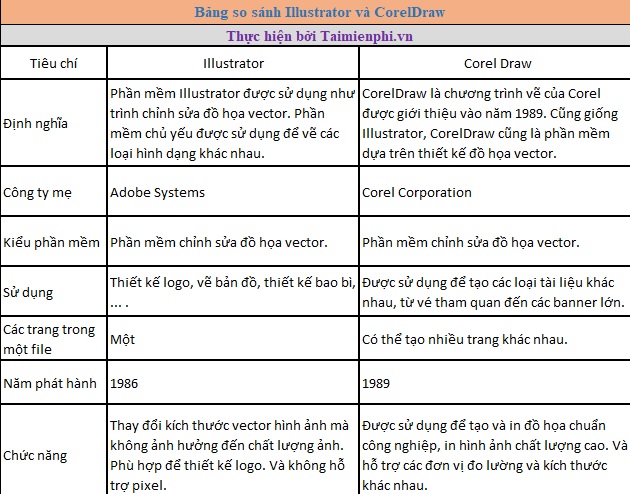
| Decision factor | Adobe Illustrator | CorelDRAW Graphics Suite |
|---|---|---|
| Best fit | Teams already using Adobe Creative Cloud; illustration, branding and cross-media asset workflows | Vector, page-layout, sign, engraving and production workflows that benefit from Corel’s toolset |
| Native format | AI | CDR |
| Multi-page work | Multiple artboards in one document | Multiple pages in one document |
| Companion ecosystem | Close workflow with Photoshop, InDesign, After Effects, Adobe Fonts and Creative Cloud libraries | Suite can include PHOTO-PAINT, Font Manager, PowerTRACE and other Corel utilities |
| Platforms | Desktop editions for Windows and macOS, plus Illustrator experiences on iPad and the web | CorelDRAW Graphics Suite desktop editions for Windows and macOS; included services depend on edition |
| Shared exchange formats | Both work with common formats such as PDF, SVG, EPS and raster images, but complex effects may not round-trip perfectly | |
| Learning transfer | Selection, nodes, Bézier curves, layers, fills, strokes and typography concepts carry between the two, but shortcuts and terminology differ | |
Where Illustrator is strongest
- Adobe workflow: moving assets among Illustrator, Photoshop, InDesign and other Creative Cloud applications is a major advantage for teams standardized on Adobe formats and libraries.
- Artboards and screen assets: one document can contain many artboards, which can be named, resized and exported in batches.
- Illustration and appearance tools: Illustrator offers mature path editing, brushes, effects, symbols, typography and reusable appearance controls.
- Cross-device work: Adobe offers Illustrator experiences beyond the desktop, although features differ by device.
Illustrator is not limited to “flat” or unrealistic work. Its vector tools can create detailed shading, gradients, meshes and complex illustrations; the practical limitation is usually the desired style and time, not the vector format itself.
Where CorelDRAW is strongest
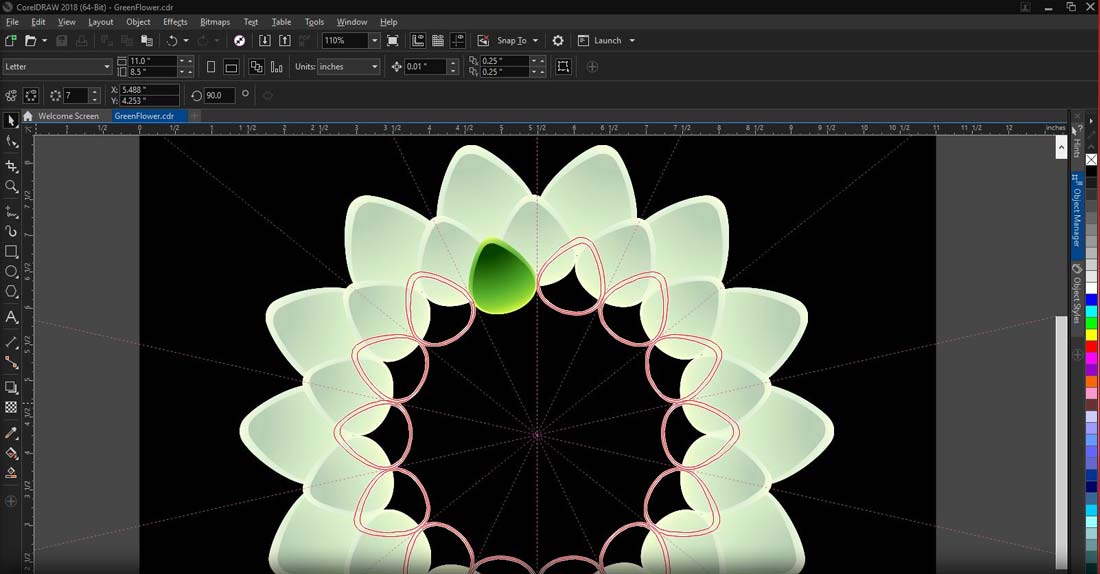
- Page-oriented documents: CorelDRAW’s multi-page model is familiar for jobs that combine illustration and layout in one file.
- Production tools: sign, print, engraving and cutting users often value CorelDRAW’s measurement, imposition, object-management and output workflow.
- Integrated suite: PHOTO-PAINT covers bitmap editing, while PowerTRACE supports bitmap-to-vector tracing and Font Manager organizes fonts.
- Interface customization: workspaces, toolbars and shortcuts can be adapted to a specialized production process.
CorelDRAW is not “desktop-only” in the sense claimed by older comparisons: the current Graphics Suite has desktop editions for both Windows and macOS. Always check the exact edition because feature sets and operating-system support vary.
File compatibility matters more than feature lists
AI and CDR are application-native formats. Both programs can import or export common exchange formats, but blends, clipping, transparency, fonts, color profiles and live effects may be changed or flattened during conversion. Before choosing software for a team, test real client files rather than a simple logo.
- Open a representative AI, CDR or PDF file.
- Check fonts, spot colors, overprints, clipping masks, gradients and linked images.
- Edit the document and export the production format.
- Open the exported file in the software used by the printer, cutter or collaborator.
- Compare dimensions and output visually before committing to a workflow.
Which one should you choose?
- Choose Illustrator when clients supply AI files, your team depends on Adobe apps and libraries, or you need an established cross-media illustration workflow.
- Choose CorelDRAW when CDR files dominate, page-based production and sign or print tools fit your work, or existing Corel automation and equipment are important.
- Keep both when conversion errors would cost more than a second license and you routinely receive both native formats.
- Test the current trial of each application with your hardware, fonts, plug-ins and output device before buying.
Compare the current Illustrator product details with the CorelDRAW Graphics Suite details; prices and plan terms can change by country and date. For related TipsMake guidance, see Illustrator vs. Photoshop, the Illustrator shortcut reference, and AI-to-Corel file conversion considerations.
Related Articles
 Comparing Adobe Illustrator and Photoshop: Similarities and Differences5 minutes read
 AI Software Shortcuts: Common Adobe Illustrator Shortcuts9 minutes read
 How to Design a 3D Logo in Adobe Illustrator8 minutes read
 Coreldraw X6 Interface Overview, and Coreldraw X6 KEYS to11 minutes read
 Adobe Illustrator: Complete Guide: Download Adobe Illustrator 2021.26.04 minutes read
 How to Open AI File Without Adobe Illustrator: How to Open a File9 minutes read
Reader Comments 0
Sign in with email or Google to join the discussion.