Table of Contents
An online Pascal compiler is useful for testing a short program without installing a toolchain. OnlineGDB currently provides a browser-based Pascal editor: open the Pascal compiler page, replace the sample source, select Run, and read the program output or compiler messages in the console. Use it for exercises and small experiments, not for confidential or production code.

Open the OnlineGDB Pascal compiler
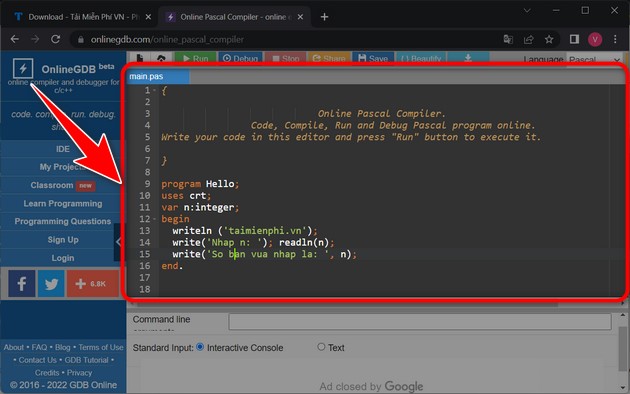
Go to the OnlineGDB Pascal compiler. The site loads an editor with a sample main.pas file and a console area. Its interface and keyboard shortcuts can change, so use the labels shown in the current toolbar when they differ from older screenshots.
Run a first Pascal program
Replace the sample code with this complete program:
program HelloOnline;

begin
  WriteLn('Hello from Pascal');
end.
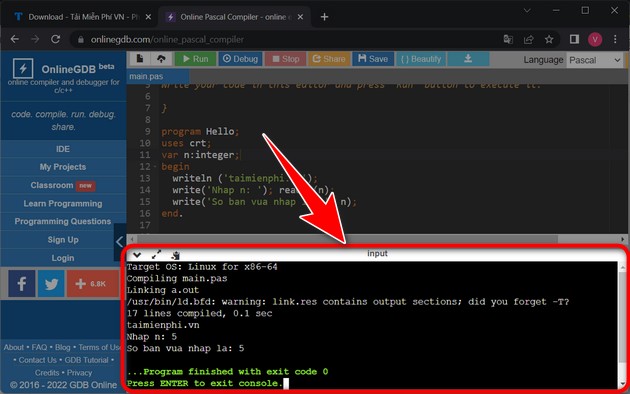
Select Run. OnlineGDB sends the source to its remote compiler, builds it, and displays the result in the console. A successful run should show:
Hello from Pascal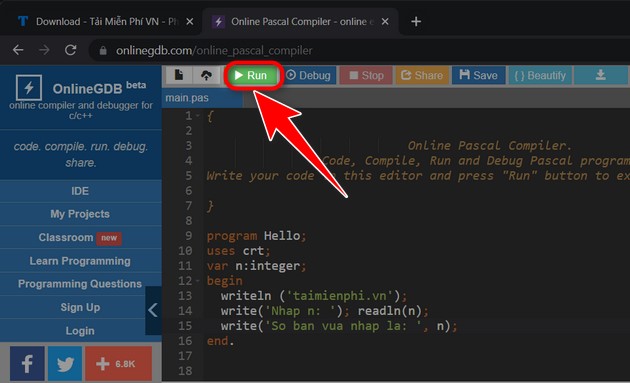
Run a program that accepts input
This example asks for a name:
program Greeting;

var
  Name: String;

begin
  Write('Your name: ');
  ReadLn(Name);
  WriteLn('Hello, ', Name, '!');
end.
Select Run, click the console if necessary, type a value when the program waits, and press Enter. If the current interface provides a separate standard-input box, put the input there before running. Interactive behavior can differ between browser compilers.
Understand compiler errors
A compiler error normally includes a filename, line, column, and message. Start with the first error because one missing delimiter can cause several later messages.
For example, this program is missing a semicolon:
program BrokenExample;

var
  Count: Integer

begin
  Count := 3;
  WriteLn(Count);
end.
The compiler should point near begin, even though the actual problem is the missing semicolon after Integer. Add the semicolon and run the program again.
Useful editor controls
- Run: compiles and executes the current source.
- Stop: ends a program that is waiting indefinitely or running too long.
- Debug: starts debugging when that function is available for the selected language and current session.
- Share: creates a link to code when the service allows it. Treat the link as potentially accessible to anyone who receives it.
- Save: may download a file or save a project, depending on whether you are signed in and which interface is active.
- Beautify: reformats source according to the editor's rules. Review the result instead of assuming formatting changes are semantically harmless.
Older instructions list shortcuts such as F9 for Run, F8 for Debug, Ctrl+S for Save, and Ctrl+B for Beautify. Browser, operating-system, and site shortcuts can conflict, so the toolbar button is the reliable fallback.
Test variable declarations
Online compilers are well suited to short experiments. This example demonstrates declaration, assignment, a calculation, and formatted output:
program RectangleArea;

var
  Width, Height, Area: Double;

begin
  Width := 4.5;
  Height := 3.0;
  Area := Width * Height;

  WriteLn('Area: ', Area:0:2);
end.
The expected output is Area: 13.50. TipsMake's guide to Pascal variables and declarations explains the syntax, named types, enumerations, and subranges in more detail.
Important limitations of online Pascal tools
Your code runs on a third-party server
Do not paste passwords, API keys, private customer data, proprietary source, or unpublished assignments into a public online compiler. The service must receive the code to compile it, and shared links may expose it further.
The compiler may differ from your local or school environment
Pascal dialects and compiler modes are not identical. Code accepted by an online Free Pascal configuration may fail in Delphi, Turbo Pascal, or a different Free Pascal mode, and the reverse is also possible. Record the compiler and mode required by the assignment.
Sessions and files may not persist
Copy important work to a local file or version-control repository before closing the page. A browser refresh, expired session, service change, or account requirement can make an unsaved snippet unavailable.
Resources and system access are restricted
Online compilers limit execution time, memory, processes, network access, and files. They are not a faithful environment for desktop interfaces, operating-system APIs, large projects, or performance benchmarks.
Debugging support may be limited
A toolbar can show a Debug command even when the selected Pascal environment offers fewer debugging functions than the site's C or C++ toolchain. Compiler messages, temporary WriteLn statements, and small test cases remain dependable techniques.
When to install Free Pascal instead
Move to a local compiler when you need multiple units, repeatable builds, external libraries, source control, offline work, a graphical debugger, or private code. The Free Pascal installation guide shows how to install the compiler and run a program on Windows.
| Need | Online compiler | Local Free Pascal |
|---|---|---|
| Try a short exercise quickly | Good fit | Works after setup |
| Work without internet access | No | Yes |
| Keep private source local | No | Yes |
| Build a multi-file application | Limited | Better fit |
| Match a specific compiler version | Usually limited control | You choose the installed version |
Use shared links safely
Before selecting Share, remove names, credentials, tokens, private URLs, and data copied from a real system. Share the smallest code sample that reproduces the problem and explain the expected versus actual result separately. For other browser-based options and their trade-offs, see TipsMake's comparison of online compilers.
Related Articles
 How to Install Free Pascal, Software That Helps You Learn Pascal Programming4 minutes read
 Download Pascal and Install Pascal on Windows3 minutes read
 Who Invented the Pascal Programming Language?5 minutes read
 Advantages and Disadvantages of Pascal Compared to Other Programming Languages4 minutes read
 Free Pascal - 3.2.25 minutes read
 16 Most Popular, Easy-to-find Programming Languages7 minutes read
Reader Comments 0
Sign in with email or Google to join the discussion.